Serverless functions are usually the better fit for event-driven, bursty, scheduled, or isolated units of work. Virtual machines are usually the better fit for long-running applications, persistent services, custom operating-system requirements, Docker Compose stacks, and workloads that need direct server control.
For small teams, the decision is less about which technology is newer and more about which operating model creates less unnecessary work.
At Raff Technologies, the practical choice can stay incremental: use Raff Functions when the unit of work can run independently, and use Raff VM when the workload needs a full server environment. A production system can use both without forcing the entire application into one model.
Serverless functions vs VMs: quick decision
| Workload | Better default | Why |
|---|---|---|
| Customer-facing app server | VM | Stable runtime, full environment, predictable control |
| HTTP webhook | Function | Small event-driven unit of work |
| Scheduled cleanup/report | Function | Runs only when triggered |
| Docker Compose application | VM | Several long-lived services share one environment |
| File processing after upload | Function | Event-driven and easy to isolate |
| Constant queue worker | VM | Always-on process may fit capacity billing better |
| Small API endpoint | Function or VM | Depends on state, traffic, runtime, and deployment model |
| Self-hosted database/cache | VM or managed service | Persistent state and long-lived service behavior |
| Batch job | Function or VM | Depends on duration, runtime weight, and frequency |
| Custom daemon/system package | VM | Needs OS-level control |
A useful rule is:
Use a function when the unit of work can be isolated. Use a VM when the environment itself is part of the workload.
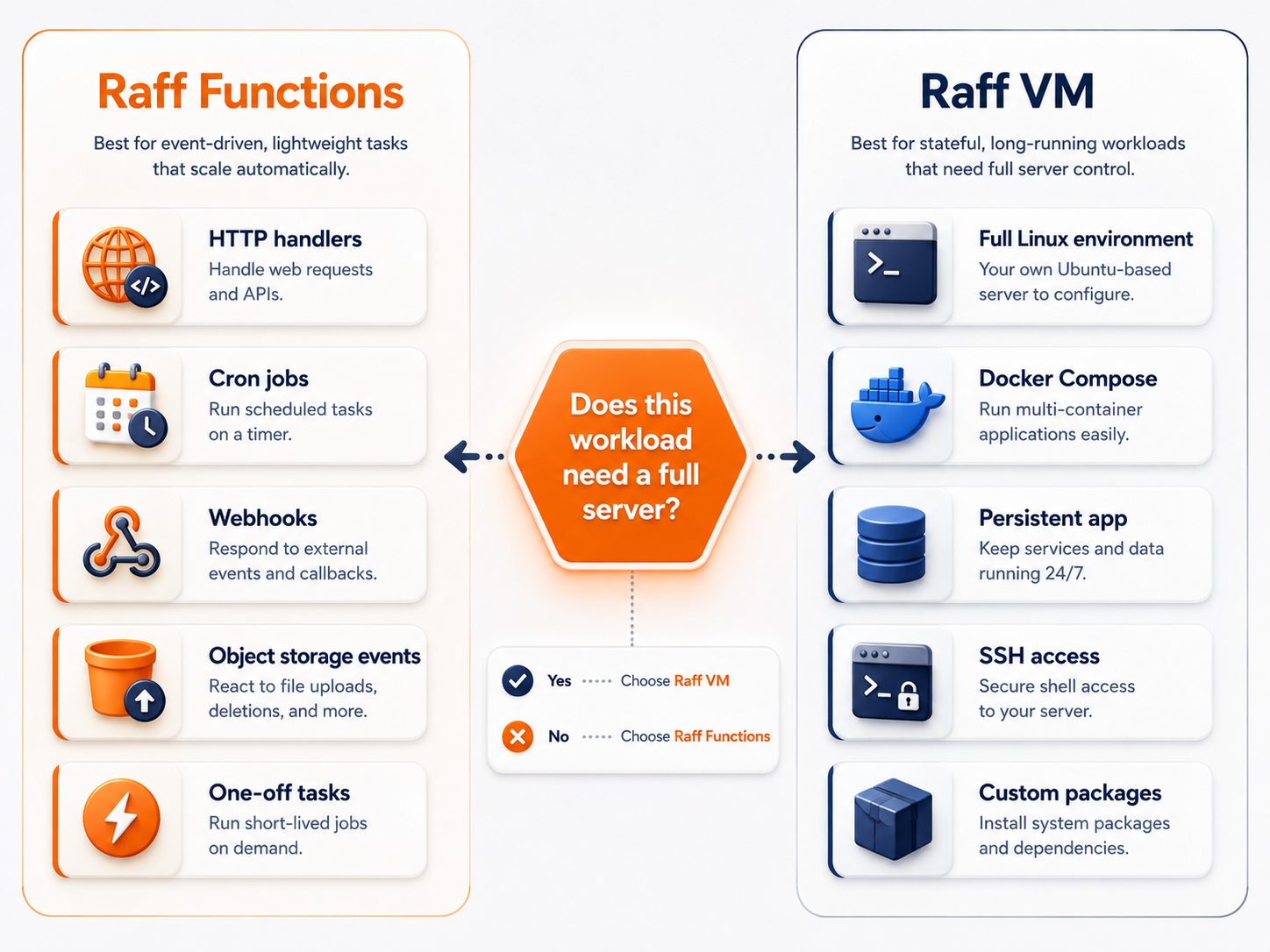
What is the difference between serverless functions and virtual machines?
A virtual machine gives your team a persistent operating-system environment. You choose the OS, install packages, run services, manage processes, configure networking, control the filesystem, and decide how the server starts, scales, and recovers.
A serverless function gives your team a smaller execution unit. You deploy code and configuration, then the platform starts that code in response to a request, schedule, event, or other trigger.
The architectural difference looks like this:
Virtual machine
  ↓
Operating system
  ↓
Runtime / Docker / services
  ↓
Application processes
versus:
Trigger
  ↓
Function runtime
  ↓
One bounded unit of application work
Both ultimately use compute. What changes is how much infrastructure lifecycle your team owns.
Serverless functions reduce infrastructure ownership for bounded work
Functions are strongest when the work has a clear start and finish.
Typical examples include:
- HTTP handlers;
- webhooks;
- cron and scheduled jobs;
- image or document processing;
- object-storage events;
- notification fanout;
- API callbacks;
- light ETL steps;
- form processing;
- one-off future jobs;
- event-driven automation.
The application does not need a permanently running server only to wait for the next event.
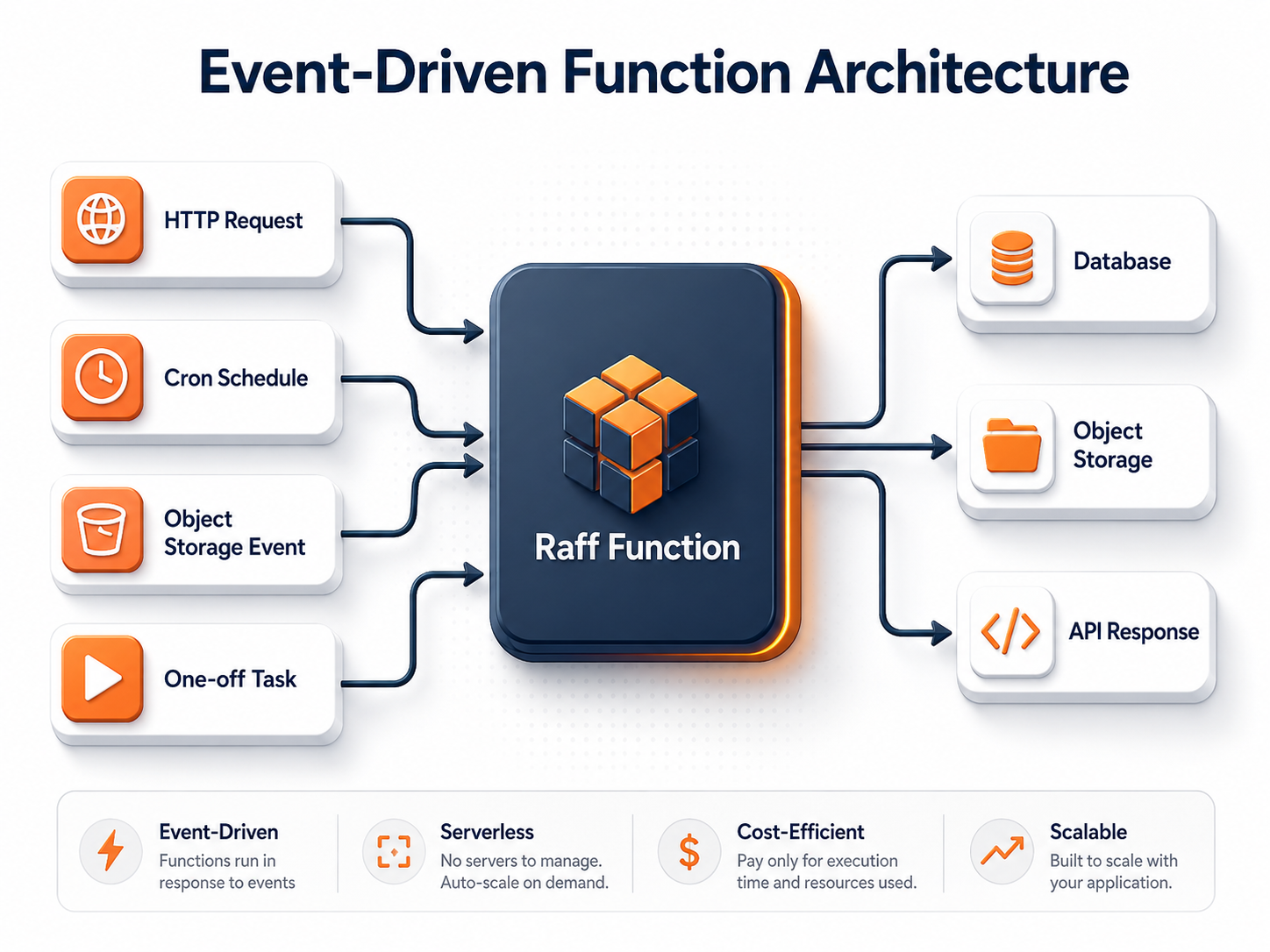
The main operational benefit is separation. A billing webhook, nightly cleanup task, or file transform does not need to share the same process lifecycle as the customer-facing application.
VMs are stronger when the workload needs a persistent environment
A VM is usually the cleaner fit when the workload wants to behave like a server rather than a task.
Use a VM when you need:
- a long-running application process;
- Docker Engine or Docker Compose;
- full SSH administration;
- system packages or custom daemons;
- persistent local services;
- long-lived TCP connections;
- direct process supervision;
- custom filesystem layout;
- a reverse proxy;
- a continuously running worker;
- self-managed databases or queues;
- infrastructure tooling that expects a normal Linux server.
For many early SaaS products, a VM remains a very practical architecture:
Internet
  ↓
Raff VM
  ├─ reverse proxy
  ├─ application
  ├─ worker
  └─ monitoring agent
       ↓
Managed Database / Object Storage where appropriate
That model can be easier to understand and recover than splitting an application into many deployment units before there is an operational reason to do so.
Serverless vs VM cost depends on workload shape
A VM and a function expose different cost shapes.
A VM is mainly capacity-based: the server exists continuously and the team pays for that provisioned environment.
A function is mainly execution-based: cost follows runtime activity more closely.
That means neither is automatically cheaper.
| Workload pattern | VM economics | Function economics |
|---|---|---|
| Runs continuously | Often natural | Continuous execution can remove much of the usage-based advantage |
| Runs a few times per day | VM may sit idle | Strong fit for execution-based billing |
| Highly bursty | May need spare capacity | Can follow bursts without permanent capacity |
| Heavy persistent service | Strong fit | Often awkward as a function |
| Short event-driven work | Possible but may waste idle server capacity | Strong fit |
| Many small independent jobs | Operationally noisy on one VM | Functions can isolate them |
The decision should include engineering time as well as infrastructure cost.
A function may cost more per active unit of compute but save enough operator time to be worthwhile. A VM may be inexpensive and simple when the workload already uses most of the server continuously.
Use the live Raff Pricing page for current VM and Functions pricing rather than relying on numbers embedded in an evergreen guide.
Functions are not automatically simpler
Serverless removes some infrastructure responsibilities, but it introduces a different set of constraints.
A function-based workload still needs decisions around:
- timeout and execution limits;
- retry behavior;
- duplicate events;
- idempotency;
- concurrency;
- cold starts;
- secrets;
- logs and metrics;
- downstream database capacity;
- event ordering where relevant;
- deployment and rollback;
- cost limits.
That is why “no server to manage” should not be interpreted as “no operations.”
The platform manages the execution environment. Your team still owns the application behavior.
For current Raff runtime, trigger, scaling, and timeout capabilities, use the live Raff Functions product page.
VMs are not automatically more operationally expensive
VMs require patching and server ownership, but their mental model can be very straightforward.
A small team may prefer:
ssh into server
inspect process
read logs
restart service
run migration
check disk
check network
That direct operating model can be valuable for a small application with one or two environments.
A VM becomes harder to operate when many unrelated jobs accumulate on the same machine, deployments interfere with one another, capacity is difficult to allocate, or horizontal scaling requires manual coordination.
The right question is not “How do we avoid servers?” It is “Which responsibilities are useful for us to own?”
Serverless functions work well for webhooks
Webhooks are a strong function use case because they are naturally event-driven.
A good webhook path often looks like:
External provider
  ↓
HTTP function
  ↓
verify signature / authenticate source
  ↓
validate + store event
  ↓
queue or trigger downstream work
  ↓
respond quickly
The handler can be deployed independently from the main application and can scale separately when an external service sends a burst of callbacks.
Production webhook design still needs:
- signature or token verification;
- replay awareness;
- idempotency;
- duplicate-event handling;
- short request paths;
- safe retries;
- durable state outside the function runtime.
Use Serverless Functions for Webhooks for the detailed architecture.
Cron and scheduled jobs often fit functions
Scheduled work is another common reason to separate a task from a long-running application VM.
Examples include:
- cleanup tasks;
- recurring imports;
- billing checks;
- report generation;
- token rotation;
- synchronization jobs;
- periodic notifications;
- cache refreshes.
A function is attractive when the job spends most of the day doing nothing and only needs compute during a short execution window.
A VM cron job remains appropriate when the task depends on local files, needs the application's full environment, runs constantly, or is operationally simpler as part of the existing server.
For the wider decision between scheduled jobs, queues, and workflows, read Cron Jobs vs Queues vs Workflow Automation.
Long-running and heavy jobs need a workload decision, not a label
Some batch jobs sit between obvious function and VM use cases.
Examples include:
- large imports;
- ETL pipelines;
- browser automation;
- long AI inference;
- media conversion;
- large exports;
- data processing.
Choose a function when:
- the job starts from a clear trigger;
- it can run independently;
- the runtime environment is reasonably portable;
- failures and retries can be modeled clearly;
- output is written to durable services;
- usage is intermittent enough for execution-based compute to make sense.
Choose a VM when:
- the worker runs continuously;
- the runtime requires several supporting processes;
- debugging through direct OS access matters;
- local persistent state is part of the design;
- custom networking or system packages are central;
- capacity is predictably used throughout the day.
Do not choose based only on duration. Duration is one constraint among many.
Keep durable state outside function runtimes
Serverless execution environments should be treated as replaceable.
Critical state should live in a persistent service designed for it.
A common architecture is:
Function
  ├─ Managed Database → business records / job state
  └─ Object Storage → files / uploads / exports / artifacts
This makes retries, scaling, and replacement safer because a function instance is not the only copy of important data.
Raff Functions currently supports integrations with Managed Databases and Object Storage. Verify current binding behavior and supported services on the live product page when designing production access.
For file architecture, use App Uploads: VM Disk vs Object Storage.
Portability matters more than the word serverless
One serverless risk is coupling business logic too closely to one provider's event format, runtime wrapper, or deployment model.
A portable function keeps most business logic independent from the platform entry point.
A useful structure is:
platform adapter / HTTP handler
        ↓
application logic
        ↓
data and external services
This makes it easier to:
- run the logic locally;
- move it into a VM worker;
- package it into a container;
- change serverless platforms;
- test business logic without the provider runtime.
Raff Functions currently emphasizes standard language/framework handlers and also provides a Dockerfile path for other runtimes. Treat that as a portability aid, not a substitute for keeping application logic cleanly separated.
Serverless vs containers is a related but different decision
A container is a packaging format. A function is an execution model.
A function may itself execute from a container image behind the platform. A VM may run several Docker containers. Kubernetes may schedule containers across many nodes.
That means the real architecture can look like:
VM
  → Docker containers

or

Functions platform
  → containerized execution environment

or

Kubernetes
  → containers across nodes
If the question is specifically whether your containerized application should remain on one VM or move to orchestration, use Kubernetes vs Docker Compose for Small Teams.
Failure and recovery look different
The recovery model should influence the choice.
VM recovery
A VM-based application needs answers for:
- how the server is recreated;
- how configuration is restored;
- how persistent data is recovered;
- how DNS/traffic returns to the replacement;
- how the team validates the restored application.
Function recovery
A function-based application needs answers for:
- how a failed deployment is rolled back;
- how duplicate/retried events are handled;
- how downstream state is recovered;
- how secrets and bindings are restored;
- how event sources are reconnected;
- how a backlog is processed after failure.
Serverless does not remove recovery. It moves the recovery boundary from a server toward code, configuration, triggers, and persistent services.
The strongest small-team architecture can use both
Many applications do not need a one-model-only decision.
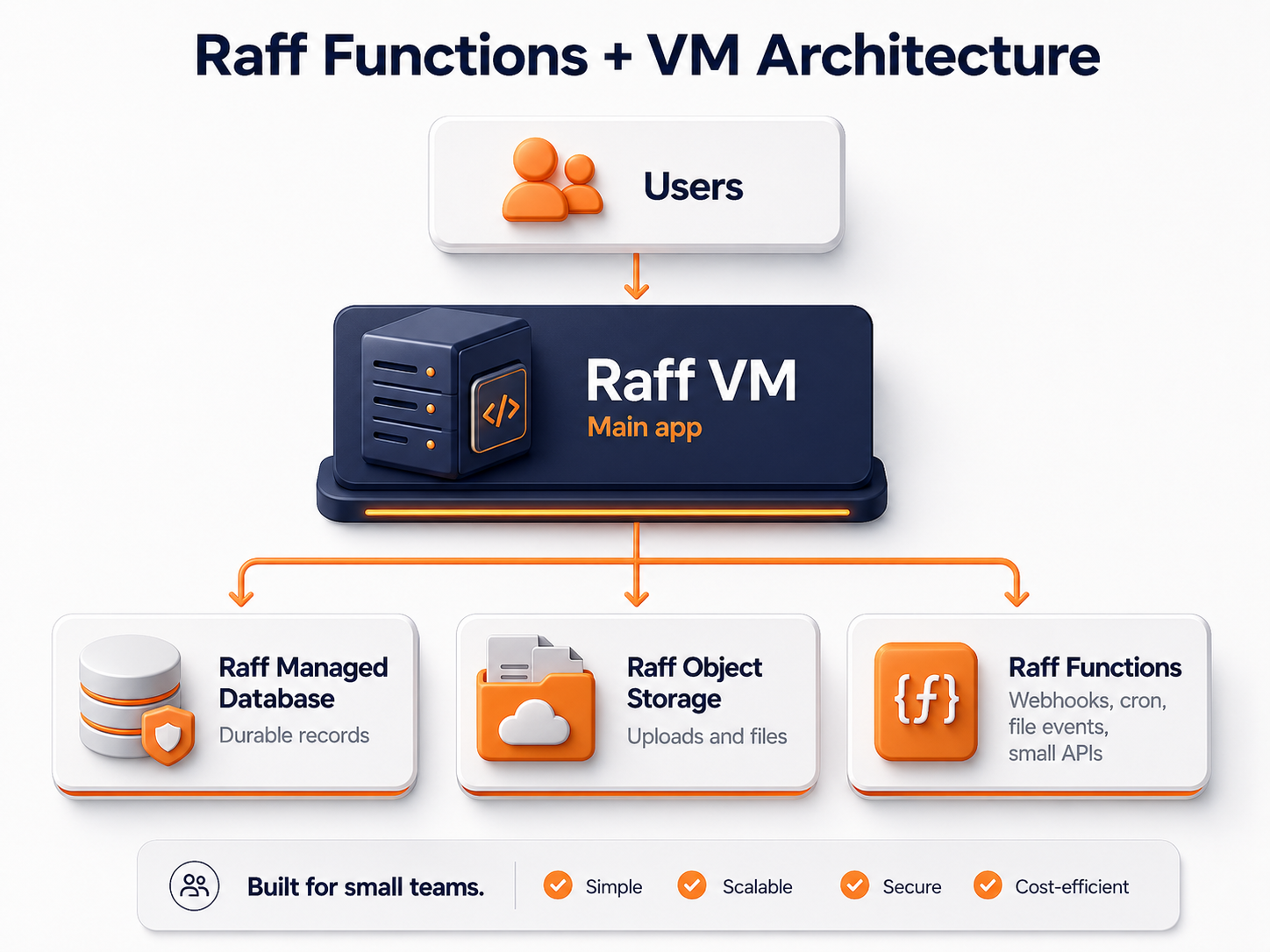
A practical mixed architecture can be:
| Workload | Infrastructure |
|---|---|
| Main application | Raff VM |
| Durable records | Managed Database |
| Uploads and generated files | Object Storage |
| Billing webhook | Raff Function |
| Image processing | Raff Function |
| Scheduled report | Raff Function |
| Constant worker | Raff VM |
This model keeps the main application understandable while allowing isolated jobs to scale and deploy independently.
The point is not to maximize the number of Functions. The point is to remove tasks from the VM when separation improves reliability, scaling, ownership, or cost.
A staged path from VM to functions
A small team can evolve without a large migration.
Stage 1 — Start with the simplest reliable environment
If one VM can host the application cleanly, use it.
Raff VM
  ↓
app + worker + simple scheduled work
Stage 2 — Externalize durable state
Move records and files into services that do not depend on the application process.
Raff VM
  ├─ Managed Database
  └─ Object Storage
Stage 3 — Extract bounded event-driven work
Move a webhook, cron job, or file processor into a function when doing so creates a clear operating benefit.
HTTP / cron / storage event
  ↓
Raff Function
  ↓
Managed Database / Object Storage
Stage 4 — Keep persistent workloads where they fit best
Do not move a continuously running worker or full application server simply to make the architecture look more serverless.
Stage 5 — Add orchestration only if coordination becomes the problem
If the system eventually needs multi-node scheduling, more sophisticated service coordination, or cluster-level operations, evaluate Raff Kubernetes separately.
How Raff fits the decision
Raff supports both execution models.
Use Raff VM when the workload needs a complete Linux server, long-running processes, Docker, SSH administration, or capacity that stays online.
Use Raff Functions when the workload is better expressed as a triggered execution unit. The current product supports standard handlers and multiple trigger models, and is designed to scale execution independently from a persistent VM environment. Product limits, billing meters, runtime options, and free-tier rules can change, so verify those details on the live Functions and Pricing pages before making a production or purchasing decision.
The commercial decision should remain workload-driven. Raff Technologies offers both products because a VM and a function represent different operating responsibilities, not a basic and advanced version of the same infrastructure.