Webhooks on serverless functions are useful when an external system needs to notify your application without sending that traffic directly to your main app server.
A webhook is an event delivered over HTTP. Payment processors, Git platforms, CRMs, email providers, monitoring tools, automation platforms, and internal systems use webhooks to tell your app that something happened. The receiving endpoint should validate the event, return quickly, store enough state, and move heavier work out of the request path.
For Raff Technologies users, Raff Functions is a strong fit for webhook handling because each function can have an HTTP live URL with automatic TLS, logs and metrics for each invocation, standard handlers, free requests and egress, and a spend cap on by default. A Raff VM is still the better fit when the webhook handler depends on a full server environment, local app code, Docker Compose, persistent services, or SSH debugging.
This guide explains when to put webhooks on serverless functions, when to keep them on a VM, and how to design webhook architecture so retries, duplicate events, secrets, logs, and downstream work do not become production risk.
If you are still comparing the broader models, read Serverless Functions vs VMs: What Small Teams Should Choose first.
Webhooks are event-driven by nature
A webhook starts because something happened somewhere else.
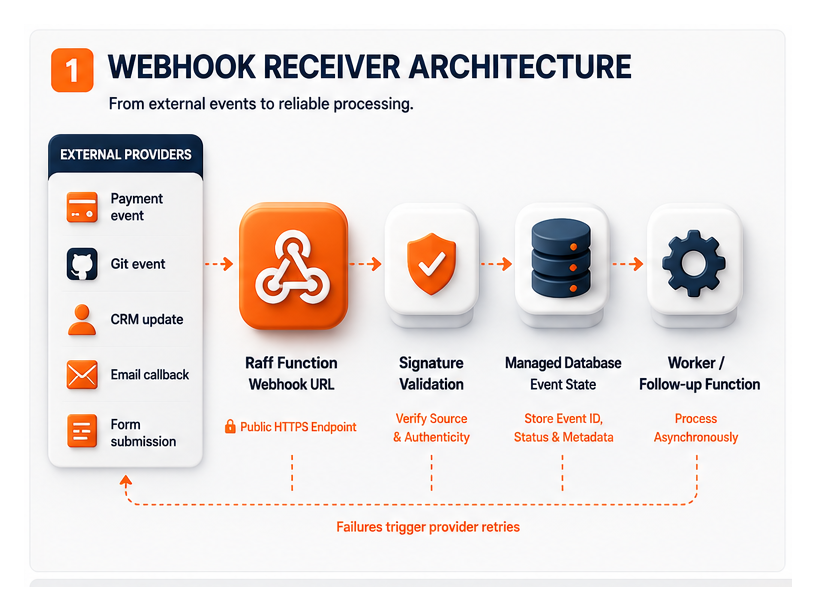
Examples:
- A payment succeeded
- A subscription failed
- A GitHub pull request opened
- An email bounced
- A CRM contact changed
- A monitoring alert fired
- A form was submitted
- A customer uploaded a file
- A marketplace order changed
- An automation workflow reached a step
- A third-party API finished a task
This is exactly the kind of workload serverless functions are designed to handle.
A webhook does not usually need a full server. It needs an HTTP endpoint that can receive the event, validate it, store it, and trigger the next step.
A clean webhook pattern looks like this:
External service
  ↓
Webhook endpoint
  ↓
Validate signature
  ↓
Store event or status
  ↓
Trigger background work
  ↓
Return quickly
The endpoint should not try to do everything during the request. If the downstream work is heavy, move it to a queue, another function, a worker VM, or a background workflow.
A webhook endpoint is often small, but it can have a large production impact. That is why isolation, visibility, and retry design matter.
The quick decision framework
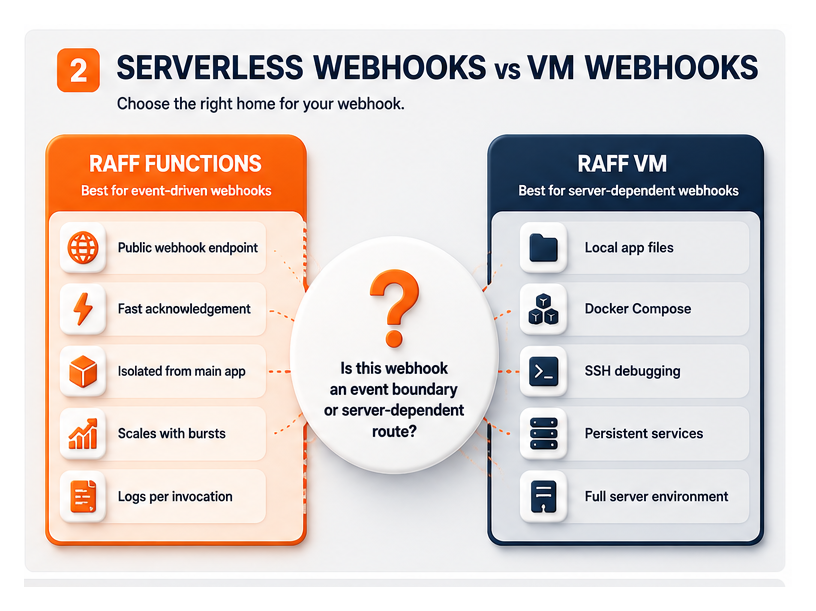
Use this table before deciding where a webhook should run.
| Webhook situation | Better default | Why |
|---|
| Lightweight event receiver | Serverless function | Event-driven and isolated |
| Payment webhook | Serverless function with durable database writes | Needs fast acknowledgement and idempotency |
| Git or CI webhook | Serverless function | Triggered by external event, easy to isolate |
| CRM or form webhook | Serverless function | Usually bounded and HTTP-based |
| Email delivery callback | Serverless function | High-volume callbacks should not hit the main app |
| Webhook starts heavy processing | Function plus queue or worker | Return quickly, process separately |
| Webhook needs local app files | VM | Depends on full server environment |
| Webhook needs SSH debugging | VM | Direct inspection may matter |
| Webhook shares Docker Compose services | VM | Local service dependencies are easier |
| Webhook traffic is constant and heavy | Function or VM, compare cost | Workload shape decides |
| Webhook needs custom system packages | VM or Dockerfile function | Choose based on dependency complexity |
| Webhook writes files | Function plus object storage | Files should not live in the function runtime |
A useful rule:
Use a function when the webhook is an event boundary. Use a VM when the webhook is tightly coupled to the server environment.
Most webhook receivers are event boundaries. That makes serverless functions a natural starting point.
Why serverless functions fit webhook receivers
A webhook endpoint has a few simple responsibilities:
- Receive the HTTP request
- Validate the sender
- Store or update durable state
- Trigger any downstream work
- Return a response quickly
This maps well to serverless functions.
With Raff Functions, a webhook can run as a standard HTTP handler. Raff Functions supports HTTP live URLs with automatic TLS, standard handlers such as Python FastAPI / ASGI, Node.js standard http, JavaScript Web Fetch, TypeScript, Go net/http, and a Dockerfile escape hatch for other languages.
That matters because webhook code should be easy to understand and easy to move. A handler that looks like normal application code is easier to test, maintain, and migrate later.
Serverless functions are especially useful for webhooks because they can:
- Stay isolated from the main app server
- Scale with webhook bursts
- Avoid keeping a server awake for occasional events
- Produce per-invocation logs and metrics
- Return quickly
- Use scoped credentials
- Trigger downstream work
- Reduce pressure on the main app VM
- Keep third-party event traffic separate from user traffic
When webhooks should stay on a VM
A function is not always the right home.
Keep webhook handling on a VM when the endpoint depends heavily on the server environment.
Use a VM when the webhook handler needs:
- Existing local application code
- Docker Compose services
- Local queues or services
- Custom binaries
- Full filesystem access
- SSH debugging
- Persistent local state
- Long-lived processes
- Internal server-only tools
- Complex network configuration
- Manual inspection during incidents
- Tight coupling to the main app routing layer
A VM-based webhook pattern looks like this:
External service
  ↓
Nginx or app server on Raff VM
  ↓
Application route
  ↓
Database / queue / local service
That can be the simplest architecture when the app is early and webhook traffic is low. If the entire app already runs on one Raff VM, adding one webhook route to the same app may be perfectly reasonable.
The risk appears when external event traffic starts affecting the user-facing app.
If webhook retries, signature verification, third-party spikes, or downstream processing slow the main app, isolate the webhook.
Return quickly and process later
Webhook senders usually expect a fast response.
If your endpoint takes too long, the sender may retry. If the sender retries while your app is still processing the previous event, duplicate work can happen.
A safer pattern is:
Webhook request
  ↓
Validate sender
  ↓
Write event record
  ↓
Return 2xx response
  ↓
Process asynchronously
The asynchronous step can be:
- Another function
- A queue worker
- A worker VM
- A scheduled retry job
- A background task
- A workflow tool
The key is to separate acknowledgement from heavy processing.
Do not make the webhook request wait while you:
- Generate reports
- Send many emails
- Process files
- Run long AI inference
- Sync large datasets
- Call several slow APIs
- Perform large database updates
- Build export files
For long work, use Long-Running Serverless Functions for AI, ETL, and Batch Jobs or move the work to a worker VM.
A webhook should normally say: "I received the event." It should not do the entire business workflow inside the HTTP request.
Validate signatures before trusting events
Webhook endpoints must not trust every incoming request.
Most webhook providers support a signing mechanism, shared secret, token, or header-based verification. The endpoint should validate that the request came from the expected sender before processing it.
A webhook validation flow:
Receive request
  ↓
Read signature header
  ↓
Reconstruct signed payload
  ↓
Verify with secret
  ↓
Reject if invalid
  ↓
Process if valid
For production, define:
- Which header contains the signature
- Which secret verifies the request
- Whether timestamps are checked
- Whether replay protection is needed
- What status code invalid requests receive
- Whether invalid requests are logged
- Whether logs avoid exposing secrets
- How secrets are rotated
Do not put webhook secrets directly in code. Use environment variables or secret management. Raff Functions supports environment variables and masked secrets, so the handler can read configuration without exposing it in the source file.
Signature validation should happen before any database write that changes state.
Idempotency prevents duplicate webhook damage
Webhook duplicates are normal.
A provider may retry after a timeout. A network issue may hide the response. A user may trigger the same event twice. A deployment may process the same stored event again. A failed function may be retried.
The endpoint must treat duplicate events as expected.
Idempotency means the same event can be processed more than once without causing duplicate or corrupted results.
Use these techniques:
| Technique | Use |
|---|
| Store provider event ID | Detect duplicates |
| Unique database constraint | Prevent duplicate inserts |
| Status transitions | Avoid repeating completed work |
| Idempotency key | Link repeated requests to one action |
| Output path versioning | Prevent overwriting wrong artifacts |
| Retry counter | Stop infinite loops |
| Event log table | Keep audit trail |
| Job table | Track downstream processing |
A simple webhook event table can store:
| Field | Purpose |
|---|
| event_id | Provider event ID |
| provider | Stripe, GitHub, CRM, email vendor, etc. |
| event_type | Kind of event |
| account_id | Tenant or customer owner |
| received_at | Arrival time |
| status | received, processing, completed, failed |
| attempts | Processing attempts |
| payload_hash | Duplicate detection |
| error_message | Safe failure summary |
A webhook handler should check whether the event already exists before creating new business records.
For example:
if event_id already exists:
    return success
else:
    store event and continue
Duplicate protection is not optional for payment, billing, order, account, or subscription webhooks.
Store the event before doing heavy work
A reliable webhook handler should save the event or the important state before doing slow work.
This creates a recovery path.
If the function fails after receiving the webhook, the system can still know what arrived. If downstream work fails, a scheduled retry job or worker can inspect failed events and retry them safely.
A good pattern:
Validate request
  ↓
Write event record
  ↓
Return response
  ↓
Process event
  ↓
Update event status
This is better than doing all work in memory.
For example, a billing webhook should not only update subscription state directly. It should also record the provider event ID and processing status. That gives the team an audit trail if a customer asks why their subscription changed.
Raff Managed Databases can store webhook events, job status, and durable business records. Raff Object Storage can store larger payloads, generated files, exports, or artifacts when the webhook leads to file work.
The function should execute the logic. Durable state should live in the database or object storage layer.
Use object storage for webhook artifacts
Some webhooks lead to files.
Examples:
- A form submission includes an attachment
- A document-signing provider sends a completed PDF
- A media provider sends a processed file
- A report needs to be generated after an event
- A customer uploads a file through a third-party service
- A marketplace sends order documents
- An import job starts after a webhook
Do not store those files inside the function runtime.
A clean pattern:
Webhook arrives
  ↓
Function validates event
  ↓
Function stores metadata in database
  ↓
Function stores files/artifacts in Object Storage
Use Raff Object Storage for:
- Attachments
- Generated reports
- Provider payload archives
- Export files
- Signed documents
- Processed media
- Import artifacts
- Debug-safe event samples
- Long-term audit files
The database should store metadata and object paths, not the full file body unless there is a specific reason.
For the storage decision, read App Uploads: VM Disk vs Object Storage for SaaS Teams.
Logs and metrics make webhook failures visible
Webhook failures can be hard to see because they happen between systems.
A customer may say a payment succeeded, but the app did not update. A CRM may show a contact changed, but your product did not receive it. An email provider may retry events, but your app may not show why.
A webhook endpoint needs visibility.
Track:
- Invocation count
- Error rate
- p50 and p95 latency
- Invalid signature count
- Duplicate event count
- Retry count
- Event type distribution
- Provider response status
- Database write failures
- Slow downstream calls
- Failed processing status
Raff Functions includes logs and metrics for every invocation, with live log tail, search, level filters, 14-day retention, count, p50, p95, and error rate per function.
For webhook logs, use safe structured messages:
webhook_received provider=stripe event_id=evt_123 type=invoice.paid
webhook_validated provider=stripe event_id=evt_123
webhook_duplicate provider=stripe event_id=evt_123
webhook_processing_started event_id=evt_123
webhook_processing_completed event_id=evt_123 duration_ms=214
webhook_processing_failed event_id=evt_123 reason=database_timeout
Do not log secrets, full payment details, tokens, or sensitive customer payloads.
Good webhook logs should help the team answer what happened without exposing private data.
Retry behavior should be designed
Webhooks involve at least two retry systems:
- The provider may retry delivery.
- Your system may retry downstream processing.
Those should not be confused.
Provider retries are about delivery. Your system retries are about business processing.
A good design separates them:
Provider retry
  ↓
Function receives duplicate event
  ↓
Event ID already exists
  ↓
Return success
and:
Stored event has failed processing status
  ↓
Retry worker or function runs later
  ↓
Processing succeeds or fails again
Decide:
- Which errors should return non-2xx?
- Which errors should return 2xx but mark processing failed?
- How many internal retries are allowed?
- What backoff strategy is used?
- Who is alerted after final failure?
- How are failed events replayed?
- Can one event block others?
- Can processing run twice safely?
For many webhooks, the endpoint should return quickly after storing the event. If processing fails after that, handle retries internally.
This avoids making the third-party provider responsible for your internal processing workflow.
Security boundaries matter more for public endpoints
A webhook URL is public by design.
That means it needs stronger boundaries than an internal-only function.
Use these controls:
- Validate signatures or tokens
- Reject unknown providers
- Use HTTPS
- Keep secrets out of code
- Avoid logging sensitive payloads
- Rate-limit where appropriate
- Store only necessary payload data
- Scope database credentials
- Scope object-storage credentials
- Use separate functions for unrelated providers
- Monitor invalid request patterns
- Disable retired webhook endpoints
- Rotate secrets after incidents or ownership changes
Raff Functions provides HTTP live URLs with automatic TLS, masked secrets, and scoped bindings to Raff Managed Databases and Raff Object Storage. Use those features to keep each webhook narrow.
A payment webhook should not share the same broad credentials as a file-processing webhook. A CRM webhook should not have access to unrelated object-storage buckets. A Git webhook should not have database write access unless it actually needs it.
Small teams often move fast by using one credential everywhere. That becomes dangerous when the endpoint is public.
Pricing for webhook functions
Webhook cost depends on invocation volume, duration, memory, and active CPU.
Webhooks are often short and I/O-heavy. They validate a signature, write a database record, maybe call one API, and return. That can fit usage-based serverless pricing well.
Raff Functions bills memory and active CPU. Requests and egress are free. That matters for webhooks because retries and event bursts can increase request counts quickly.
Estimate:
- Events per month
- Retry rate
- Average duration
- Memory setting
- Active CPU time
- Whether downstream work happens inside the request
- Whether the function calls slow external APIs
- Whether payloads are large
- Whether heavy work is moved out of the request path
A webhook that only validates and stores an event is usually easier to forecast than one that performs long downstream processing during the request.
For cost planning, read Serverless Function Pricing: CPU, Memory, Requests, and Egress.
A practical Raff webhook architecture
A strong Raff webhook architecture keeps the public endpoint isolated and durable state outside the function.
External provider
  ↓
Raff Function webhook URL
  ↓
Signature validation
  ↓
Raff Managed Database = event state and business records
  ↓
Raff Object Storage = files and artifacts
  ↓
Worker VM or function = downstream processing
Each layer has a job:
| Layer | Responsibility |
|---|
| Raff Function | Receives, validates, stores, and acknowledges webhook |
| Managed Database | Stores event IDs, status, metadata, and business records |
| Object Storage | Stores files, attachments, reports, or artifacts |
| Worker VM or another function | Handles slow downstream processing |
| Logs and metrics | Shows delivery, latency, errors, and retry behavior |
This pattern works for:
- Billing webhooks
- Git provider webhooks
- Email delivery callbacks
- CRM event callbacks
- Form submissions
- Marketplace events
- Automation workflows
- Monitoring alerts
Start with one function per provider or per major event family. Avoid one giant webhook function that handles every provider and every event type unless there is a strong reason.
When to use one function or multiple webhook functions
A team can handle webhooks in one function or split them.
Use one webhook function when:
- Events come from one provider
- Event types are closely related
- Shared validation logic is useful
- Traffic is low
- The code remains easy to understand
- The same credentials and data access are needed
Use multiple webhook functions when:
- Providers are unrelated
- Security boundaries differ
- Credentials should be separate
- One provider has high traffic
- Event handling logic is large
- Different teams own different integrations
- Different runtime settings are needed
- Failure isolation matters
A practical split:
billing-webhook
git-webhook
email-webhook
crm-webhook
file-event-webhook
This keeps ownership clear.
Do not split too early into dozens of tiny functions if the team cannot operate them. Split when security, traffic, ownership, or complexity justify it.
Webhook readiness checklist
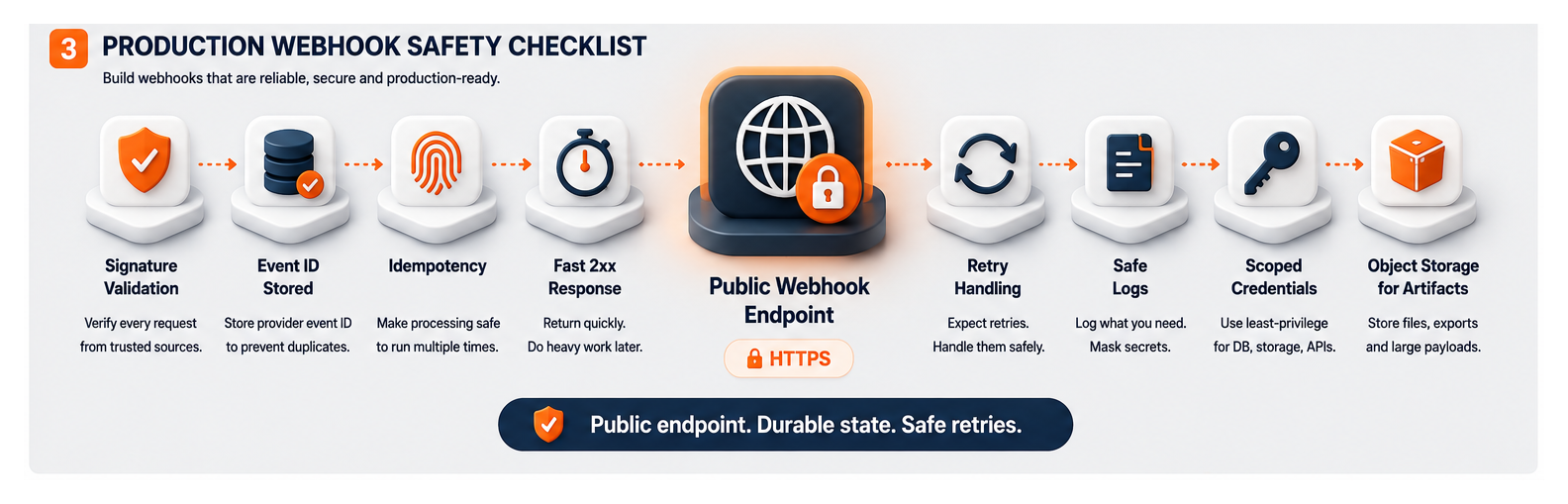 Before launching a production webhook function, check:
Production webhooks are small endpoints with large consequences. Treat them accordingly.
Common mistakes to avoid
Doing too much inside the webhook request
Validate, store, and acknowledge quickly.
Move heavy work to a function, queue, worker VM, or background process.
Skipping signature validation
A public URL must not trust every incoming request.
Verify the sender before changing data.
Ignoring duplicate events
Webhook providers can retry events.
Store event IDs and make processing idempotent.
Storing only in memory
If the function fails, in-memory state disappears.
Store event status and durable records in a database.
Logging sensitive payloads
Webhook payloads can contain customer, payment, or private integration data.
Log identifiers and safe summaries, not secrets.
Using one broad credential for every webhook
Public endpoints should have narrow credentials.
Scope database and object-storage access to what each function needs.
Keeping webhook traffic on the main app when it causes incidents
If webhook spikes or retries slow the customer-facing app, isolate the endpoint.
Serverless functions are often a cleaner boundary.
Webhooks should be isolated, fast, and durable
Webhook handlers look small, but they sit at an important boundary between your app and external systems.
Use Raff Functions when the webhook is event-driven, should scale independently, should return quickly, and does not need a full server environment. Use Raff VM when the webhook depends on local application code, Docker Compose, SSH debugging, custom packages, or persistent server-side services.
The strongest Raff pattern is to receive the webhook in a function, validate the sender, store event state in Raff Managed Databases, store files or artifacts in Raff Object Storage, and move heavy processing into a follow-up function, queue, or worker VM.
That keeps webhook traffic away from the main app, makes failures visible, and gives the team a safer retry path.

