
In short
SQL Server 2025 licensing has two main commercial models:
- Per Core — available for SQL Server 2025 Standard and Enterprise. You license the compute running SQL Server; users and devices do not need SQL Server CALs under this model.
- Server + CAL — available for SQL Server 2025 Standard only. You license the server software and also license every user or device that accesses SQL Server, including many indirect-access scenarios.
For hosted or virtual SQL Server, the harder question is often not Standard vs Enterprise. It is who supplies the SQL Server license and which Microsoft rights allow it to run on the chosen infrastructure.
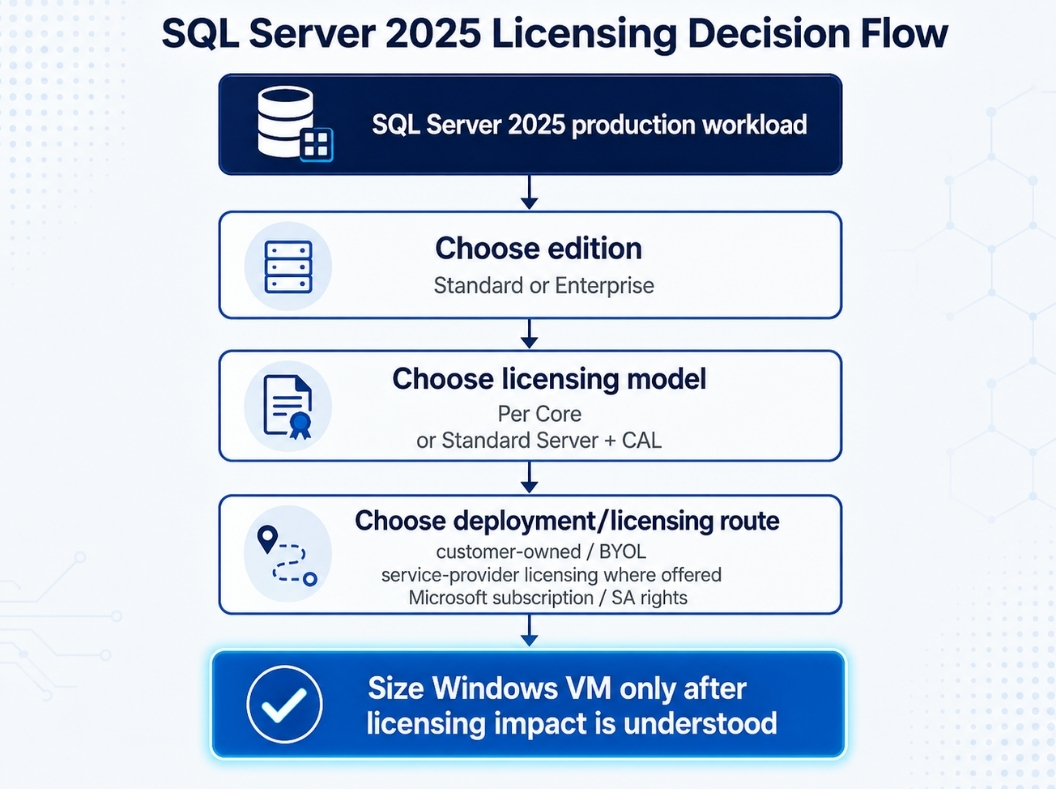
For most self-managed hosted SQL Server workloads with many or unpredictable users, Per Core is the simpler model to evaluate because it does not require counting every accessing user or device. Server + CAL can be attractive for a controlled Standard-edition environment with a small, countable population.
This guide owns the SQL Server licensing-model decision. For edition features, use MSSQL Standard vs Enterprise — When to Pay More. For installation, use Install SQL Server 2025 on a Windows Server VPS. For Windows Server OS licensing, use Windows Server Licensing on Raff.
Licensing note: Microsoft licensing rights depend on the agreement, purchase channel, Software Assurance or subscription status, deployment model, and provider. Microsoft Product Terms and the customer’s executed agreement control if they differ from this guide.
SQL Server 2025 licensing models at a glance
Microsoft’s current SQL Server 2025 licensing guidance identifies these commercial options:
| SQL Server 2025 edition | Per Core | Server + CAL |
|---|---|---|
| Standard | Yes | Yes |
| Enterprise | Yes | No |
If you already know you need Enterprise, the commercial licensing model is Per Core. If Standard fits the workload, you can evaluate either Per Core or Server + CAL.
Microsoft also notes that Server + CAL is not the licensing model for its SQL pay-as-you-go billing options. This guide focuses on customer commercial licensing and hosted Windows VM planning rather than Azure SQL service pricing.
Per Core licensing pays for SQL compute instead of SQL CALs
Under the Per Core model, SQL Server licenses are assigned according to the physical cores or virtual cores that run SQL Server, depending on the licensing approach being used.
The main advantage is operational simplicity:
Licensed SQL compute
→ users and devices can access SQL Server
→ no separate SQL Server CAL for each user/device
This can be a better fit when:
- the application has many users;
- users are external or difficult to count;
- applications, services, devices, APIs, or middleware access SQL Server;
- the user/device population changes frequently;
- the database is part of a hosted business application;
- CAL administration would be more complex than core licensing.
SQL Server core licenses are sold in two-core packs, but licensing calculations are based on the number of required core licenses, not simply the number of packs purchased.
Licensing SQL Server 2025 by virtual machine requires SA or subscription rights
Microsoft allows SQL Server 2025 Standard and Enterprise to be licensed by virtual machine under the Per Core model when the licenses have active Software Assurance or are qualifying software subscription licenses.
For a licensed virtual operating system environment (virtual OSE), Microsoft requires licenses for the virtual cores allocated to that VM, subject to a minimum of four core licenses per virtual OSE.
If a virtual core maps to more than one hardware thread, Microsoft also requires licensing each hardware thread to which that virtual core is mapped.
The practical consequence for a small Windows VM is important:
A very small VM does not automatically create a two-core SQL Server licensing requirement. Under Microsoft’s eligible per-VM core model, the minimum is four core licenses per VM.
Example core-count planning
Assume each vCPU exposed to the VM represents one virtual core and no virtual core maps to multiple hardware threads. Under that simplified assumption:
| Windows VM | Virtual cores to consider | Minimum SQL core licenses under eligible per-VM model |
|---|---|---|
| 2 vCPU | 2 | 4 |
| 4 vCPU | 4 | 4 |
| 6 vCPU | 6 | 6 |
| 8 vCPU | 8 | 8 |
| 16 vCPU | 16 | 16 |
This table is a planning example, not a substitute for checking the actual virtualization mapping and Microsoft entitlement.
The four-core minimum matters commercially because infrastructure sizing and SQL licensing cost do not scale identically at the smallest VM sizes.
Physical-server Per Core licensing is different
When licensing a physical server by cores, Microsoft requires enough SQL Server core licenses for the physical cores, with a minimum of four core licenses per physical processor.
Do not copy a physical-host calculation into a virtual-machine calculation. Microsoft treats these as different licensing approaches with different use rights.
This distinction becomes especially important in highly virtualized environments where Enterprise edition plus qualifying Software Assurance or subscription rights can provide broader virtualization benefits.
Server + CAL licensing is Standard-only and licenses the server plus every accessor
SQL Server 2025 Standard can also be licensed using the Server + CAL model.
At a high level:
SQL Server Standard server license
+
SQL Server CAL for every accessing user or device
Microsoft’s current SQL Server 2025 guidance states that one server license permits one running SQL Server instance in one physical or virtual OSE. Additional server licenses can be stacked on the same device when additional entitled instances/OSEs are required.
A single SQL Server CAL assigned to a user or device can allow that licensed user or device to access more than one properly licensed SQL Server, subject to Microsoft’s terms.
Server + CAL is worth evaluating when:
- the environment uses Standard edition;
- the population is small;
- users or devices are easy to count;
- access is internal and predictable;
- the organization already manages Microsoft CALs cleanly;
- future growth is unlikely to make CAL administration expensive.
It becomes less attractive when the database is accessed by a large, changing, public, customer-facing, or difficult-to-count population.
Multiplexing does not reduce SQL CAL requirements
This is one of the most common SQL Server licensing mistakes.
Putting an application server, API, connection pool, middleware layer, or other multiplexing technology between users and SQL Server does not automatically reduce the number of SQL Server CALs required under Server + CAL licensing.
Conceptually:
100 users
   ↓
Web / ERP / application server
   ↓
One SQL connection pool
   ↓
SQL Server
The fact that SQL Server sees a smaller number of technical connections does not mean only those connection-pool identities need CALs.
Microsoft explicitly states that hardware or software used to reduce the number of users or devices directly accessing SQL Server does not reduce the required CAL count. Microsoft also notes that unattended devices accessing SQL Server require CALs under the Server + CAL model.
For a customer-facing or high-user application, this is one reason Per Core licensing is often easier to model.
Per Core vs Server + CAL is mainly a population and deployment decision
| Situation | Usually evaluate first | Why |
|---|---|---|
| Small internal app with 5 known users | Server + CAL or Per Core | Both may be viable; compare total licensing and admin overhead |
| 50 employees using an ERP | Per Core | CAL count can become material |
| Public web application backed by SQL Server | Per Core | End users are difficult or impractical to license individually |
| Devices/services access SQL indirectly | Per Core often simpler | Multiplexing does not erase CAL requirements |
| Enterprise edition required | Per Core | Server + CAL is not available for Enterprise |
| User count changes frequently | Per Core | Avoid recurring CAL-count administration |
| Small stable Standard-edition environment | Server + CAL can be viable | Predictable user/device population may favor CAL economics |
Do not choose the model from a generic internet calculator alone. Model the real users, devices, VM cores, edition, growth plan, and deployment rights.
SQL Server edition choice and licensing choice are separate decisions
First ask:
What SQL Server features and scale does the workload need?
Then ask:
How should that edition be licensed in this deployment?
For SQL Server 2025, Microsoft documents Standard edition with a maximum compute capacity of 32 licensed cores. In Microsoft’s virtual-machine licensing guidance, that 32-core Standard limit is expressed in terms of hardware threads for the VM licensing model.
Enterprise is intended for workloads requiring higher scale and additional enterprise capabilities.
The canonical feature decision is covered in MSSQL Standard vs Enterprise — When to Pay More. This page stays focused on licensing.
Developer, Evaluation, and Express are not normal paid-production substitutes
Microsoft identifies Standard Developer, Enterprise Developer, and Evaluation as non-production editions. Express can be used in production within its technical and license limits.
| Edition | Typical role |
|---|---|
| Standard Developer | Development/test against Standard feature set |
| Enterprise Developer | Development/test against Enterprise feature set |
| Evaluation | Time-limited evaluation/testing |
| Express | Small workloads that fit Express limits |
| Standard | Main paid production choice for many SMB workloads |
| Enterprise | Paid production for advanced scale/features |
Microsoft currently documents SQL Server 2025 Evaluation as providing the Enterprise feature set for up to 180 days. It must be upgraded to Standard or Enterprise for a normal paid production deployment.
Do not deploy Developer edition into production simply because the Windows VM itself is properly licensed.
Windows Server and SQL Server are separate Microsoft products with separate licensing requirements.
SQL Server 2025 adds broader Power BI Report Server use rights
A 2025-specific licensing change is easy to miss: Microsoft’s current SQL Server 2025 guidance states that Power BI Report Server use rights are included with SQL Server 2025 Standard and Enterprise editions even without active Software Assurance.
For pre-2025 SQL Server Enterprise releases, those Power BI Report Server use rights were tied to Enterprise Core licenses with active Software Assurance.
This does not mean every Power BI scenario becomes license-free. Microsoft still documents separate Power BI licensing requirements for actions such as publishing shared Power BI reports. The important point for this SQL Server guide is that the base Power BI Report Server use right changed materially with SQL Server 2025.
Windows Server and SQL Server licensing stack together
A SQL Server VM normally involves more than one licensing layer.
For a customer-managed commercial deployment, think in layers:
Windows VM infrastructure
+
Windows Server licensing/access rights
+
SQL Server licensing
+
RDS licensing if users consume RDS functionality
+
Microsoft 365 licensing if Office apps are used in shared sessions
One layer does not automatically grant another.
For example, a correctly licensed Windows Server VM does not automatically include SQL Server Standard licensing.
Likewise, buying SQL Server licenses does not create Remote Desktop Services rights for users working through an RD Session Host.
Use Windows Server Licensing on Raff and RDS CAL Licensing Guide for those separate layers.
SPLA and BYOL are different hosted SQL Server routes
The Microsoft Services Provider License Agreement (SPLA) is Microsoft’s licensing program for service providers and software companies that provide hosted software services to customers.
Microsoft describes SPLA as a monthly licensing model for eligible Microsoft products during the agreement term. The service provider reports usage and follows the applicable Services Provider Use Rights (SPUR).
This is different from customer BYOL:
SPLA
→ service provider licenses eligible hosted Microsoft software
→ provider reports usage under SPLA

BYOL / customer licensing
→ customer supplies qualifying licenses
→ customer must have rights that permit the hosted deployment
Do not assume that a provider’s Windows Server SPLA offering automatically includes SQL Server. SQL Server availability, edition, licensing unit, and commercial price must be confirmed for the specific provider/service.
For Raff deployments, treat the Windows VM and SQL Server license as separate decisions unless the current commercial offer explicitly says otherwise.
BYOL depends on entitlement, not whether a product key activates
BYOL is not one universal Microsoft license transfer rule.
A customer may be able to deploy qualifying SQL Server licenses on third-party infrastructure through rights such as:
- Software Assurance benefits;
- qualifying Microsoft software subscription licenses;
- License Mobility through Software Assurance where applicable;
- Flexible Virtualization Benefit for eligible outsourcing scenarios;
- other rights in the customer’s Microsoft agreement and Product Terms.
The exact route depends on the license and provider environment.
Do not assume that owning a perpetual SQL Server license automatically means it can be moved to any hosted VM. A product key and a licensing entitlement are not the same thing.
Flexible Virtualization Benefit can permit SQL Server on an Authorized Outsourcer
Microsoft’s Flexible Virtualization Benefit expands outsourcing rights for customers with qualifying subscription licenses or licenses with active Software Assurance.
Microsoft’s current guidance says an Authorized Outsourcer is an outsourcer that is not a Microsoft Listed Provider and is not using a Listed Provider as the datacenter provider for that outsourcing service.
Under the Flexible Virtualization Benefit, eligible SQL Server licenses can be deployed on an Authorized Outsourcer’s shared or dedicated servers, subject to the applicable terms.
When SQL Server Standard or Enterprise is licensed by virtual machine under this benefit, the same virtual-core rules still apply, including the four-core minimum per VM and the hardware-thread mapping rule.
Provider qualification matters. The customer should verify the actual hosting arrangement before treating the Flexible Virtualization Benefit as available.
License Mobility and Flexible Virtualization are not identical
SQL Server licenses with active Software Assurance can include License Mobility through Software Assurance, which Microsoft describes as a route for running SQL Server on an Authorized License Mobility Partner’s shared servers.
Flexible Virtualization Benefit is a separate outsourcing right for qualifying subscription licenses or licenses with active Software Assurance.
These mechanisms can overlap in deployment goals but are not interchangeable.
When a company asks, “We already own SQL Server, can we bring it to Raff?”, the correct next questions are:
- Which SQL Server edition and version?
- Per Core or Server + CAL?
- Perpetual or software subscription?
- Is Software Assurance active?
- How is the license currently assigned?
- Which outsourcing right covers the intended provider/deployment?
- How many virtual cores will the SQL VM use?
- Does HA/DR create additional licensing requirements?
Do not answer BYOL from the product key alone.
Software Assurance and subscription rights materially change virtualization
Active Software Assurance or qualifying software subscription licenses can provide important SQL Server rights related to:
- licensing SQL Server by virtual machine under the Per Core model;
- moving licensed virtual OSEs across servers in the same server farm more flexibly;
- License Mobility where applicable;
- passive failover/disaster-recovery rights;
- Enterprise unlimited virtualization when the qualifying physical-core requirements are met;
- Flexible Virtualization Benefit where the provider/deployment qualifies.
If a customer already pays for Software Assurance, model those rights before buying duplicate licenses or redesigning the VM architecture.
High availability and disaster recovery can add or remove licensing cost
Adding a second SQL Server VM for failover is not just an infrastructure decision.
Microsoft’s current SQL Server 2025 licensing guidance states that for each properly licensed physical or virtual OSE with Software Assurance or qualifying subscription licenses, the customer may run passive replicas in anticipation of failover, including:
- one passive failover replica for high availability in a separate OSE;
- one passive failover replica for disaster recovery in a separate OSE;
- one passive disaster-recovery replica in Azure, subject to Microsoft’s applicable terms.
Microsoft defines a passive replica as one that is not serving SQL Server data to clients or running active SQL Server workloads. The passive replica’s otherwise-required license count cannot exceed the licenses covering the primary OSE.
Licenses without qualifying SA/subscription rights do not receive the same HA/DR entitlements.
Do not assume that a second SQL VM is automatically license-free because it is called “passive.” Verify what the replica actually does and which Microsoft entitlement covers it.
SQL Server licensing and VM sizing should be planned together
Licensing can influence the VM shape you choose.
Example:
Application needs 2 vCPU today
SQL Server eligible per-VM licensing minimum = 4 core licenses
If you are already licensing four SQL cores, a 2-vCPU VM does not reduce the SQL licensing minimum below four cores. But increasing the VM beyond four virtual cores can increase the required SQL core count.
That does not mean you should oversize the VM just because four licenses are required. VM sizing should still follow workload evidence.
Instead, understand both curves:
Infrastructure requirement
→ CPU, RAM, storage, workload

Licensing requirement
→ edition, cores, CAL population, SA/subscription rights
Then choose the smallest production configuration that satisfies both performance and licensing requirements with sensible headroom.
For workload-level sizing, use Windows Server Sizing by Workload.
Common SQL Server licensing scenarios
Small internal business application
Assume SQL Server 2025 Standard, a small known employee population, no public/customer access, and a modest database workload.
Evaluate both Server + CAL and Per Core. Server + CAL may be economically attractive if the licensed population is genuinely small and stable.
ERP used by many employees
Assume SQL Server Standard, dozens of employees, and an application server that multiplexes database connections.
Do not count only the application server connection. Multiplexing does not reduce CAL requirements. Per Core can be easier to model as user count rises.
Public SaaS or customer portal
A database behind a customer-facing application can have a large or unpredictable number of indirect users.
Per Core is generally the model to evaluate because Server + CAL requires licensing users/devices that access the SQL Server software, including indirect access scenarios.
Enterprise SQL workload
If the workload needs Enterprise edition, the licensing model is Per Core. Then model physical-core versus eligible virtual-OSE licensing and any Software Assurance/subscription benefits.
Existing SQL licenses moving to hosted Windows VMs
Do not start migration until entitlement is checked.
Review edition, licensing model, active Software Assurance/subscription, outsourcing rights, provider qualification, virtual-core count, license assignment/movement rules, and HA/DR design. Then build the Windows VM around the compliant path.
Common SQL Server licensing mistakes are expensive
Assuming one SQL license covers unlimited VMs
Virtualization rights depend on edition, licensing model, how the licenses are assigned, and Software Assurance/subscription status.
Treating BYOL as “upload my key”
A product key and a licensing entitlement are not the same thing. Hosted deployment rights must exist independently of whether installation media accepts a key.
Counting application servers instead of end users under Server + CAL
Multiplexing does not erase CAL requirements.
Using Developer edition for production
Developer editions are for development, testing, and demonstration, not normal production workloads.
Copying Windows Server core minimums into SQL Server
Windows Server and SQL Server use different core-licensing rules. Under eligible SQL Server per-VM licensing, the SQL minimum is four core licenses per VM; Windows Server has its own licensing framework.
Hard-coding an old SQL Server price into architecture
Microsoft pricing, reseller pricing, SPLA pricing, and commercial-agreement pricing can differ and change over time. Compare current quotes for the exact licensing route.
Building HA first and asking about licensing later
Replica rights can depend on Software Assurance or subscription rights. Resolve the intended licensing path while designing HA/DR.
A purchasing checklist should be completed before SQL Server production go-live
| Question | Decision |
|---|---|
| Which SQL Server edition does the application require? | Standard / Enterprise / other |
| Is this production? | Yes / No |
| Per Core or Server + CAL? | Chosen model |
| If Server + CAL, how many users/devices really access SQL? | Documented count |
| If Per Core, how many virtual cores will SQL Server use? | Documented count |
| Does the four-core per-VM minimum apply? | Verified |
| Are the licenses perpetual, subscription, or provider supplied? | Documented |
| Is Software Assurance active? | Yes / No |
| Is BYOL permitted for the intended provider/deployment? | Verified |
| Does HA/DR introduce replica licensing? | Verified |
| Is Windows Server licensing handled separately? | Yes |
| Is RDS licensing needed for interactive users? | Verified |
| Is the licensing route documented before go-live? | Yes |
If several of these are unknown, the licensing decision is not ready for production.
Raff provides the Windows infrastructure layer, not a bundled SQL Server license
Raff provides the Windows Server infrastructure layer for self-managed SQL Server workloads.
A common production architecture is:
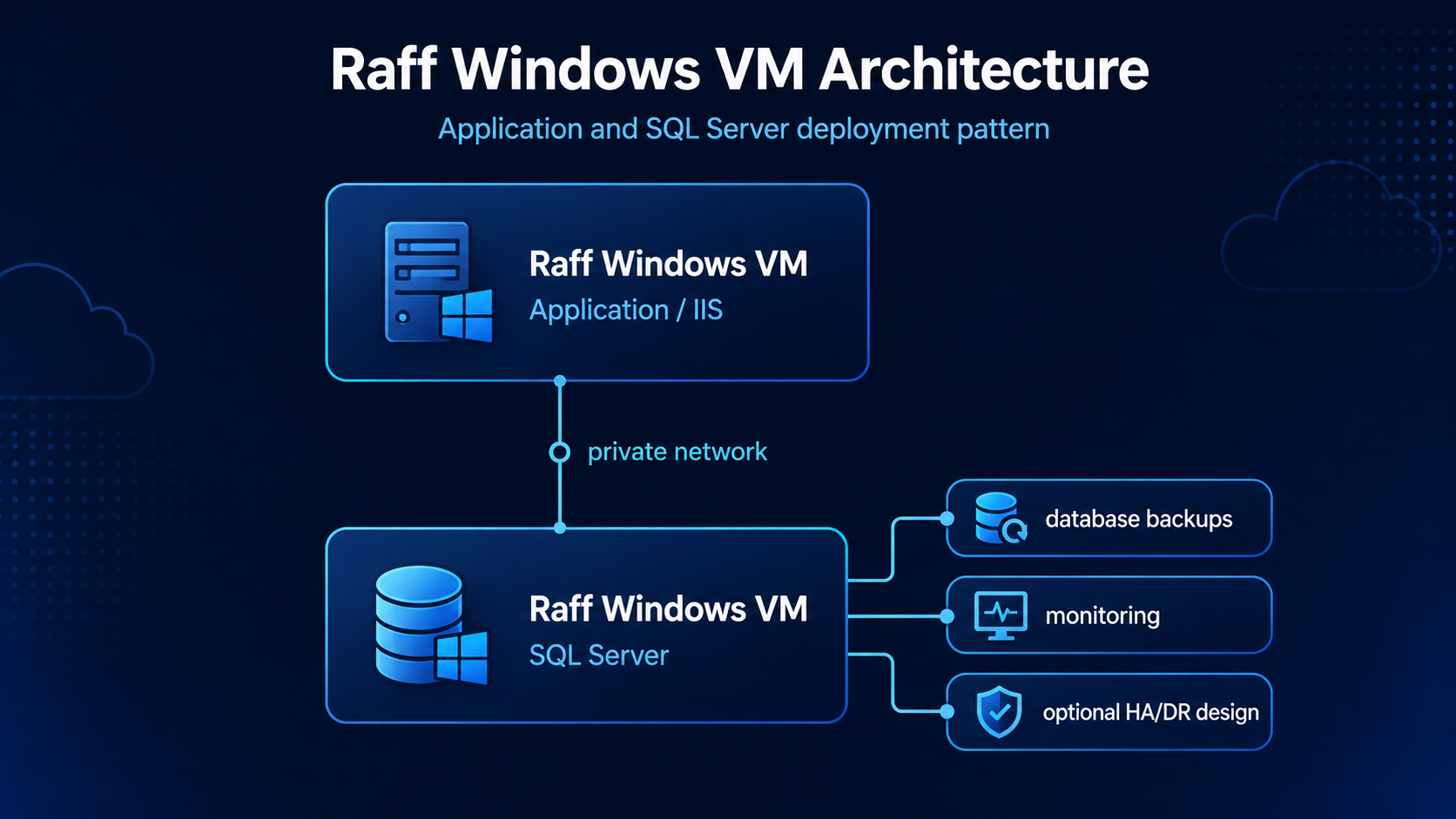
The Windows VM size can be selected around the application and database workload, while SQL Server licensing is handled as a separate Microsoft licensing decision.
Current Raff planning examples make that separation visible:
| Windows infrastructure example | Compute | Windows Server Standard SPLA | Windows subtotal before SQL Server |
|---|---|---|---|
| 4 vCPU / 8 GB / 120 GB | $40.99/mo | $15/mo | $55.99/mo |
| 8 vCPU / 16 GB / 180 GB | $76.99/mo | $15/mo | $91.99/mo |
Those totals do not include SQL Server licensing, RDS User SALs, additional volumes, backups/snapshots, or third-party application licensing.
Raff Windows VM traffic is currently 3 Gbps unmetered with no VM egress fees. Additional Raff Volumes are $0.08/GB/month, and snapshots/backups are $0.06/GB/month.
For customers migrating an existing SQL-backed application, first determine whether the SQL entitlement is Per Core, Server + CAL, BYOL-eligible, or supplied through an appropriate service-provider route; then choose the Windows VM architecture.
Do not assume SQL Server licensing is bundled with a Raff Windows VM unless the current commercial offer explicitly says so.