
In short
A Windows VPS backup strategy for small businesses should protect the whole server, the business data inside it, and the applications that depend on that data. Snapshots are useful before risky changes. Scheduled backups protect against server failure. App-aware backups protect SQL Server, accounting databases, and line-of-business software. Restore tests prove the plan works. Raff Technologies gives small teams Windows VMs with backup and snapshot options, but the recovery plan still needs clear ownership.
A Windows VPS is often where a small business puts Remote Desktop users, accounting software, tax tools, Microsoft Access databases, SQL Server tools, IIS apps, shared files, or admin workflows. That makes backup planning a business continuity issue, not just a technical checkbox.
The right backup strategy answers four questions: what must be recovered, how much data the business can lose, how long the business can be down, and who performs the restore. If those answers are missing, the business does not have a backup strategy yet. It only has backup hope.
Quick backup strategy for a small business Windows VPS
Use this as the practical starting model:
| Layer | What it protects | Recommended use |
|---|---|---|
| VM snapshot | Server state before a risky change | Before Windows updates, app upgrades, registry changes, firewall changes, or migrations |
| Scheduled VM backup | Whole-server recovery | Daily recovery point for the Windows VPS |
| File-level backup | Shared folders, exports, documents, reports | Restore individual files without rolling back the whole server |
| App-aware backup | SQL Server, accounting software, ERP data, Access files | Required when app data must be transaction-consistent |
| Off-server copy | Backup data outside the Windows VPS | Protection if the VM, disk, account, or app is compromised |
| Restore test | Proof the backup works | Required before trusting the strategy |
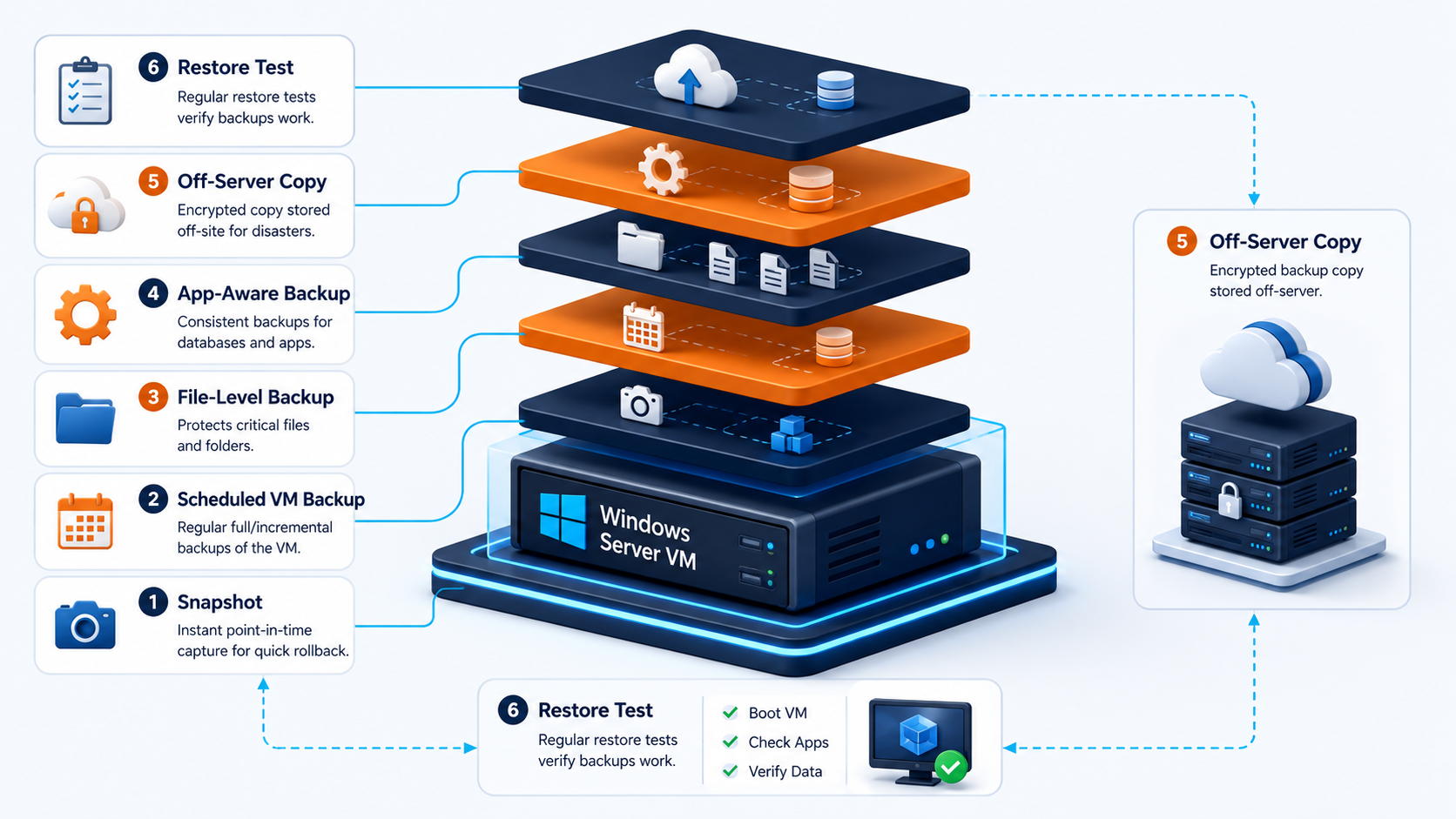 The safest small business pattern is not one backup type. It is layered recovery: snapshot for fast rollback, scheduled backup for server recovery, app-aware backup for databases, and off-server copies for business continuity.
Start with RPO and RTO before choosing tools
A backup tool is not the strategy. The strategy starts with two numbers: RPO and RTO.
| Term | Meaning | Small business example |
|---|---|---|
| RPO | Recovery point objective: how much data loss is acceptable | “We can lose 24 hours of reports, but not a week of invoices.” |
| RTO | Recovery time objective: how long the system can be unavailable | “We need the server usable again within 4 hours.” |
A small accounting office, tax preparer, MSP client, or remote operations team needs these numbers before choosing backup frequency. A once-per-week backup may be fine for a static test server. It is usually not enough for a Windows VPS that holds daily business transactions.
Use this decision shortcut:
| Workload | Suggested RPO | Suggested RTO |
|---|---|---|
| Admin-only Windows VPS | 24-48 hours | Same day |
| Shared files and reports | 24 hours or less | Same day |
| Accounting or tax software | 4-24 hours | 2-8 hours |
| SQL Server workload | 15 minutes to 24 hours, depending on recovery model | 1-8 hours |
| RDP server for daily staff work | 24 hours or less | 2-8 hours |
| Critical production app | Minutes to hours | Minutes to hours, with stronger architecture |
Do not pick aggressive numbers casually. A 15-minute RPO usually requires transaction log backups, monitoring, storage planning, and restore practice. A 24-hour RPO is simpler but means the business accepts losing up to a day of work.
Snapshots and backups solve different problems
Snapshots and backups are related, but they are not the same recovery tool. A snapshot is a point-in-time capture that helps roll back a server quickly. A backup is a recovery copy with retention, restore policy, and operational purpose.
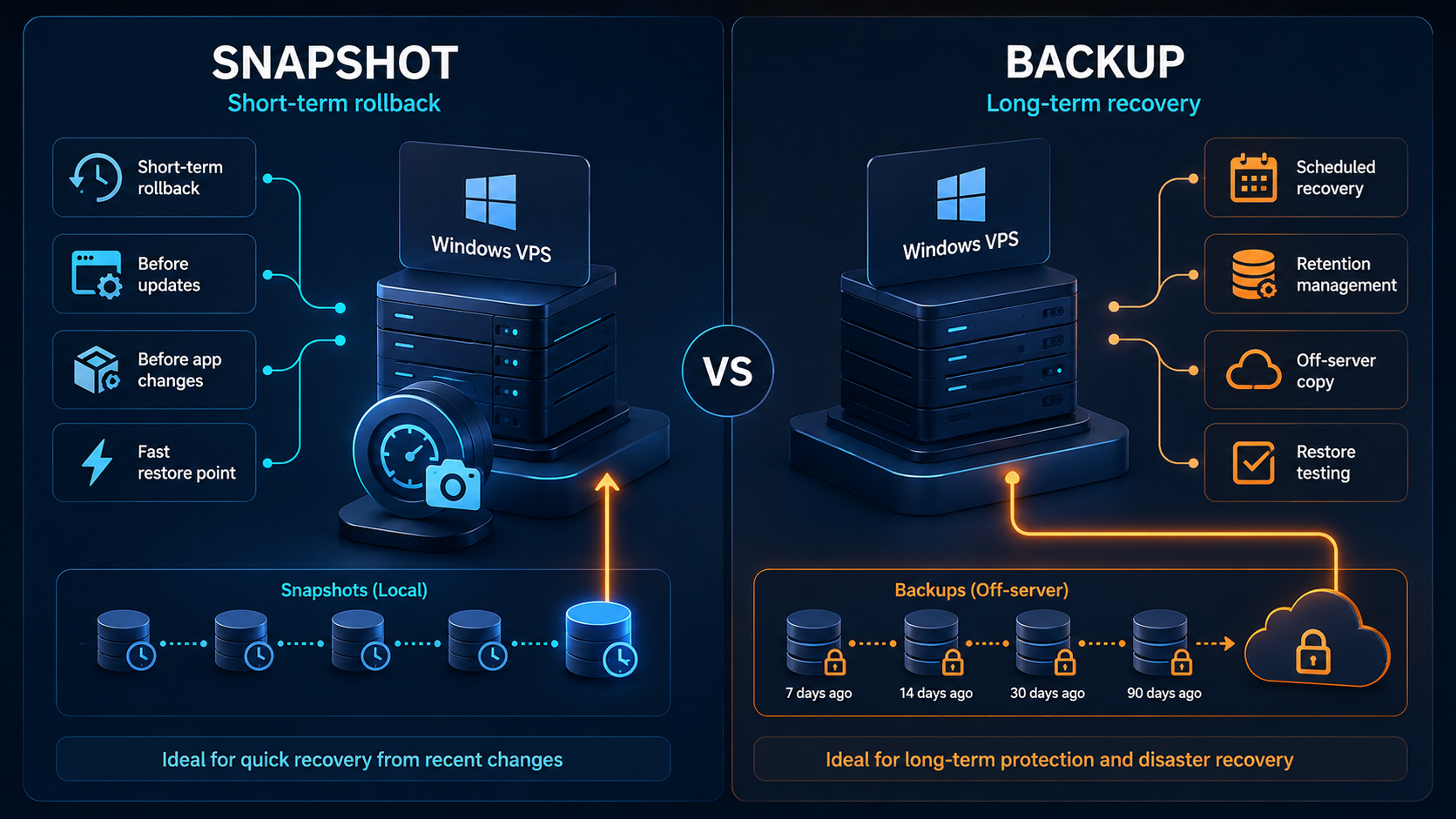
Use snapshots for short-term safety before change. Use backups for actual recovery planning.
| Scenario | Snapshot | Backup |
|---|---|---|
| Before Windows updates | Good fit | Also useful if update causes deeper issue |
| Before app upgrade | Good fit | Needed if app data must be recovered later |
| Recover one deleted file | Not ideal | Better fit with file-level backup |
| Recover from corrupted SQL database | Not enough alone | App-aware SQL backup required |
| Recover after ransomware | Risky if snapshots are reachable | Off-server and protected backups required |
| Long-term retention | Poor fit | Backup retention policy required |
| Compliance retention | Poor fit | Backup/archive process required |
A snapshot can be fast, but it should not become the only plan. If the VM is compromised, encrypted, misconfigured, or deleted, relying only on local or easily reachable restore points can fail at the worst time.
Microsoft’s Volume Shadow Copy Service coordinates point-in-time copies so applications can keep writing while backup components create a consistent shadow copy. That helps explain why backup consistency matters for active Windows workloads.
Whole-server backups protect the Windows VPS
A whole-server backup helps recover the Windows VPS when the operating system, configuration, or full environment must be restored. This matters when the server has many small settings: users, firewall rules, app installs, RDS configuration, scheduled tasks, certificates, IIS sites, or registry changes.
Whole-server backups are useful for:
| Recovery need | Why whole-server backup helps |
|---|---|
| Windows update breaks the server | Restore the prior server state |
| App upgrade fails | Return to a known working point |
| Server configuration is damaged | Recover system settings and installed roles |
| RDP/RDS configuration breaks | Restore working desktop access |
| IIS or service configuration is lost | Recover app server setup |
| Migration rollback is needed | Restore before cutover |
For small teams, the mistake is backing up only files while forgetting the server configuration. Rebuilding a Windows VPS from scratch can take hours or days if nobody documented roles, users, firewall rules, services, and app settings.
Raff Windows VM buyers should enable backup planning before storing production data. The best time to design recovery is before the first business app goes live.
File-level backups protect daily work
File-level backups help restore documents, exports, PDFs, reports, scripts, configuration files, and shared folders without rolling back the entire Windows VPS.
This is important because many small business incidents are not full server failures. They are smaller mistakes:
| Incident | Best restore type |
|---|---|
| User deletes a folder | File-level restore |
| Report export is overwritten | File-level restore |
| Wrong file version is saved | File version restore |
| User downloads bad data | File-level rollback |
| App config file is changed | File-level restore |
| Shared folder permissions are broken | File backup plus permission documentation |
If the Windows VPS acts as a file server, do not rely only on VM-level restore. Rolling back the whole server to recover one folder can erase unrelated work that happened after the restore point.
A practical small business backup plan separates:
- server recovery
- user file recovery
- application database recovery
- long-term retention
- emergency rebuild documentation
App-aware backups protect databases and business software
Application data needs special care. SQL Server, accounting software, ERP systems, tax software, and some Microsoft Access deployments can write data while users work. A basic file copy may not capture a clean, consistent application state.
App-aware backups matter when the workload includes:
| Workload | Backup concern |
|---|---|
| SQL Server | Full, differential, and transaction log backups may be needed |
| QuickBooks or Sage-style software | Vendor-supported backup process should be used |
| Tax software | Data folders and app-specific backup/export steps must be documented |
| ERP or inventory apps | Database and app files must be consistent |
| Microsoft Access | File locking and split database design affect backup timing |
| IIS/.NET app | App files, config, certificates, and database must be backed up together |
Microsoft’s SQL Server backup documentation explains that the recovery model determines backup and restore requirements. In practice, that means SQL Server backup planning is not the same as copying a .mdf file from Windows Explorer.
If your Windows VPS runs SQL Server, use the dedicated Raff MSSQL backup strategy guide after this article. It covers full, differential, and log backups, recovery models, off-server copies, and restore verification for SQL workloads.
Off-server copies protect against the worst cases
A backup stored only on the same Windows VPS is not enough. It may help with accidental file changes, but it does not protect against every real business incident.
Use off-server backup copies for:
| Risk | Why off-server matters |
|---|---|
| VM disk issue | Backup should not depend only on the same disk |
| Ransomware | Attackers may encrypt reachable local backups |
| Account compromise | Restore points should not all be exposed to the same credentials |
| App corruption | Clean older copies may be needed |
| Accidental deletion | Recovery copy should exist outside the affected system |
| Failed migration | Rollback should not depend on the broken server |
A good small business rule is:
One backup is not enough if it lives only where the failure happens.
For Windows VPS workloads, use a mix of platform backups, snapshots, app-specific backups, and off-server copies. The exact design depends on the workload, retention needs, security requirements, and recovery targets.
Retention should match business risk
Retention means how long backup copies are kept. More retention gives more recovery options, but it also increases storage cost and management responsibility.
A practical small business retention model:
| Backup type | Example retention |
|---|---|
| Daily VM backups | 7-14 days |
| Weekly backups | 4-8 weeks |
| Monthly backups | 3-12 months |
| App/database backups | Based on business and compliance needs |
| Pre-change snapshots | Delete after the change is verified |
| Legal/tax records | Based on accounting and regulatory requirements |
Keep short-term restore points for fast mistakes. Keep longer-term backups for corruption, delayed discovery, audit needs, or business records.
Do not keep every snapshot forever. Old snapshots and backups can increase cost, clutter recovery choices, and create confusion during an emergency. Name backup sets clearly and document what each layer is for.
Restore testing is the real proof
A backup that has never been restored is an assumption. Restore testing turns the assumption into evidence.
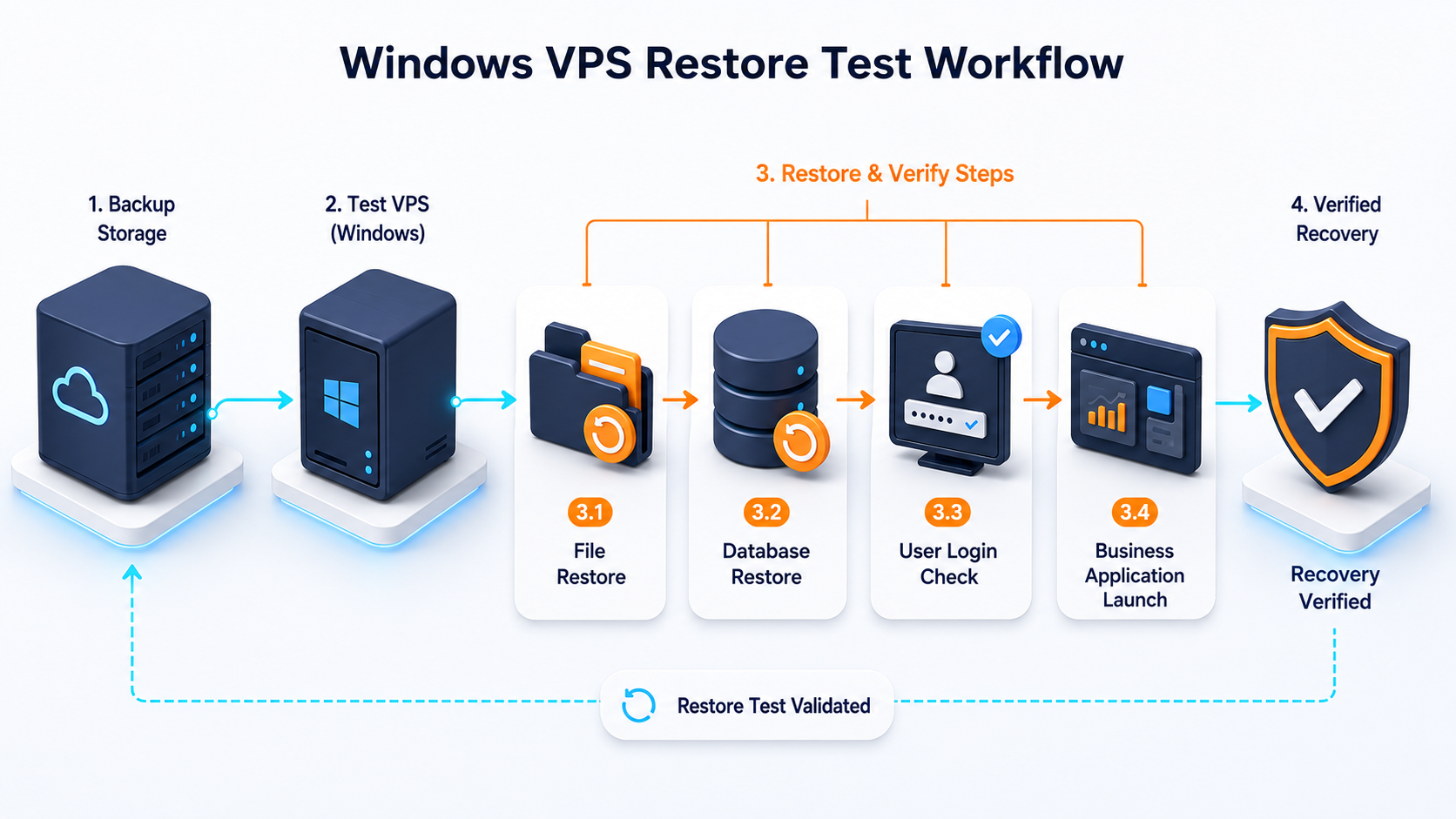
Small businesses should test:
| Restore test | What it proves |
|---|---|
| Restore one file | User mistake recovery works |
| Restore a folder | Shared data recovery works |
| Restore app data to a test location | App backup is usable |
| Restore SQL backup with verification | Database backup is valid |
| Restore whole server or clone | Disaster recovery process is realistic |
| Login after restore | User access and permissions still work |
| App launch after restore | Business workflow can resume |
At minimum, run a restore test after the first backup setup, after major app changes, and before peak business periods such as tax season, audit season, or high-volume reporting periods.
Document the restore steps in plain language. During an outage, nobody wants to reverse-engineer the backup design from memory.
A practical backup schedule for 1, 3, 5, and 10-user teams
Use this as a starting plan. Adjust based on workload and RPO/RTO.
| Environment | Suggested backup approach |
|---|---|
| 1 admin user | Daily VM backup, snapshot before changes, monthly restore test |
| 3 light users | Daily VM backup, file-level backup for shared folders, snapshot before updates |
| 5 business users | Daily VM backup, app-aware backup, off-server copy, quarterly restore drill |
| 10 active users | Daily VM backup, app-aware backup, off-server copy, restore test, documented runbook |
| SQL Server workload | Full/differential/log backup plan based on recovery model |
| Tax or accounting workload | Vendor-supported app backup plus VM backup and off-server copy |
For Remote Desktop teams, connect this backup plan to your sizing plan. A server with 10 active users usually stores more profiles, more exports, more app data, and more daily changes than a one-user admin server.
Read the Windows VPS sizing guide before choosing storage. Backups and snapshots add storage planning on top of the production disk.
Security controls belong in the backup plan
Backups are part of security. If the same account can delete production data and delete every backup, the recovery plan is weak.
Use these controls:
| Control | Why it matters |
|---|---|
| Separate admin accounts | Reduce the chance one login controls everything |
| Restrict backup access | Users should not browse or delete backup storage |
| Protect off-server copies | Backup destination should not be casually writable by users |
| Monitor backup failures | Failed jobs must be visible |
| Keep backup logs | You need evidence of success or failure |
| Use strong passwords | RDP compromise often becomes data loss |
| Patch the server | Backup does not replace hardening |
| Test restore permissions | A backup is useless if nobody can restore it |
Backups also need ransomware thinking. If malware can encrypt the server and connected backup destination, the backup design is incomplete. Use separation, permissions, retention, and monitoring so backup copies are harder to destroy.
Backup strategy for common SMB Windows VPS workloads
Different workloads need different backup emphasis.
| Workload | Backup priority |
|---|---|
| RDP server for staff | VM backup, user profile backup, shared folder backup |
| Accounting software | Vendor-supported app backup, VM backup, off-server copy |
| SQL Server | Full/differential/log backup plan, CHECKSUM, restore verification |
| Microsoft Access | Backup file shares during low activity; test locking behavior |
| IIS/.NET app | App files, config, certificates, database, and deployment package |
| File server | File-level backup, permissions documentation, off-server copy |
| ERP/inventory app | App-aware database backup and restore runbook |
| Tax software | Vendor data backup, retention, encrypted off-server copy |
| MSP client server | Standardized backup policy and documented restore owner |
Do not use the same schedule for every server without checking the workload. A Windows VPS that holds SQL Server data has different recovery needs from a Windows VPS used only for occasional admin RDP.
How Raff fits a Windows VPS backup strategy
Raff fits this use case when a small business wants a Windows Server VPS for remote access, hosted business apps, RDP users, or office server replacement, and wants backup/snapshot planning to be part of the infrastructure discussion from day one.
Raff Windows VMs are useful for this pattern because buyers can deploy a Windows Server environment, enable platform-level protection options, use NVMe storage, and plan storage growth as the workload changes.
Raff is not a substitute for application-specific backups. If the workload uses SQL Server, QuickBooks, Sage, Microsoft Access, ERP software, tax software, or custom business databases, use the application’s supported backup method alongside VM-level protection.
Raff Technologies currently lists 15,000+ VMs deployed on its public site, and Trustpilot lists Raff Technologies at 4.5/5 across 16 reviews. For Windows VPS buyers, those trust signals matter because the server often becomes part of daily operations.