
A managed VPS includes an agreed layer of server administration from the provider, while an unmanaged VPS leaves guest operating-system and application management primarily to the customer. The important distinction is that managed is not a standardized service level: one provider may patch the OS and monitor services proactively, while another may only assist with a control panel or respond after a ticket is opened.
For most technically capable teams, an unmanaged VPS is the better fit when they want full control and can already handle patching, monitoring, backups, security, and recovery. A managed VPS becomes more attractive when the team lacks server-administration capacity or when the cost of operational interruptions is higher than the management premium.
Raff Technologies provides full-control cloud VMs with infrastructure and platform support, but that support should not be confused with an automatic promise to administer every guest OS, database, control panel, container stack, or custom application. The correct buying question is therefore not simply “managed or unmanaged?” It is who owns each production task after the server goes live? If you are still choosing the server model itself, use the VPS Hosting Decision Guide before comparing management responsibilities.
Managed vs unmanaged VPS: quick decision
| If this describes your team | Better starting point |
|---|---|
| You can secure, patch, monitor, back up, and recover servers | Unmanaged VPS |
| You want full root access and unrestricted software choices | Unmanaged VPS |
| You already use automation, monitoring, and configuration management | Unmanaged VPS |
| No one on the team owns server administration | Managed VPS or an MSP |
| Routine server work keeps interrupting product work | Managed VPS may be worth the premium |
| You need proactive patching, monitoring, and alert response | Managed VPS, but verify that these are actually included |
| You only need fast technical help with infrastructure issues | Support may be enough; you may not need a managed plan |
| You run a custom stack outside typical managed-service scope | Unmanaged VPS or a co-managed model |
The key distinction is simple:
- Unmanaged VPS: the provider operates the infrastructure; you operate the guest environment.
- Managed VPS: the provider also takes responsibility for a documented set of tasks inside the guest environment.
- Technical support: help is available when you need it, but support alone does not automatically transfer ongoing operating responsibility to the provider.
The rest of this guide explains how to compare those boundaries in practice.
Managed and Unmanaged VPS Describe Responsibility, Not Hardware
Managed and unmanaged VPS plans can use similar CPU, memory, storage, networking, and virtualization infrastructure. The distinction is usually about who operates the guest environment after provisioning.
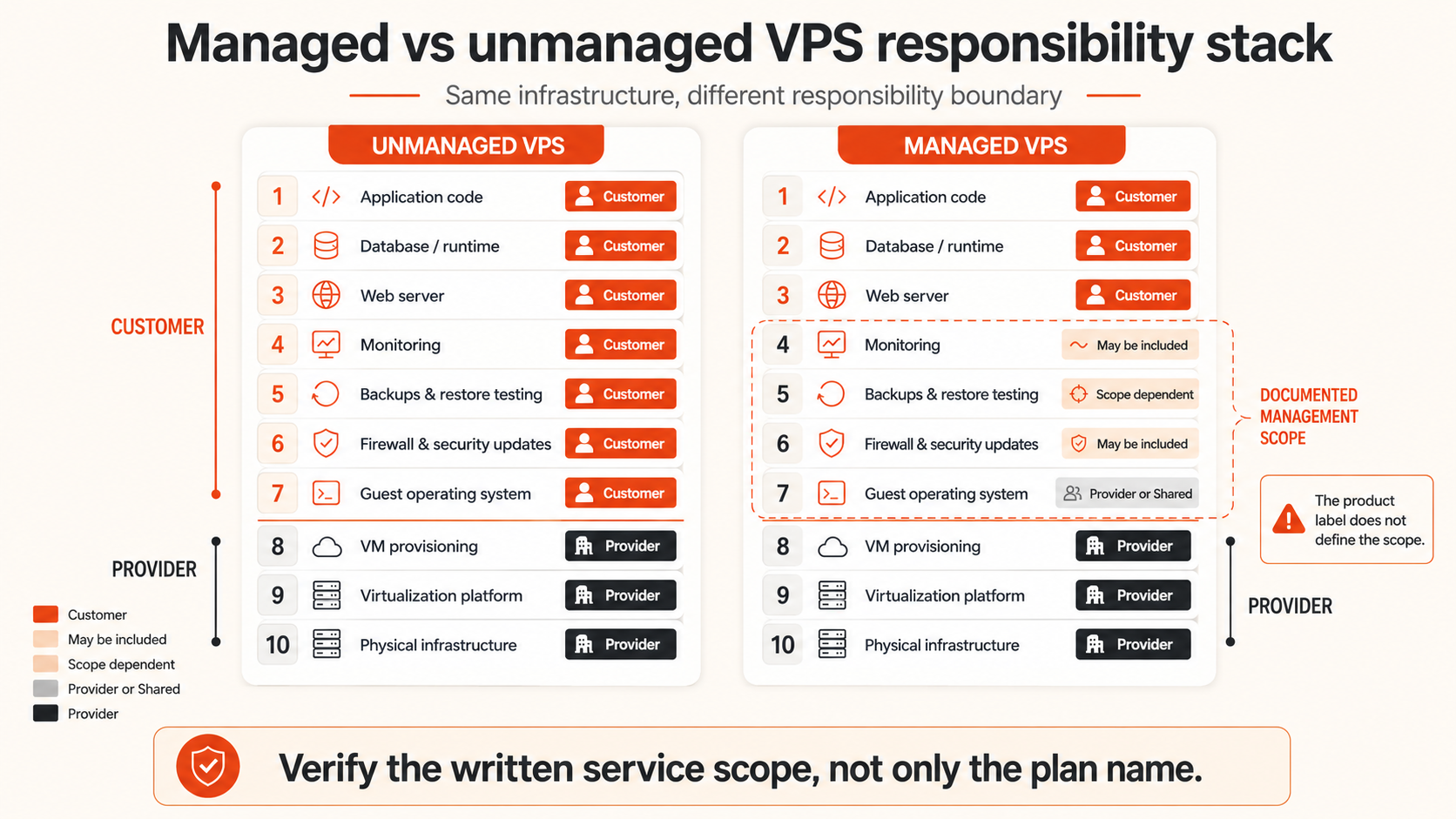
With an unmanaged VPS, the provider normally operates the physical server, virtualization layer, data-center network, and platform control plane. The customer receives access to the VM and takes responsibility for the guest operating system and the software running inside it.
With a managed VPS, the provider also accepts some operating responsibility inside the VM. The exact scope varies by provider and plan.
A simplified responsibility model looks like this:
| Layer | Unmanaged VPS | Managed VPS |
|---|---|---|
| Physical hardware | Provider | Provider |
| Virtualization platform | Provider | Provider |
| Data-center networking | Provider | Provider |
| VM provisioning | Provider | Provider |
| Guest operating system | Customer | Shared or provider, depending on scope |
| Security updates | Customer | May be included |
| Firewall configuration | Customer | May be included |
| Monitoring | Customer | May be included |
| Backups | Customer must configure and verify | May be configured or monitored |
| Web server and runtime | Customer | May be included |
| Application code | Customer | Usually customer |
| Database administration | Customer | Sometimes available as an add-on |
| Incident response | Customer coordinates | Shared, within documented scope |
The words “managed VPS” do not reveal which rows the provider owns. The service description, support policy, and exclusions are more important than the product name.
For the infrastructure layer itself, read how VPS hosting works.
What an Unmanaged VPS Usually Requires From the Customer
An unmanaged VPS is a full-control server environment. The provider gives the customer the VM, credentials or SSH-key access, network connectivity, and platform tools. The customer builds and operates the software stack.
Typical customer responsibilities include:
- Choosing and installing the operating system
- Creating users and securing SSH access
- Applying operating-system security updates
- Configuring the firewall
- Installing the web server, runtime, database, or container engine
- Managing TLS certificates
- Monitoring CPU, memory, disk, network, and services
- Configuring backups and retention
- Testing restores
- Investigating application and operating-system errors
- Handling compromised credentials or malware
- Planning upgrades and migrations
- Recovering the service after a bad deployment or configuration change
Unmanaged does not mean unsupported. A provider may still help with platform issues, networking, VM lifecycle operations, snapshots, backups, billing, and migration. It means that the customer should not assume the provider is continuously administering the guest operating system or application stack.
An unmanaged VPS works well when the team already knows how to operate Linux or Windows servers, has repeatable deployment and monitoring processes, and wants control over versions, configuration, and architecture.
It becomes risky when the server is launched by someone who can install an application but cannot confidently secure, monitor, update, and recover it.
What a Managed VPS May Include
A managed VPS adds provider work inside the guest environment, but packages vary widely.
Common managed services may include:
- Initial server setup
- Operating-system updates
- Security hardening
- Control-panel installation
- Web server and PHP configuration
- Firewall rules
- Basic monitoring
- Backup scheduling
- Restore assistance
- Malware scanning or cleanup
- Performance investigation
- Service restart and recovery
- Migration assistance
- Proactive alert response
Some plans are reactive. The provider helps only after the customer opens a ticket.
Others are proactive. The provider monitors services, applies updates, responds to alerts, and performs scheduled maintenance without waiting for a request.
Some providers manage only approved software stacks, such as cPanel, Plesk, Apache, Nginx, PHP, MySQL, or WordPress. Custom Docker deployments, Kubernetes, unusual databases, application code, CI/CD systems, and third-party agents may be outside scope.
That leads to the most important buying rule:
Do not buy “managed VPS.” Buy a written list of responsibilities, response targets, and exclusions.
Support Is Not the Same as Server Management
Fast technical support and managed administration are related but different services.
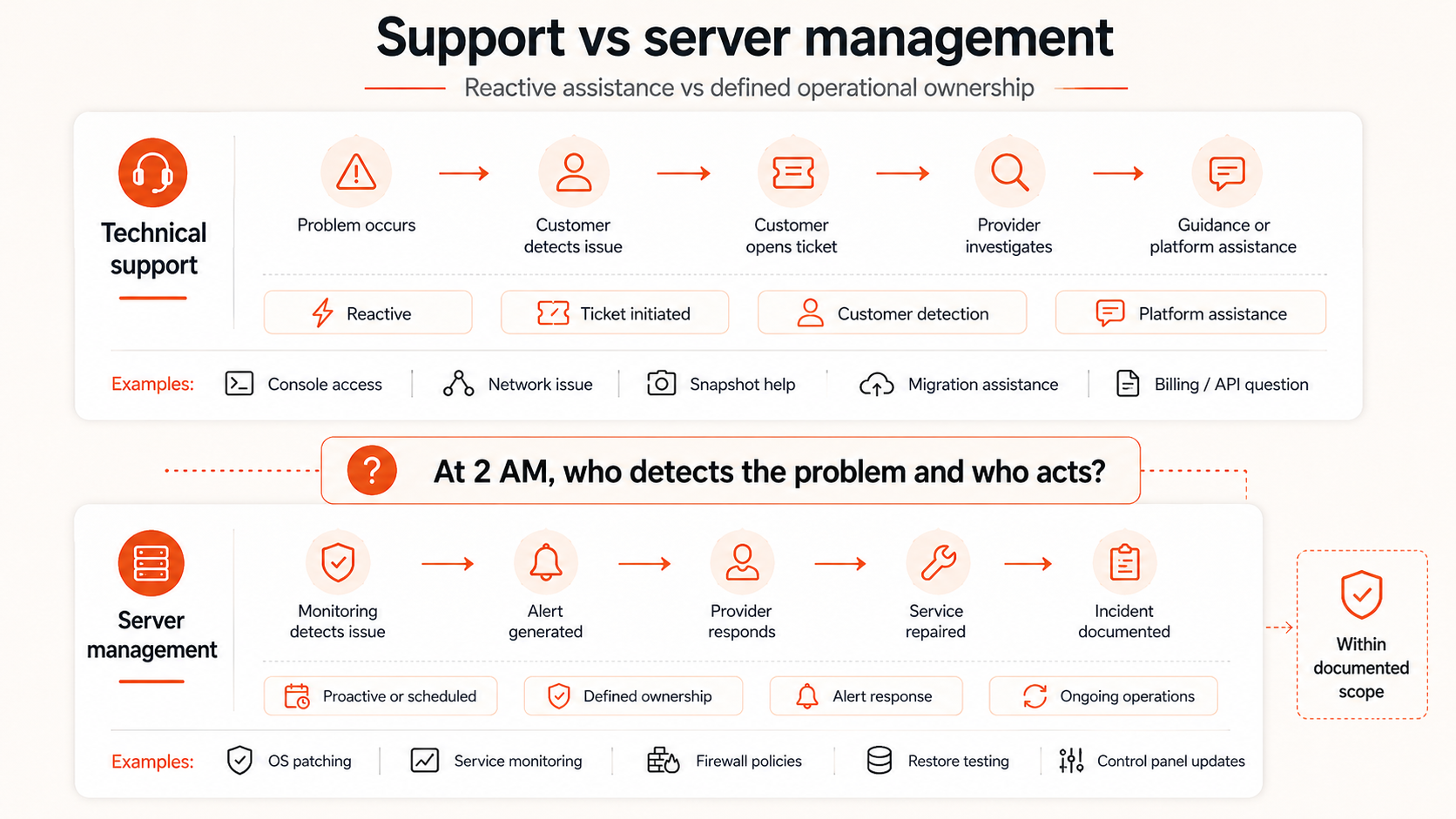
Support helps a customer diagnose or resolve a problem. Management means the provider has accepted an ongoing operational responsibility.
Examples of support:
- Explaining why a VM cannot reach the network
- Helping recover access through a console
- Investigating a platform or storage issue
- Assisting with a snapshot or retained backup
- Answering API or billing questions
- Helping plan or perform a migration
Examples of management:
- Applying operating-system updates on a schedule
- Monitoring guest services continuously
- Responding to guest-service alerts without a customer ticket
- Maintaining firewall and SSH policies inside the server
- Managing web-server configuration
- Testing application-level backup restoration
- Patching a control panel
- Owning an application-level incident runbook
A provider can offer responsive human support without selling a fully managed VPS. Buyers should not treat response speed, live chat, or access to engineers as proof that every operating-system and application task is included.
Ask instead:
When something breaks at 2 AM, who is expected to detect it, who is expected to act, and which parts of the stack are covered?
Compare Total Cost, Not Only the Monthly Plan
An unmanaged VPS usually has a lower direct price because the customer supplies the operational labor. A managed VPS adds labor, tooling, and responsibility to the provider’s cost.
The real comparison is:
Unmanaged total cost
= VM price
+ engineering time
+ monitoring and backup tooling
+ incident risk
+ maintenance work

Managed total cost
= VM price
+ management fee
+ customer work outside scope
+ add-ons and escalation costs
A cheap unmanaged server can become expensive when a developer repeatedly interrupts product work to patch systems, investigate disk pressure, repair certificates, or recover failed services.
A managed plan can also become poor value when the team already has automation and operational skill, or when the provider excludes the exact application stack the team uses.
| Cost factor | Unmanaged VPS | Managed VPS |
|---|---|---|
| Monthly infrastructure price | Usually lower | Usually higher |
| Internal administration time | Higher | Lower within scope |
| Tooling | Customer selects and pays | Some tools may be included |
| Emergency labor | Customer responsibility | Included or billed, depending on plan |
| Application debugging | Customer | Usually customer |
| Backup verification | Customer | May be shared or included |
| Control and customization | Higher | May be constrained |
| Predictability | Depends on team maturity | Depends on contract clarity |
The financial decision should include the value of the operator’s time and the cost of downtime. A founder spending five hours each month on routine server work may be paying more than the difference between managed and unmanaged plans, even when that labor does not appear on an invoice.
Security Depends on Ownership and Execution
A managed VPS is not automatically secure, and an unmanaged VPS is not automatically unsafe.
Security depends on whether required tasks are assigned, performed, and verified.
Important responsibilities include:
- Operating-system patching
- Package and runtime updates
- SSH hardening
- Firewall management
- Least-privilege access
- Credential and key rotation
- Log review
- Vulnerability response
- Malware investigation
- Backup isolation
- Restore testing
- Incident communication
With an unmanaged VPS, the customer owns these tasks. With a managed VPS, some may move to the provider, but application security, user permissions, code vulnerabilities, secrets, and business logic usually remain customer responsibilities.
A dangerous managed-service assumption is:
The provider manages the server, so our application is secure.
The provider cannot usually correct insecure application code, weak user roles, exposed API keys, vulnerable dependencies, or unsafe business logic unless those services are explicitly included.
Before purchase, map every security task to an owner. Shared responsibility without named ownership often becomes no responsibility.
Backups and Recovery Need Separate Verification
“Backups included” can describe several different services:
- The platform provides a backup feature, but the customer must enable it
- The provider schedules backups but does not test restores
- The provider monitors backup jobs
- The provider performs restoration only after a ticket
- The provider manages application-consistent backups
- The provider retains complete server images but not external data
Buyers should verify:
- What is backed up?
- How often does backup run?
- How long is data retained?
- Is backup stored outside the primary VM?
- Who monitors failed jobs?
- Who initiates a restore?
- Has the restore process been tested?
- What recovery time is realistic?
- Are databases application-consistent?
- What happens if the customer deletes the VM or account?
A managed VPS may reduce recovery work, but it does not remove the need for a recovery objective. The customer still needs to know how much data can be lost and how quickly service must return.
Control and Flexibility Usually Favor Unmanaged VPS
An unmanaged VPS gives the customer freedom to choose:
- Operating-system version
- Package sources
- Web server
- Container runtime
- Database engine
- Monitoring stack
- Backup tooling
- Security policies
- Deployment workflow
- Network configuration
- Upgrade schedule
That freedom is useful for developers, DevOps teams, SaaS products, custom application stacks, Docker hosts, and infrastructure automation.
Managed providers may restrict support to approved distributions, versions, panels, or configurations. A customer can sometimes install unsupported software, but the provider may refuse to troubleshoot it.
This does not make managed plans worse. Standardization is how providers deliver consistent administration efficiently. It does mean that teams with unusual software or strong internal automation should check whether management creates friction instead of reducing it.
Use a Decision Framework
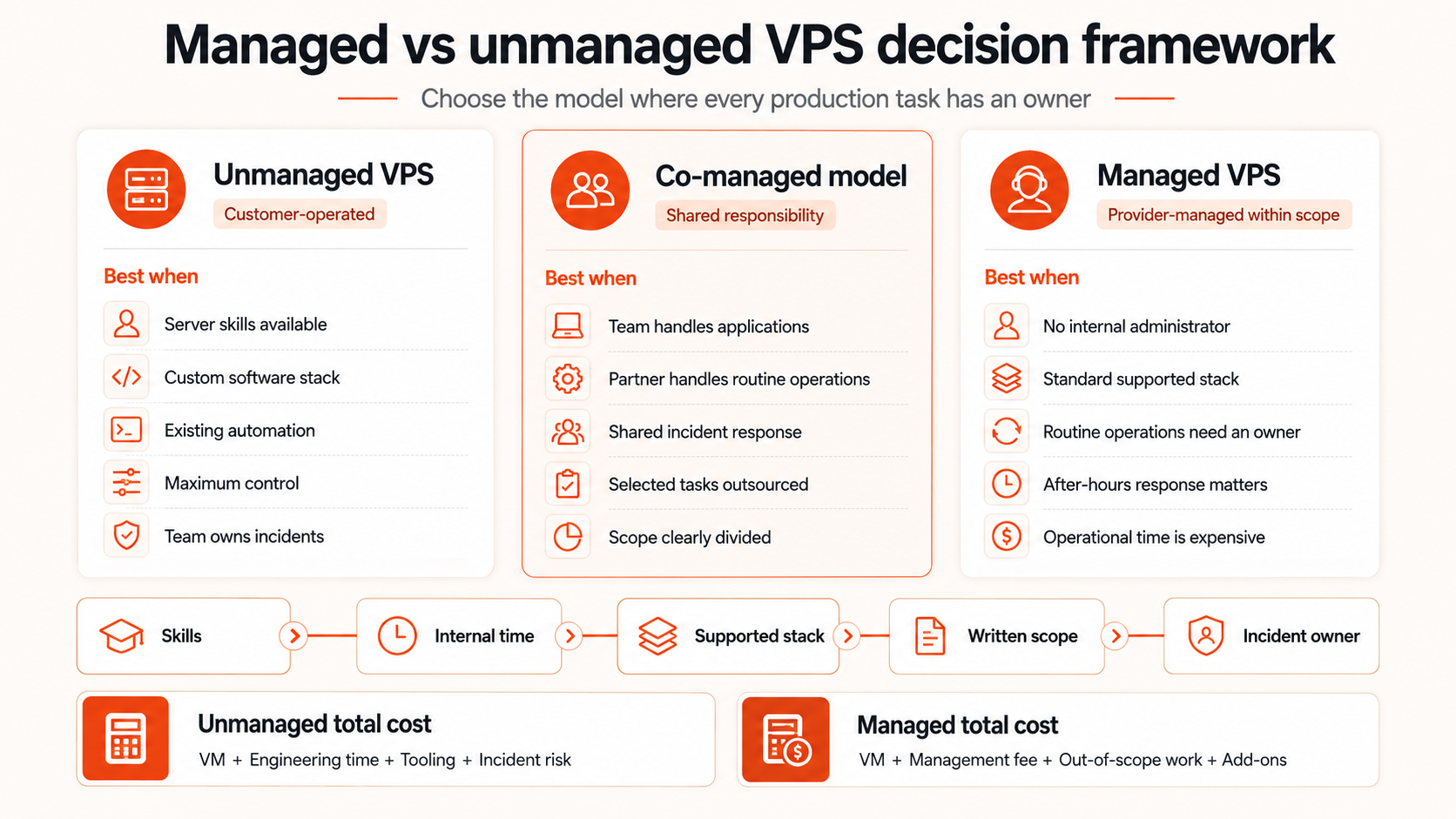
| Situation | Better starting point | Why |
|---|---|---|
| Developer or DevOps team with server experience | Unmanaged VPS | Control and lower direct cost |
| Small business without an administrator | Managed VPS | Routine operations need an owner |
| Custom Docker or application stack | Unmanaged VPS | Fewer support-scope restrictions |
| Standard WordPress or control-panel hosting | Managed VPS may fit | Standardized management can reduce workload |
| Production service with no monitoring process | Managed VPS or external operations help | Detection and response need ownership |
| Strict configuration requirements | Unmanaged VPS | Full control over system design |
| Founder wants to avoid server maintenance | Managed VPS | Time may be more valuable than the fee |
| Team already uses configuration management and monitoring | Unmanaged VPS | Existing automation reduces management value |
| Compliance requires documented patching and response | Compare written scope | Either can work when evidence and ownership are clear |
| Low-risk development environment | Unmanaged VPS | Operational risk is limited |
| Revenue-critical application with a small team | Managed or co-managed model | Risk and after-hours response matter |
Use these five questions:
- Can the team securely operate the server today? Installing software is not the same as maintaining it.
- How much internal time will routine operations consume? Include updates, monitoring, backups, and incidents.
- What does the managed plan actually cover? Read exclusions before comparing price.
- Does the provider support the required stack? Custom software can fall outside management scope.
- Who acts during an outage? Detection, escalation, repair, and communication must have owners.
Questions to Ask a Managed VPS Provider
Before purchasing, ask for specific answers:
Operating system and patching
- Which operating systems and versions are supported?
- Are security updates automatic or scheduled?
- Are reboots coordinated?
- Are third-party repositories supported?
- Who handles major-version upgrades?
Monitoring and incident response
- Is monitoring proactive or ticket-based?
- Which services are monitored?
- Does the provider act on alerts automatically?
- What coverage exists outside business hours?
- What response and resolution targets apply?
Applications and control panels
- Which web servers, runtimes, databases, and panels are covered?
- Is Docker supported?
- Is application-code debugging included?
- Are performance optimizations included?
- Which custom configurations void support?
Backups and recovery
- Are backups included, enabled, and monitored?
- Are restores tested?
- Is database-consistent recovery supported?
- Who performs restoration?
- Are recovery times documented?
Security
- Who manages the firewall and SSH policy?
- Is malware response included?
- Are vulnerability scans included?
- Who rotates credentials after an incident?
- Is remediation billed separately?
Commercial scope
- Is management included in the plan or sold separately?
- Are there limits on support time or tickets?
- Are emergency interventions billable?
- Can the customer retain root access?
- What actions require customer approval?
The answers should be written into the service description or agreement. Verbal assurances are difficult to rely on during an incident.
