
A VPS is a virtual server with an independent operating system and allocated resources on provider-managed physical infrastructure. A dedicated server gives one customer control of an entire physical machine. The practical difference is not that one is professional and the other is basic: a VPS prioritizes flexibility and efficient resource use, while a dedicated server prioritizes hardware exclusivity and large, stable capacity.
A VPS and a dedicated server solve different capacity and isolation requirements. The decision should follow measured utilization, hardware needs, physical-isolation requirements, recovery design, and total cost rather than team size alone. High sustained utilization, specialized hardware needs, strict physical-isolation requirements, or predictable demand large enough to justify an entire server are stronger upgrade signals than traffic growth alone.
This guide compares VPS and dedicated servers across cost, performance, isolation, scaling, operations, and migration risk. For the broader hosting decision first, use the VPS hosting decision guide.
VPS and Dedicated Servers Allocate Hardware Differently
A VPS runs as an isolated virtual machine. The provider’s virtualization layer presents virtual CPU, memory, storage, networking, and firmware to the guest operating system. Multiple virtual machines can run on the same physical host while maintaining separate filesystems, processes, users, and operating-system configurations.
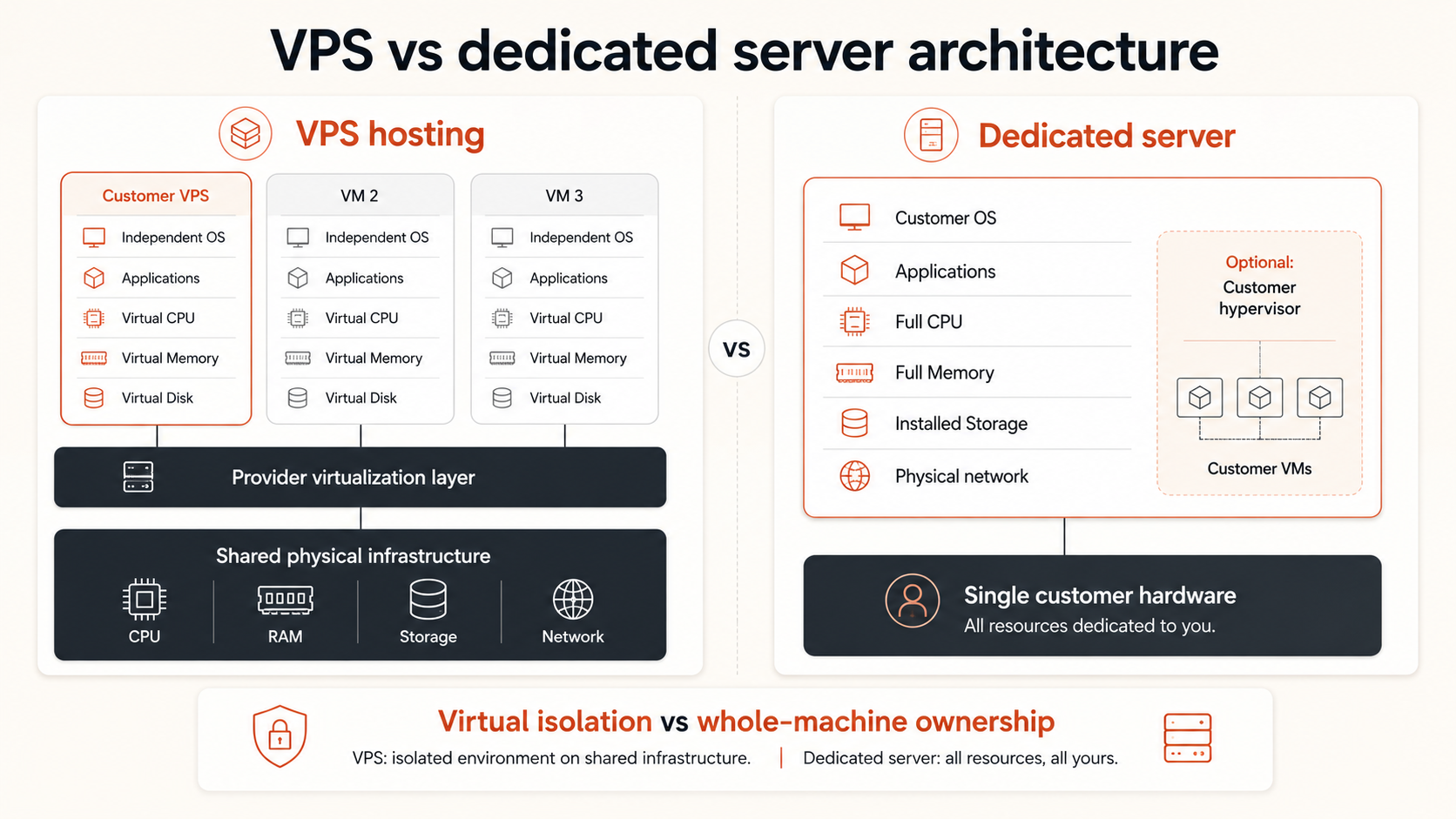
A dedicated server assigns the entire physical machine to one customer. Its processors, installed memory, local storage devices, and server chassis are not divided into customer VMs by the hosting provider unless the customer chooses to run its own virtualization layer.
The architectural distinction is straightforward:
A dedicated server is also often described as a bare-metal server. In hosting comparisons, both terms usually mean that the customer rents physical hardware without another customer’s VM running on the same machine. Providers may still distinguish bare metal through faster automated provisioning or cloud-style APIs, so service details should be verified.
A dedicated CPU VPS is not the same as a dedicated server. A virtual machine may receive reserved or more exclusive processor capacity while still using provider-managed virtualization, storage, networking, and host infrastructure. The shared vs dedicated vCPU guide explains that narrower compute decision.
VPS vs Dedicated Server Comparison
The right model depends on whether the workload benefits more from virtual-machine flexibility or whole-machine control.
| Factor | VPS | Dedicated server |
|---|---|---|
| Customer environment | Independent virtual machine | Entire physical machine |
| Physical hardware | Shared host infrastructure | Exclusive server hardware |
| CPU model | Shared or dedicated vCPU, depending on plan | Full installed processor capacity |
| Memory | Defined VM allocation | Full installed system memory |
| Storage | Virtual disks on provider storage or local host storage | Direct use of installed disks or provider-attached storage |
| Initial cost | Usually lower | Usually higher |
| Deployment speed | Often minutes | Usually slower, though automated bare metal can be fast |
| Resizing | Often simple within platform limits | Commonly requires hardware change or migration |
| Operating-system control | Full guest-level control | Full machine-level control |
| Custom hardware | Limited | Possible when provider offers options |
| Physical tenant isolation | No | Yes at the server level |
| Best fit | Variable, growing, or moderate workloads | Large stable workloads and hardware-specific requirements |
The table describes the infrastructure category, not a guaranteed service level. A poorly sized dedicated server can be slower than a modern VPS. A high-quality VPS can provide better storage, networking, automation, and recovery tooling than an older physical server.
The product label should therefore begin the comparison, not finish it.
Cost Depends on Utilization, Not Only Monthly Price
A VPS usually has a lower starting price because the provider can allocate physical capacity efficiently across several customers. A small team can select the CPU, memory, and storage it needs without paying for an entire machine.
A dedicated server has a higher minimum commitment. The customer pays for the machine whether its resources are fully used or mostly idle.
This creates two different cost models:
VPS value comes from buying the capacity needed now. Dedicated-server value comes from using enough of a whole machine to justify the commitment.
A dedicated server may become cost-effective when a workload continuously consumes a large amount of CPU, memory, storage throughput, or local disk capacity. At that point, buying equivalent high-end virtual-machine capacity can cost as much as or more than renting one physical server.
However, the server price is only part of total cost.
| Cost area | VPS consideration | Dedicated-server consideration |
|---|---|---|
| Compute | Pay for selected VM size | Pay for the whole machine |
| Idle capacity | Usually limited | Can be substantial |
| Hardware replacement | Provider responsibility | Provider responsibility, but replacement may take longer |
| Scaling | Resize or deploy another VM | Upgrade hardware or migrate |
| Backups | Platform option or external system | Must be designed around the physical server |
| High availability | Add VMs and distribute workloads | Requires another server or recovery target |
| Licensing | Based on guest OS and software | May be affected by sockets, cores, or physical deployment |
| Operations | Guest OS and applications | OS, applications, hardware-aware design, and recovery planning |
Dedicated hardware can reduce unit cost at high sustained utilization, but it can increase operational concentration. If the entire application, database, and storage stack lives on one large server, that machine becomes a significant failure domain.
Small teams should compare the cost of a working system rather than a single server. Include backups, secondary capacity, migration time, licenses, monitoring, and the impact of hardware failure. The cloud server cost guide provides the broader cost framework.
Performance Is About Consistency, Capacity, and Bottlenecks
Dedicated servers provide direct access to the installed hardware and remove contention from other customer VMs on the same machine. This can improve predictability for sustained workloads and provide access to larger local resource pools.
That does not mean a dedicated server is always faster.
A VPS may run on newer processors, faster NVMe storage, a better network, or a platform with stronger automation than an available dedicated server. It may also be easier to select a dedicated-CPU VM without accepting the operational commitment of a physical machine.
Performance should be evaluated by resource:
CPU
A dedicated server gives the customer the installed processor capacity. This is useful for continuous builds, rendering, encoding, analytics, simulation, high-volume game workloads, or other compute that can keep many cores active.
A VPS remains a strong fit when CPU demand is moderate, bursty, or can be handled through dedicated vCPU plans. Moving to physical hardware solely because a shared-CPU VPS is inconsistent skips an important intermediate option.
Memory
Dedicated servers can provide large memory configurations at a favorable unit cost. They become attractive when the workload needs a consistently large working set, such as an in-memory database, cache, analytics engine, or many consolidated services.
A VPS is more efficient when the application needs a smaller allocation or when memory requirements are still changing.
Storage
Dedicated hardware can offer direct local NVMe performance and predictable disk access, but local disks create a recovery question. If the machine fails, the application needs backups, replicated data, or another recovery target.
A VPS may use local or distributed provider storage. The virtualized model does not reveal storage quality by itself. Compare latency, throughput, IOPS, durability, expansion, snapshots, and backup design.
Networking
A dedicated server can have a defined physical network interface, but upstream switching, transit, and internet routes are still provider infrastructure. Dedicated hardware does not automatically mean a dedicated end-to-end network path.
For either model, verify port speed, transfer policy, routing, private networking, DDoS protection, and sustained-use limits.
The strongest performance decision begins with measurements. Determine whether the current constraint is CPU contention, memory capacity, disk latency, network throughput, or application design before changing infrastructure categories.
Isolation Improves, but Responsibility Also Increases
A VPS provides logical isolation. Each virtual machine normally has its own operating system, files, users, processes, and virtual network interfaces. The provider controls the physical host and virtualization layer.
A dedicated server adds physical tenant isolation at the machine level. Another customer does not run a VM on the same server hardware.
This can matter when:
- A policy requires single-tenant physical infrastructure
- The application handles sensitive data under a defined isolation requirement
- Licensing depends on physical sockets or cores
- A workload needs direct device access
- The team must control the machine-level virtualization layer
- Host-level contention is unacceptable
Physical isolation does not remove security responsibility. The customer still needs operating-system updates, access control, firewall rules, service hardening, monitoring, backups, credential management, and incident response.
It can also expand the responsibility boundary. A team that installs its own hypervisor on dedicated hardware now owns virtual-machine placement, host updates, capacity planning, and recovery at that layer.
For most small teams, strong virtual-machine isolation plus clear resource guarantees is sufficient. Dedicated hardware should be selected when physical tenancy is a documented requirement, not because the word “dedicated” simply sounds safer.
Scaling and Recovery Favor Different Models
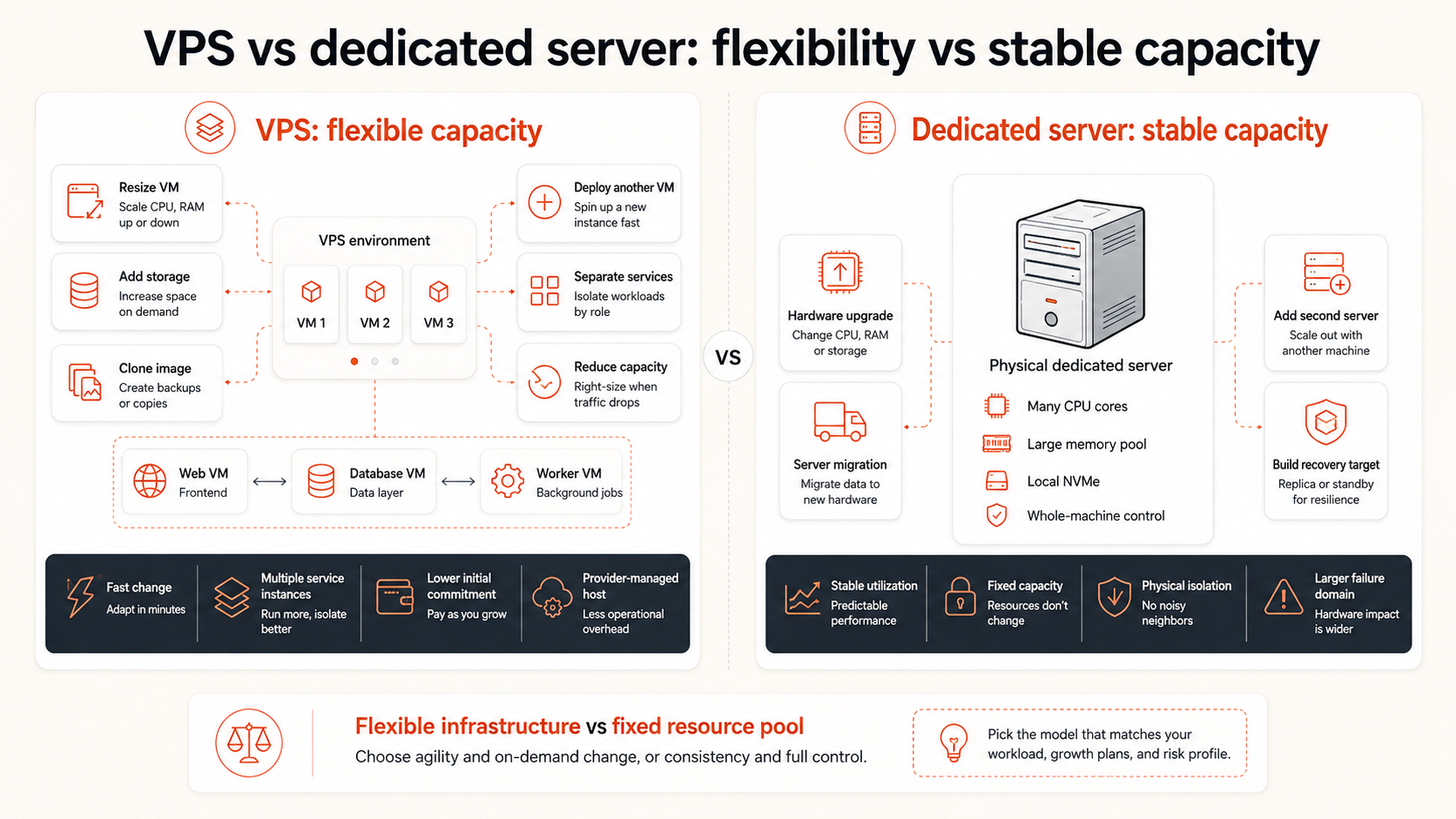 VPS platforms are designed for change. A team can often resize a VM, attach storage, create another instance, clone an image, or distribute services across several servers without waiting for physical hardware changes.
This flexibility is valuable when demand is uncertain. The team can begin with a smaller server, observe real usage, and adjust the architecture as the workload grows.
Dedicated servers favor stable capacity. They provide a large fixed resource pool, but vertical upgrades can require migration to another machine. Horizontal scaling requires purchasing and operating additional servers.
| Change | VPS | Dedicated server |
|---|---|---|
| Add CPU or RAM | Often resize plan | Hardware upgrade or migration may be required |
| Add another server | Deploy another VM | Provision another physical machine |
| Replace failed host | Provider platform may recreate or move the VM | Hardware repair or replacement process applies |
| Create test environment | Clone image or deploy smaller VM | Usually requires another VM layer or server |
| Build high availability | Multiple VMs and services | At least 2 physical servers plus coordination |
| Reduce capacity | Resize or remove VM | Continue paying or migrate to smaller hardware |
A dedicated server is not automatically more reliable than a VPS. It removes one type of shared-host risk, but it concentrates the workload on one physical machine. High availability still requires redundancy.
For both models, define:
- Recovery Point Objective
- Recovery Time Objective
- Backup frequency and retention
- Restore procedure
- Replacement capacity
- DNS or traffic cutover plan
- Database consistency requirements
The migration path matters as much as the destination. Moving from VPS to dedicated hardware can involve copying data, rebuilding the operating system, transferring secrets, testing storage, changing IP addresses, updating DNS, and planning rollback.
Use a Workload Decision Framework
Choose the server model by workload behavior and operating constraints.
| Requirement | Better starting point | Reason |
|---|---|---|
| New application with uncertain demand | VPS | Lower commitment and easier resizing |
| Website, API, or SaaS app with moderate usage | VPS | Flexible resources and simpler operations |
| Development and staging | VPS | Fast deployment and lower idle cost |
| Sustained CPU workload | Dedicated-CPU VPS first; dedicated server at larger scale | Test whether reserved compute solves the problem |
| Very large stable memory requirement | Dedicated server may fit | Whole-machine memory can improve unit economics |
| Physical single-tenancy requirement | Dedicated server | Entire server assigned to one customer |
| Custom accelerator or device requirement | Dedicated server | Direct hardware options may be necessary |
| Large local-storage workload | Dedicated server may fit | Direct disks can provide capacity and throughput |
| Workload must shrink or grow frequently | VPS | Capacity can change more easily |
| Multi-environment product team | VPS | Separate production, staging, and test instances |
| Large predictable 24/7 utilization | Compare total cost | Dedicated hardware may become economical |
| Small team without hardware-level operations | VPS | Provider retains more infrastructure responsibility |
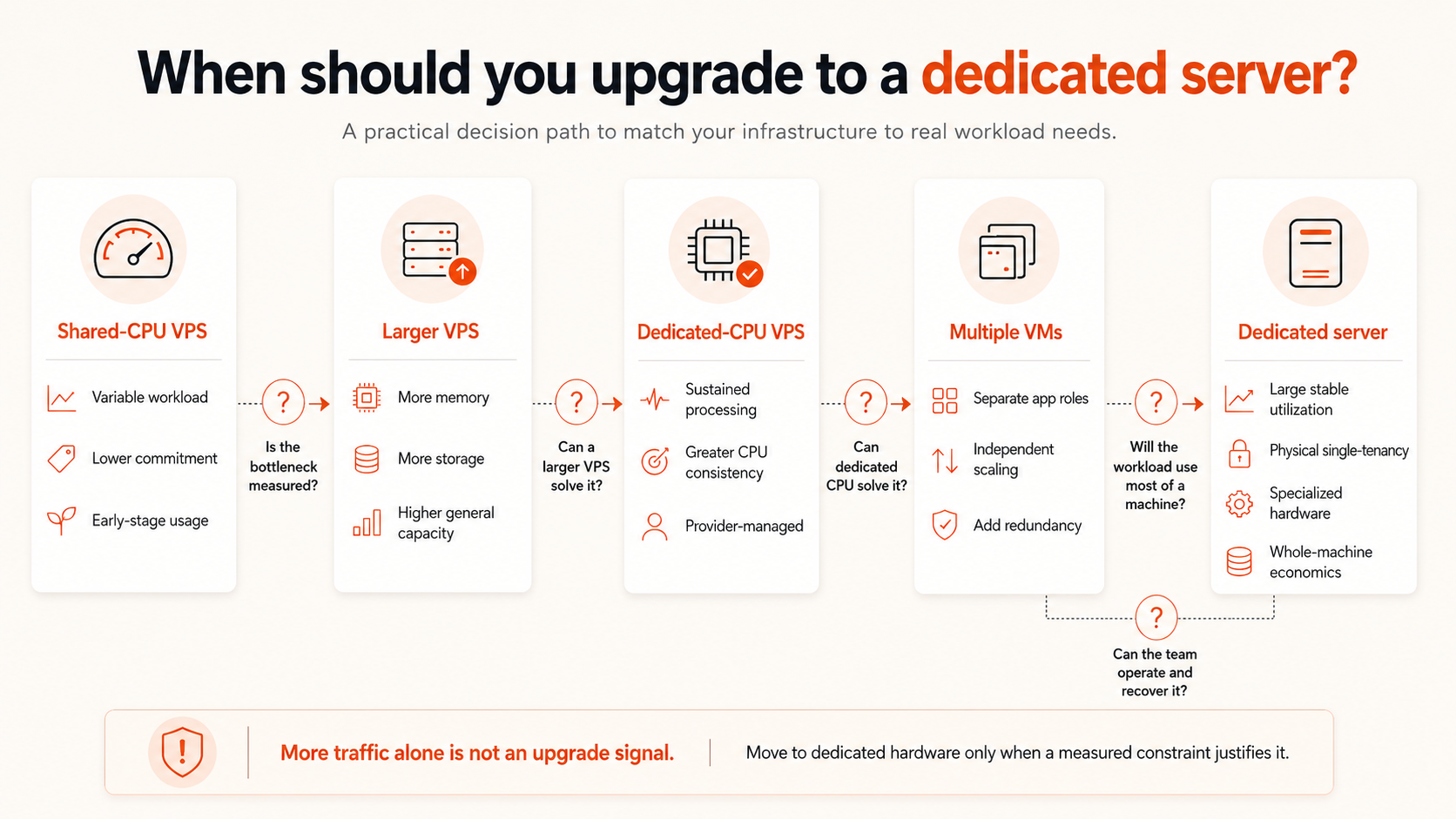
Use four questions:
- Is the current VPS actually constrained? Confirm the resource and duration of the bottleneck.
- Can a larger or dedicated-CPU VPS solve it? Test the simpler upgrade before changing infrastructure models.
- Will the workload use most of a physical machine continuously? Dedicated economics weaken when capacity remains idle.
- Can the team operate and recover the physical-server design? Include redundancy and migration, not only benchmark performance.
Upgrade From VPS When the Evidence Is Clear
A dedicated server becomes reasonable when several of these signals appear together:
- CPU utilization remains high for long periods across a large VM
- Dedicated vCPU no longer provides enough capacity or value
- Memory requirements are large, stable, and expensive in VM form
- Local storage throughput or capacity is central to the workload
- Physical single-tenancy is required by contract or policy
- Specialized hardware or device access is necessary
- The application can use most of the server continuously
- The team has a tested backup, replacement, and migration plan
- The cost of equivalent VM capacity is consistently higher
Traffic growth by itself is not an upgrade trigger. A busy application may still run efficiently across multiple VMs, while a low-traffic database may require dedicated hardware because of memory or storage behavior.
The best upgrade signal is a measured constraint combined with a clear economic or technical benefit.
Avoid moving because the server appears more serious, because a competitor uses bare metal, or because one benchmark looks faster. Those reasons do not account for recovery, scaling, utilization, or operational cost.
Stay on VPS When Flexibility Has More Value
A VPS remains the better option when:
- Demand is still changing
- The workload fits comfortably within available VM sizes
- A dedicated-CPU plan provides enough consistency
- Multiple small environments are more useful than one large machine
- Rapid deployment and rebuilding matter
- The team wants provider-managed host infrastructure
- Capacity may need to decrease later
- Physical single-tenancy is not required
- The application architecture benefits from several failure domains
For many startups and small teams, the correct path is not VPS followed automatically by dedicated server. It may be:
Small shared-CPU VPS
  ↓
Larger VPS
  ↓
Dedicated-CPU VPS
  ↓
Multiple VMs or separated services
  ↓
Dedicated server only when economics or hardware requirements justify it
This path keeps the infrastructure proportional to the workload. Use the VM sizing guide to determine whether the current problem is plan size rather than server type.
