
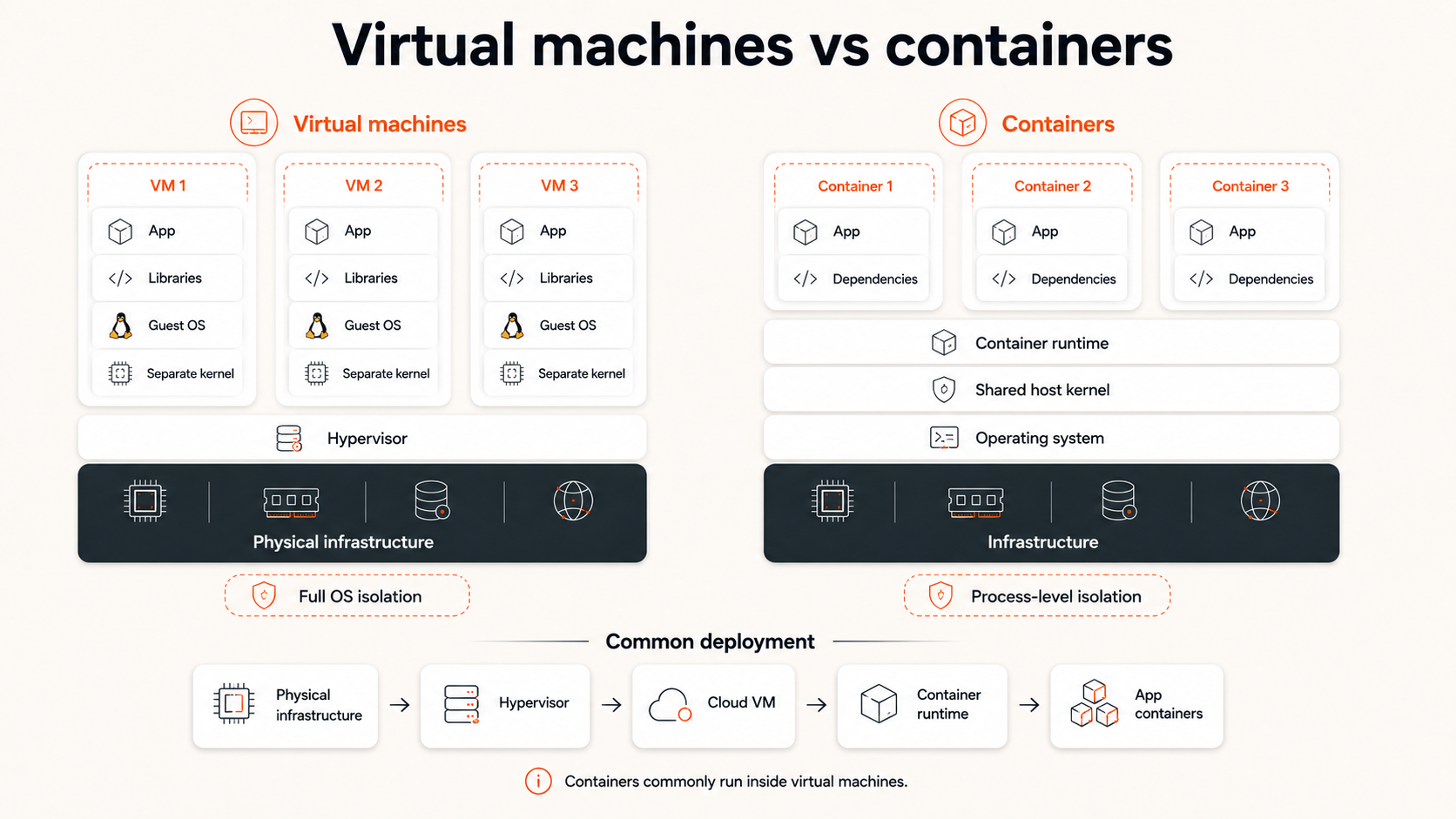
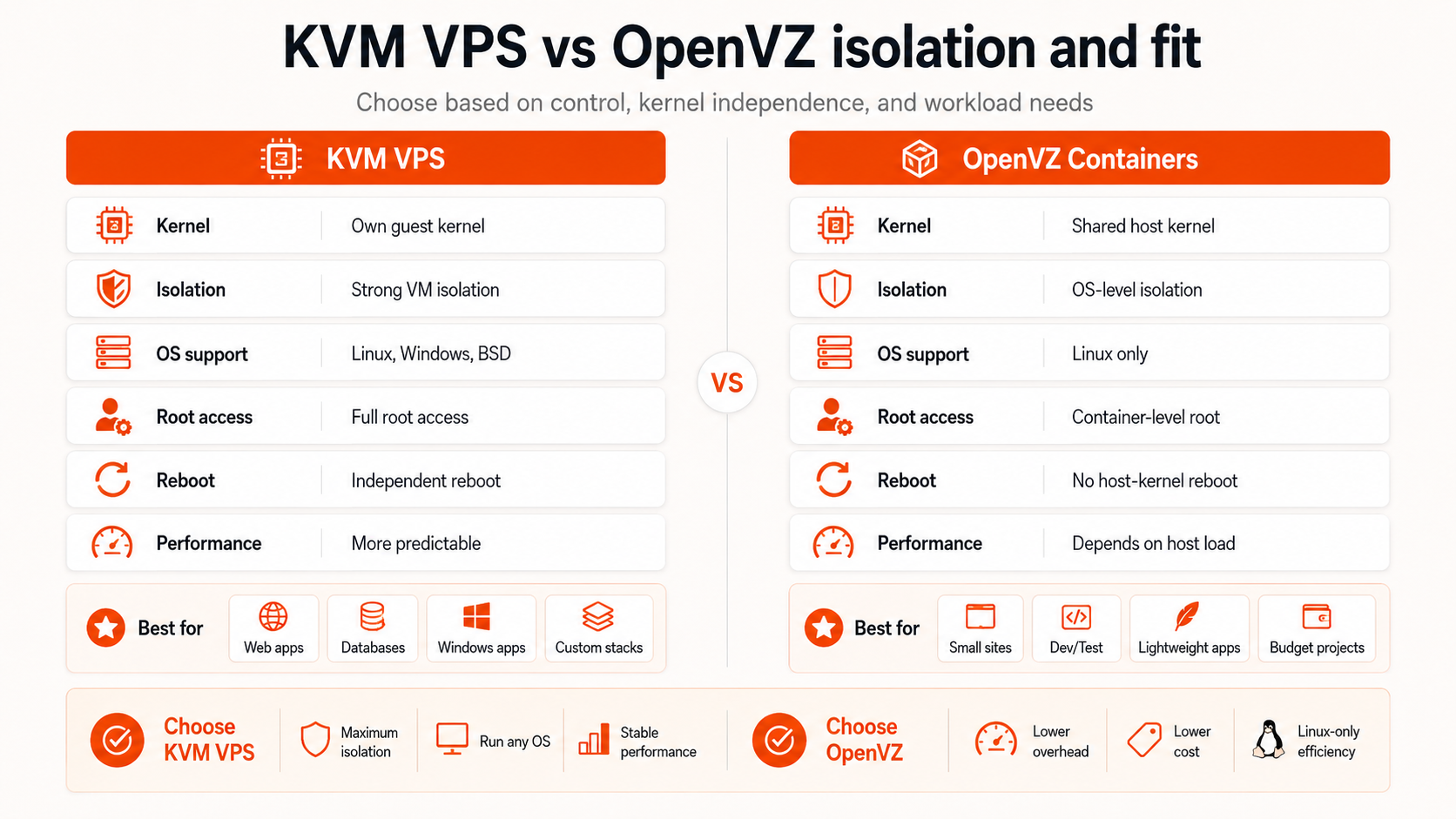
A KVM VPS is a full virtual machine with its own guest operating system and guest kernel. An OpenVZ container VPS uses operating-system-level virtualization and shares the host Linux kernel. For a primer on VM virtualization, see what a hypervisor is.
For most buyers, KVM is the more flexible choice when the workload needs Windows, its own kernel, broader low-level control, Docker compatibility with fewer provider-specific constraints, or a stronger VM-style isolation boundary. OpenVZ containers can still be efficient for conventional Linux workloads that do not need an independent kernel.
The important catch is that KVM vs OpenVZ does not tell you which VPS will be faster. CPU allocation, host oversubscription, RAM policy, storage latency, network capacity, backup/recovery options, and provider operations can matter more than the virtualization label.
Raff Technologies' current Linux VM page identifies KVM virtualization for its Linux cloud servers. This guide explains what that means for a buyer without treating KVM as an automatic performance guarantee.
Choose KVM when you need a full VM boundary and broader operating-system control. Choose an OpenVZ container when a standard Linux userspace is enough and the provider's resource policy is a better fit. Then compare the actual CPU, memory, storage, network, recovery, and support terms.
KVM vs OpenVZ: quick comparison
| Decision factor | KVM VPS | OpenVZ container VPS |
|---|---|---|
| Virtualization layer | Hardware-assisted virtual machine | Operating-system-level container |
| Guest kernel | Independent | Shared host Linux kernel |
| Windows guest | Possible when provider offers it | No for the container model |
| Linux guest | Yes | Yes, within supported container model |
| Custom kernel | Possible subject to provider/guest constraints | No independent guest kernel |
| Kernel modules | More guest control when supported | Primarily host/provider controlled |
| VM-style isolation | Stronger boundary | Shared-kernel boundary |
| Virtualization overhead | Higher than OS-level containers in principle | Lower in principle |
| Provider density | Usually lower than containers | Can be higher |
| Docker host | Usually the safer default | Capability depends more on provider configuration |
| Best fit | General-purpose VMs, Windows, custom OS/kernel needs | Conventional Linux workloads with standard kernel needs |
Neither architecture tells you whether the provider oversells CPU, throttles sustained workloads, or delivers consistent storage performance.
What is KVM VPS hosting?
KVM stands for Kernel-based Virtual Machine. On a Linux virtualization host, KVM provides the foundation for full virtual machines.
A KVM VPS normally receives virtualized hardware such as:
- vCPU;
- memory;
- virtual disks;
- network interfaces;
- firmware/boot configuration;
- a guest operating system;
- its own guest kernel.
The guest behaves like a separate computer rather than a containerized userspace.
Physical server
   ↓
KVM virtualization layer
   ├─ VM A → guest OS + guest kernel
   ├─ VM B → guest OS + guest kernel
   └─ VM C → guest OS + guest kernel
That makes KVM a strong fit when the workload needs:
- Windows Server;
- a full Linux VM;
- an independently booted kernel;
- custom kernel packages or modules where supported;
- custom ISO installation;
- low-level networking features;
- software expecting conventional virtual hardware;
- clearer separation between guest operating systems.
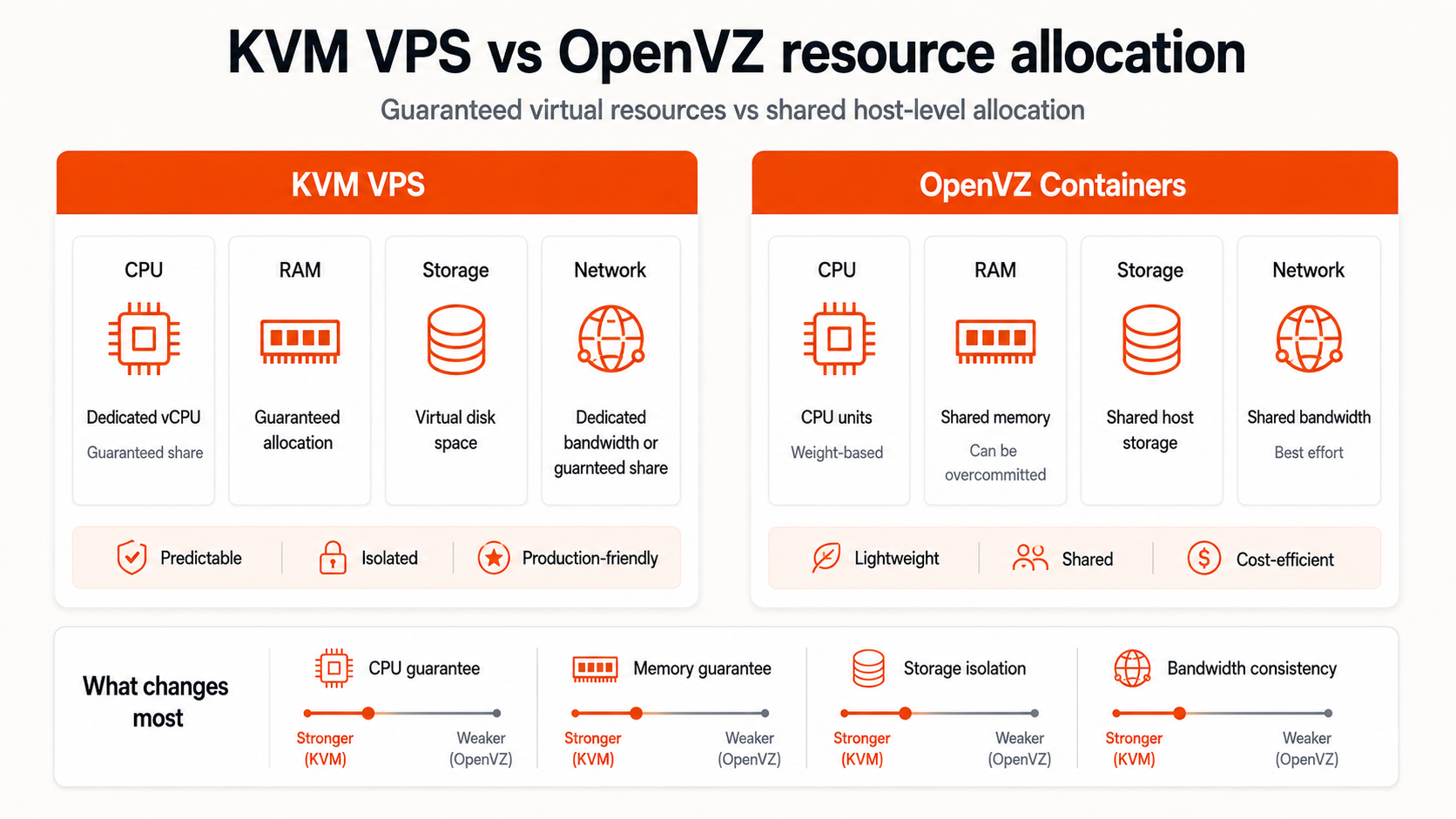
KVM does not mean the physical server itself is dedicated to one customer. CPU cores, storage systems, networking, and physical hosts may still be shared unless the provider explicitly says otherwise.
It also does not mean every vCPU is dedicated. Shared CPU and dedicated CPU are separate commercial/resource-allocation decisions.
What is an OpenVZ container?
OpenVZ also supports operating-system-level virtualization. In the container model, isolated workloads share the host Linux kernel instead of booting independent guest kernels.
Physical server
   ↓
Host Linux kernel
   ├─ OpenVZ container A → isolated userspace
   ├─ OpenVZ container B → isolated userspace
   └─ OpenVZ container C → isolated userspace
Each container can still have its own:
- files and packages;
- processes;
- users;
- hostname;
- network identity;
- resource limits;
- application stack.
But the kernel remains a host-level resource.
This lighter approach can reduce per-instance virtualization overhead and allow higher host density. It can work well for:
- standard Linux web servers;
- simple APIs;
- lightweight development environments;
- conventional Linux automation workloads;
- small services that do not need kernel customization.
The trade-off is control. A container cannot independently boot Windows or a different kernel family, and low-level kernel/device capabilities depend more heavily on host configuration and provider policy.
OpenVZ platform vs OpenVZ container VPS
This distinction matters in 2026.
OpenVZ's own documentation describes the broader platform as supporting both containers and KVM-based virtual machines. So saying “OpenVZ cannot run VMs” would be wrong.
In hosting comparisons, however, OpenVZ VPS usually refers to the container-based offering contrasted with a KVM VPS. That is the comparison this guide makes.
Why is KVM VPS often considered better than OpenVZ?
KVM is often preferred because it gives the customer a fuller VM boundary.
That creates practical advantages in four areas.
1. Broader operating-system compatibility
A KVM VM can run a complete guest operating system supported by the provider and virtual hardware.
That can include Linux distributions and Windows Server. An OpenVZ container relies on a Linux host kernel and therefore cannot provide a normal Windows guest inside the container model.
2. Independent guest kernel
KVM lets the VM boot its own guest kernel.
That matters for workloads requiring:
- a specific kernel version;
- kernel modules;
- low-level networking;
- security modules;
- custom ISO installation;
- certain storage or device features.
An OpenVZ container does not independently replace the host kernel.
3. Stronger VM-style isolation boundary
KVM separates complete guest operating systems behind a virtual-machine boundary.
OpenVZ containers isolate userspace while sharing the host kernel.
That does not mean OpenVZ is automatically insecure. Both architectures still depend on host patching, provider controls, account security, guest/application patching, firewalls, and operational discipline. But a full VM provides a broader isolation boundary than a shared-kernel container.
4. Fewer container-host compatibility assumptions
Software such as Docker, VPN tooling, firewalls, kernel-dependent agents, or custom networking is generally easier to reason about inside a full VM because the customer controls the guest OS and kernel environment more directly.
This is why KVM is often the safer general-purpose default.
But “more flexible” is not the same as “always better.” A standard Linux website may never use any of these capabilities.
Is KVM faster than OpenVZ?
Not necessarily.
OpenVZ containers can have lower virtualization overhead because they share the host kernel. KVM uses a fuller virtual-machine abstraction, although modern hardware virtualization substantially reduces that overhead.
Real hosting performance is usually dominated by other factors:
- CPU model and clock behavior;
- CPU scheduling;
- shared vs dedicated CPU policy;
- oversubscription;
- host density;
- memory pressure;
- storage latency and IOPS;
- network capacity and routing;
- noisy-neighbor management;
- workload shape.
A lightly loaded OpenVZ host can outperform a badly oversubscribed KVM host. A conservatively managed KVM platform can outperform a densely packed container host.
The virtualization label by itself is not a benchmark.
KVM does not automatically mean dedicated resources
This is one of the most common VPS buying mistakes.
A KVM server can still use:
- shared physical CPU;
- shared host storage;
- shared network links;
- shared physical memory capacity managed by the provider.
A provider can also sell dedicated or reserved CPU products using KVM.
So evaluate virtualization type and resource allocation policy separately.
Ask:
- Is CPU shared, burstable, reserved, or dedicated?
- Is sustained CPU use permitted?
- Is RAM guaranteed?
- Are disk IOPS or throughput capped?
- Is public bandwidth capped, metered, or unmetered?
- What happens during noisy-neighbor contention?
For the CPU decision specifically, see Shared vs Dedicated vCPU.
Kernel control is the biggest compatibility difference
| Requirement | KVM VPS | OpenVZ container |
|---|---|---|
| Own guest kernel | Yes | No |
| Windows Server | Possible | No |
| Standard Linux userspace | Yes | Yes |
| Custom ISO | Commonly possible if provider supports it | Not a normal container workflow |
| Kernel modules | Possible subject to provider/guest support | Host/provider dependent |
| Nested virtualization | Possible only when explicitly supported | Generally not the right model |
| Low-level network features | More flexible | More host-dependent |
| Full boot process | Yes | No separate guest-kernel boot |
If your application is a normal LAMP/LEMP stack, Node.js API, Python service, or small reverse proxy, you may not care about independent kernel control.
If your workload is Windows, Docker-heavy infrastructure, a VPN appliance, a custom kernel environment, nested virtualization, or low-level networking, you are more likely to care.
KVM vs OpenVZ for Docker
KVM is usually the safer default for a Docker host.
Docker itself uses Linux kernel capabilities such as namespaces, cgroups, networking, and storage drivers. Running Docker inside another OS-level container can work in some provider configurations, but compatibility depends more heavily on which capabilities the host exposes.
Inside a KVM VM, Docker runs against the VM's own guest kernel. That gives the customer a more conventional Linux host boundary and reduces provider-specific nested-container constraints.
That does not mean Docker requires KVM specifically. It means a full Linux VM is generally the easier infrastructure boundary when you want to control the Docker host yourself.
For the broader application decision, see Docker vs Virtual Machine.
KVM vs OpenVZ for Windows
For a normal Windows VPS, KVM is the relevant model of the two.
Windows requires its own guest operating system and kernel. An OpenVZ Linux container cannot provide that.
The broader OpenVZ platform may manage KVM-based VMs, but that Windows workload is then running as a VM—not as an OpenVZ container.
If Windows Server, RDP, IIS, SQL Server, or Windows business software is part of the requirement, compare providers on:
- supported Windows Server versions;
- licensing model;
- vCPU/RAM sizing;
- storage performance;
- RDP access;
- backup/recovery;
- support scope.
Use Raff Windows VM for Raff's current Windows offering.
KVM vs OpenVZ for ordinary Linux hosting
For a small Linux website or API, the decision can be less dramatic.
An OpenVZ container may be perfectly adequate when:
- you use a standard supported Linux userspace;
- you do not need custom kernel features;
- Docker or low-level networking is not required;
- the provider offers clear resource limits;
- the price and recovery model are attractive.
KVM becomes more valuable when:
- you want full VM semantics;
- operating-system flexibility matters;
- you want custom ISO or kernel control;
- the application may evolve into more complex infrastructure;
- you prefer a stronger VM-style isolation boundary.
Do not overbuy architecture. If a basic Linux container meets the workload and the provider is transparent about resources, it can still be a rational choice.
Isolation and security: KVM has the broader boundary, but provider quality still matters
KVM isolates separate guest kernels. OpenVZ isolates userspace environments while sharing the host kernel.
That difference affects the attack and failure boundary, but security is not determined by one technology name.
The full security model includes:
- host patching;
- virtualization/container platform maintenance;
- provider administrative controls;
- guest OS patching;
- firewall configuration;
- SSH/RDP access;
- account MFA and API keys;
- backups;
- monitoring;
- incident response.
A full VM does not compensate for an unpatched guest or exposed credentials.
An OS-level container does not automatically mean weak security when the provider operates the platform correctly and the workload fits the model.
The honest conclusion is: KVM provides the stronger general-purpose isolation boundary; operational security still depends on both provider and customer controls.
Compare recovery before buying the VPS
Virtualization comparisons often focus on CPU and kernel control while ignoring recovery.
For production use, ask whether the provider offers:
- snapshots;
- scheduled backups;
- configurable retention;
- browser/VNC console access;
- rebuild/reinstall workflows;
- custom images or ISOs;
- volume recovery;
- documented restore behavior.
A server that benchmarks well but cannot be restored predictably is a weak production choice.
Raff's current Data Protection model uses scheduled backups with configurable retention plus a shared free storage pool for backups and snapshots. Check the live page for current limits and pricing rather than relying on old “free backup slot” counts.
Compare bandwidth and storage separately from virtualization
Neither KVM nor OpenVZ tells you:
- whether bandwidth is metered;
- whether egress is charged;
- port speed;
- storage media;
- disk throughput;
- snapshot pricing;
- block-volume availability.
These can materially affect total cost and application performance.
Raff's current VM product pages advertise NVMe storage and unmetered VM traffic, but public-port speed differs by class: 1 Gbps on Cost-Optimized Linux VMs and 3 Gbps on General Purpose, CPU-Optimized and Windows VMs. Cost-Optimized has older DDR4 hosts, node-local NVMe and no uptime SLA. Use the live pricing page for plan resources and pricing because those details can change independently from virtualization technology.
Decision matrix: which is better for your workload?
| Workload | Better starting point | Reason |
|---|---|---|
| Windows Server / RDP | KVM VPS | Needs full guest OS/kernel |
| Docker host | KVM VPS | More conventional self-managed Linux host boundary |
| Custom kernel/module | KVM VPS | Independent guest kernel |
| VPN/security appliance | Usually KVM VPS | More low-level network/kernel control |
| General Linux website | Either | Resource quality may matter more |
| Small Linux API | Either | Choose on resources, recovery, price |
| Development sandbox | Either | Depends on OS/kernel needs |
| Standard low-cost Linux environment | OpenVZ can fit | Shared-kernel model may be sufficient |
| Custom ISO | KVM VPS | VM boot/install workflow |
| Stronger general-purpose isolation | KVM VPS | Separate guest kernel/VM boundary |
| Sustained CPU processing | Compare CPU policy | KVM/OpenVZ label does not define CPU guarantees |
| Lowest total cost | Compare full offer | Pricing, bandwidth, backup, storage, and support decide value |
Ask these questions before choosing a VPS provider
Virtualization
- Is this a full VM or an OS-level container?
- Does it boot its own guest kernel?
- Which operating systems are supported?
- Can I use a custom ISO?
- Are kernel modules supported?
- Is nested virtualization supported if I need it?
CPU and memory
- Is CPU shared or dedicated?
- Is sustained CPU usage allowed?
- What does one vCPU represent?
- Is memory guaranteed?
- Are there burst or throttling rules?
Storage and networking
- What storage technology is used?
- Are IOPS/throughput limits documented?
- Can storage expand independently?
- What is the public port speed?
- Is traffic metered or unmetered?
- Is private networking available?
Recovery and operations
- Are backups scheduled automatically?
- What retention options exist?
- Are snapshots separate from backups?
- How does restore work?
- Is console access available if networking breaks?
- Who is responsible for guest OS patching?
Support and commercial terms
- What does support cover?
- Is the guest OS/application self-managed?
- Is there an uptime SLA?
- What happens when a VM is deleted or resized?
- Are there additional IP, backup, or volume charges?
A provider should be able to answer these questions without using “KVM” as a substitute for the full service definition.
How Raff fits this decision
Raff's current public Linux VM page identifies KVM virtualization and advertises full root access, custom ISO support, NVMe storage, DDoS protection, firewall controls, and unmetered bandwidth.
That makes Raff relevant to buyers who are specifically looking for the full-VM side of the KVM vs OpenVZ decision.
The more important buying questions remain the surrounding service terms:
- select the VM class according to availability requirements: Cost-Optimized for interruption-tolerant Linux tasks; General Purpose for balanced shared-vCPU workloads; or CPU-Optimized for sustained dedicated-vCPU compute;
- size RAM and NVMe storage for the application;
- use VPC when private server-to-server communication is needed;
- use Data Protection according to recovery requirements;
- use Volumes when mounted storage should scale separately from the VM;
- use the live pricing page for current plans and charges.
Raff VMs remain self-managed at the guest operating-system and application level. Raff operates the cloud infrastructure; your team remains responsible for guest patching, application configuration, credentials, firewall rules inside the guest where applicable, and workload-level recovery planning.
