
A Windows VPS for manufacturing businesses is a cloud-hosted Windows Server that centralizes office-facing manufacturing software, databases, files, and remote user sessions. It fits ERP, MRP, inventory, purchasing, accounting, reporting, and administrative workflows when the software vendor supports Windows Server. Raff Technologies recommends keeping PLC, CNC, SCADA, and other hardware-bound plant control local unless every dependency has been tested.
For the broader small-business decision, read Windows VPS Hosting for Small Businesses.
Windows VPS for manufacturing businesses: quick verdict
A Windows VPS is strongest on the office and management side of manufacturing. It is weaker when the workload directly controls physical equipment.
| Manufacturing situation | Windows VPS fit | Reason |
|---|---|---|
| ERP or MRP software runs on Windows Server | Strong fit after vendor confirmation | The application, database, reports, and users can share one hosted environment. |
| Office staff need the same inventory and purchasing data | Strong fit | Central access reduces separate installs and duplicated files. |
| Managers need access from another plant, warehouse, or home | Strong fit with remote-access planning | Users can reach the same Windows applications and reports. |
| An aging factory-office server hosts business software | Strong fit after dependency review | The business can move away from one physical server without replacing the application. |
| Production reports and quality documents are scattered | Good fit | Shared folders, permissions, and backups can be centralized. |
| The application depends on SQL Server | Good fit with database sizing | Database memory, storage, maintenance, and backups must be planned. |
| Label printers and barcode scanners are essential | Test before production | Redirection, drivers, network paths, and application behavior vary. |
| PLC, CNC, SCADA, or machine control is the main workload | Keep local or use a designed hybrid architecture | Physical-process systems have different safety, reliability, and latency requirements. |
| Production must continue through an internet outage | Hybrid or local design required | A cloud-only workflow creates a connectivity dependency. |
| Heavy CAD, simulation, or rendering is the main workload | Specialized assessment | GPU, display protocol, storage throughput, and file size may exceed a standard VPS. |
The best candidate is a small or midsize manufacturer with Windows-based business software tied to an office or plant server. The company wants remote access, central data, simpler server management, and tested recovery without redesigning every application as SaaS.
A manufacturing company should not move its entire plant into one cloud VM. The practical goal is to separate workloads by function: centralize the business systems that benefit from shared access, while protecting the operational technology that depends on local equipment, deterministic response, or continued operation during an internet outage.
Manufacturing workloads should be separated into IT and OT
The first decision is not server size. It is workload classification.
Information technology (IT) supports business operations such as accounting, ERP, purchasing, reporting, email, shared files, and employee access. Operational technology (OT) monitors or controls physical processes and equipment. OT can include programmable logic controllers (PLCs), supervisory control and data acquisition (SCADA), distributed control systems, industrial PCs, sensors, and machine interfaces.
NIST SP 800-82 Revision 3 treats OT as a distinct security and reliability domain because it interacts with the physical environment. That distinction matters when planning a Windows VPS.
Raff Technologies' default recommendation is simple:
- move office-facing applications first;
- keep machine control local;
- document every integration between the two;
- add connectivity only where the business case is clear;
- test failure behavior before production.
A safe first phase may move ERP clients, purchasing, accounting, document storage, reports, and remote administration. It should not automatically move PLC programming stations, machine-control databases, serial-device gateways, or production systems that must remain available when the WAN is down.
This separation gives the business a useful cloud environment without turning a server migration into an unplanned OT redesign.
Office-facing manufacturing workloads are the strongest fit
Manufacturing businesses often rely on Windows software that sits between general office tools and plant operations. These workloads can fit a Windows VPS when the vendor supports the deployment model.
ERP, MRP, and production-planning applications
Enterprise resource planning (ERP) connects finance, purchasing, inventory, sales, and operations. Material requirements planning (MRP) focuses more directly on materials, bills of materials, production demand, scheduling, and purchasing requirements.
A Windows VPS can host these applications when:
- the vendor supports Windows Server;
- hosted or virtualized use is permitted;
- Remote Desktop Services is supported where needed;
- the application database is supported in the chosen layout;
- integrations can reach the required endpoints;
- backups can protect both the application and its data;
- plant devices are not assumed to work without testing.
The existing Windows VPS for ERP and Inventory Software guide covers the deeper ERP hosting decision. The manufacturing-specific question is broader: which production-office workflows belong in the hosted environment, and which dependencies must stay near the plant floor?
Inventory, purchasing, and warehouse administration
A hosted Windows environment can centralize:
- item masters and stock records;
- purchase orders;
- supplier records;
- reorder reports;
- receiving administration;
- warehouse transfers;
- batch or lot documentation;
- finished-goods records;
- inventory valuation reports;
- exported labels and packing documents.
This does not guarantee that every scanner or label printer will work remotely. The application may run correctly while the physical workflow fails. Receiving, picking, printing, and correction procedures must be tested from the actual warehouse location.
Accounting, payroll, and job costing
Manufacturers frequently combine an ERP or MRP system with separate accounting, payroll, costing, or reporting software.
A Windows VPS can provide one controlled environment for:
| Financial workload | Typical need |
|---|---|
| General ledger | Central access for finance staff |
| Accounts payable | Supplier invoices, approvals, and payment files |
| Accounts receivable | Customer invoices, credits, and statements |
| Payroll | Restricted access for authorized staff |
| Standard costing | Material, labor, overhead, and variance analysis |
| Job costing | Costs by work order, batch, project, or production run |
| Month-end reporting | CPU, RAM, database, and export capacity during peak periods |
The server should be sized for active sessions and reporting peaks, not only the number of licensed employees.
Quality, compliance, and production documents
A Windows VPS can also centralize documents that support production without controlling the machinery itself:
- standard operating procedures;
- work instructions;
- inspection forms;
- certificates of analysis;
- calibration records;
- nonconformance records;
- corrective-action documents;
- training records;
- supplier documents;
- maintenance reports;
- production schedules;
- completed batch or work-order files.
Shared folders need a deliberate structure. Moving disorganized files to a cloud server only relocates the problem. Clean up duplicate folders, naming rules, permissions, archives, and ownership before migration.
Reporting and management access
Owners, plant managers, finance leads, purchasing teams, and operations managers may need reports without direct access to plant-control systems.
A hosted Windows environment can provide access to:
- production summaries;
- inventory reports;
- purchasing dashboards;
- financial reports;
- order status;
- capacity-planning exports;
- maintenance documents;
- approved quality records.
This is a strong reason to separate reporting from control. A manager can reach business information remotely without opening a path directly into the OT network.
Hardware-bound plant workloads should remain local until proven
A cloud Windows Server should not become the default home for systems that directly interact with physical equipment.
Keep or test locally when the workload depends on:
- PLC communication;
- CNC controllers;
- SCADA servers;
- human-machine interfaces;
- machine vision;
- serial or fieldbus devices;
- real-time data acquisition;
- USB licensing dongles;
- proprietary PCI hardware;
- local sensor gateways;
- low-latency machine commands;
- safety-related processes;
- operation during a WAN outage.
The issue is not that cloud infrastructure is inherently unsuitable. The issue is that these systems have different failure consequences. A delayed report is inconvenient. A delayed or unavailable machine-control command can stop production or create a safety risk.
CISA's Secure Connectivity Principles for Operational Technology recommends treating connectivity into OT as a deliberate design decision. Manufacturing teams should document why a connection exists, who owns it, how it is secured, and what happens when it fails.
A Windows VPS may still support the surrounding workflow. It can host the business application, reporting database, document repository, or remote office desktop while the control system remains local.
A hybrid plant-cloud design reduces unnecessary risk
For many manufacturers, hybrid is not a temporary compromise. It is the correct architecture.
A practical pattern looks like this:
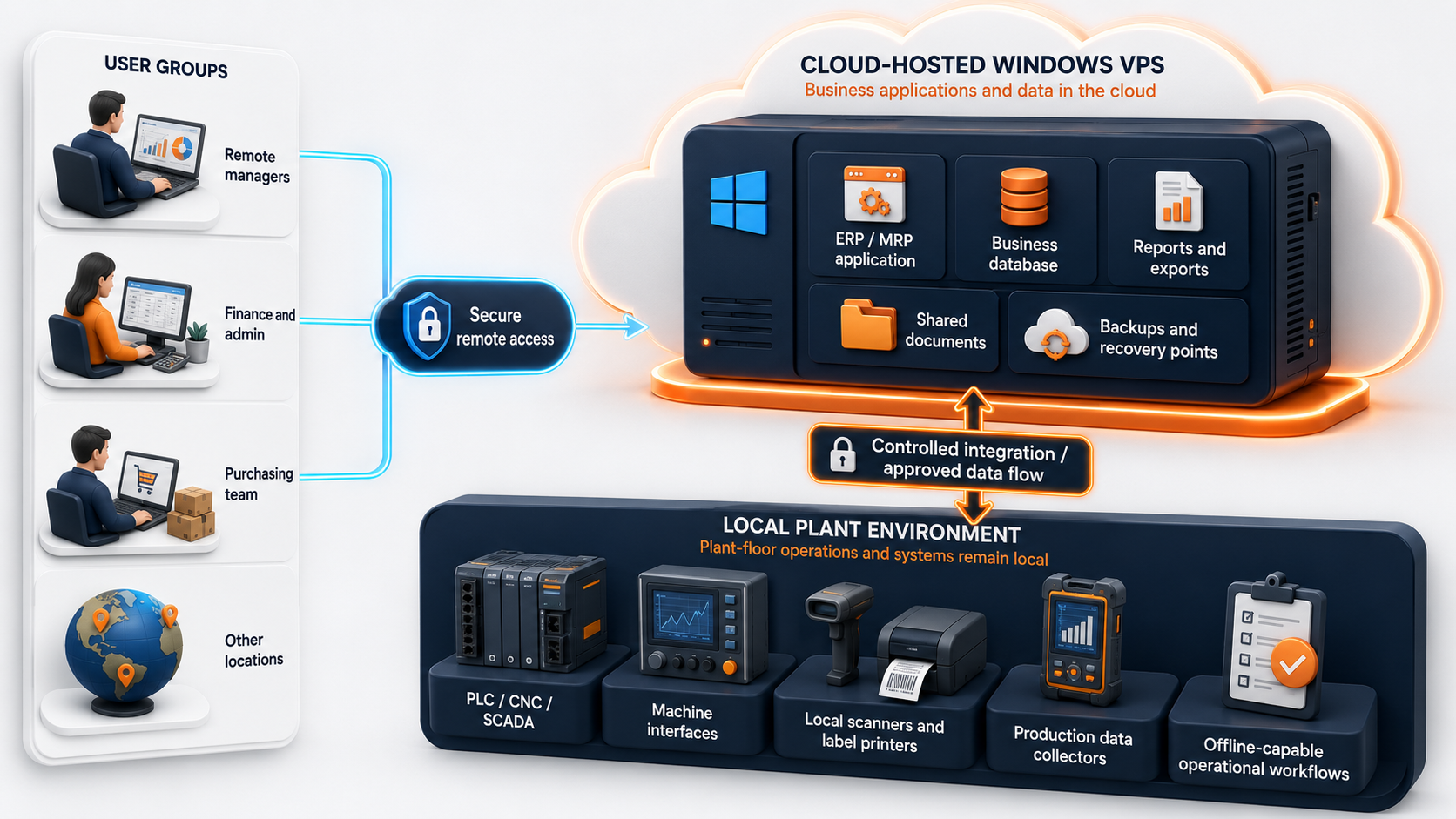
The connection between the cloud environment and the plant should carry only the data and services required by the business. Do not create broad network access because it is convenient.
A good hybrid design answers five questions:
- Which system is the source of truth?
- Which direction does data move?
- Which ports and identities are required?
- What happens when the link is unavailable?
- How is the connection monitored and revoked?
Raff recommends proving 5 workflows before cutover: login, transaction entry, printing, backup, and restore.
Multi-site manufacturing benefits from one business environment
A manufacturer may operate a head office, plant, warehouse, service location, or second production site. Separate office servers can create different versions of applications, reports, and files at each location.
One Windows VPS can give authorized users access to the same business environment when:
- each location has reliable connectivity;
- latency is acceptable for the application;
- user roles are defined;
- printing and scanning have been tested;
- database and file access stay inside the hosted environment where practical;
- the business has a fallback for connectivity loss.
Centralization can reduce version drift and duplicated data. It does not remove the need for site-level procedures. A warehouse may still require local label printing. A plant may need offline work instructions. A second facility may need a separate recovery path.
The architecture should follow the workflow, not the organization chart.
Remote access should match manufacturing user roles
Remote Desktop Services (RDS) can deliver managed Windows desktops and applications to users in offices, homes, branches, and partner locations. Microsoft describes this model in its Remote Desktop Services overview.
Manufacturing users do not all need the same access.
| User role | Likely access need |
|---|---|
| Owner or director | Reports, approvals, and dashboards |
| Plant manager | Production reports, schedules, and documents |
| Finance team | Accounting, costing, payroll, and exports |
| Purchasing team | Suppliers, purchase orders, and material planning |
| Inventory administrator | Stock records, transfers, and adjustments |
| Sales or customer service | Order status, availability, and customer records |
| IT or MSP | Administration, patching, monitoring, and recovery |
| Machine operator | Often local application or kiosk access rather than full remote desktop |
Use named accounts. Separate administrator credentials from daily user accounts. Restrict clipboard, drive, printer, and device redirection based on the workflow rather than enabling everything by default.
If employees use an RD Session Host for daily desktop or application sessions, Microsoft states that each connecting user or device needs an RDS Client Access License. Administrative RDP sessions are not a substitute for a licensed multi-user deployment.
Printers, scanners, and shop-floor devices require full workflow tests
Device behavior is one of the most common reasons a technically successful migration fails operationally.
Manufacturing workflows may depend on:
- label printers;
- barcode scanners;
- document scanners;
- scales;
- signature pads;
- USB dongles;
- serial devices;
- network printers;
- local folders used by import tools;
- email or PDF export components.
Test the entire process, not only whether Windows recognizes the device.
| Device or dependency | Test before approval |
|---|---|
| Label printer | Correct driver, label size, template, queue, and print speed |
| Barcode scanner | Input mode, focus behavior, session mapping, and application validation |
| Document scanner | TWAIN/WIA requirement, upload method, resolution, and file path |
| Network printer | Reachability, permissions, driver compatibility, and spool behavior |
| USB license dongle | Vendor permission, redirection support, and network-license alternatives |
| Serial device | Gateway method, latency, reconnection, and failure behavior |
| Scale or measurement device | Data interface, local service, and application integration |
| Export folder | Path, permissions, file naming, and downstream pickup process |
Microsoft documents printer and drive redirection as configurable Remote Desktop features, and its troubleshooting guidance shows that policy and client settings can prevent redirection even when the session itself works. Treat every device as a separate acceptance test.