• Pricing
  • Performance
  • About Us
PricingPerformanceAbout Us
Sign InSign Up
  • Pricing
  • Performance
  • About Us
PricingPerformanceAbout Us
Sign InSign Up
Sign InGet Started

High-Performance Cloud Infrastructure

Empowering businesses with enterprise-grade cloud solutions at competitive prices. Built for reliability and simplicity. Designed for growth.

SOC 2 Compliant
ISO 27001
99.9% Uptime

Stay Updated

3000+

Customers

15,000+

VMs Deployed

24/7

Human Support

Products

Build

  • Raff VM
  • Raff Windows VM
  • Raff Apps
  • Kubernetes

Templates

  • Linux VM
  • Forex VM
  • n8n VM

Store

  • Raff S3
  • Raff Databases

Support

  • Documentation
  • API Reference
  • CLI
  • Terraform Provider
  • Contact
  • FAQ
  • Status

Company

  • About
  • Pricing
  • Blog
  • Release Notes
  • Performance
  • Status

Account

  • Sign In
  • Sign Up
  • Reset Password

Legal

  • Terms of Service
  • Privacy Policy
  • Service Level Agreement
  • Acceptable Use Policy

© 2026 Raff Technologies. All rights reserved.

System Status
run your software
run your softwarebeginner18 min read·Updated Jul 11, 2026

Windows VPS for Insurance Agencies: Remote Access, Client Files, Apps, and Backups

Learn when a Windows VPS makes sense for insurance agencies that need remote access, client files, agency apps, shared folders, backups, security, permissions, and office server migration.

Batuhan Esirger
Batuhan Esirger
Co-Founder & Business Lead

A Windows VPS can help insurance agencies centralize remote access, client files, agency applications, shared folders, reports, downloads, scanned documents, and backups in a cloud-hosted Windows Server environment. It works best when the agency plans user access, agency software support, file permissions, retention needs, backup strategy, Remote Desktop licensing, security, and migration before production. Raff Technologies provides Windows VMs for insurance agencies, small offices, and MSPs that need a practical Windows Server foundation without depending on one old office server or scattered workstation setup.

Insurance agencies do not only need “a server.” They need a controlled place where producers, CSRs, owners, admins, and remote staff can reach the same files, tools, reports, and workflows.

A Windows VPS can support that model when the agency still depends on Windows apps, mapped drives, shared folders, PDFs, policy documents, downloads, scanned files, quote exports, or office server workflows.

The goal is not to move everything to the cloud blindly. The goal is to make agency work easier to access, easier to protect, easier to support, and less dependent on one physical office machine.
Run insurance apps, files, and remote users on Raff Windows VM.

Explore Windows VM

Quick verdict: when insurance agencies should use a Windows VPS

Use this table before moving agency workloads to a Windows VPS.

Insurance agency situationWindows VPS fitWhy
Producers or CSRs need remote accessStrong fitUsers can connect to one hosted Windows environment.
Client files are spread across PCs, shares, or branchesStrong fitFiles can be centralized with permissions and backups.
Agency apps need Windows or shared file pathsStrong fit after vendor checkApps can run in a supported Windows Server environment.
Old office server is slow or riskyStrong fitA cloud Windows VPS can replace the office server role.
Branch offices need the same files or appsStrong fit with access planningTeams can work from one environment.
MSP manages the agency environmentStrong fitCentralized server is easier to document and support.
Agency only uses browser-based SaaS toolsDependsSaaS access may already be enough.
Heavy scanning or local device workflows are criticalDependsTest printers, scanners, and local devices first.
Vendor does not support hosted/RDS useRiskyVerify support before production.
Agency has strict regulatory or contractual requirementsNeeds planningAccess, logging, backups, retention, and policy ownership matter.

The best fit is an insurance agency that still depends on Windows-based office workflows but wants safer remote access, clearer backups, and a more supportable server model.

Why insurance agencies move Windows workloads to the cloud

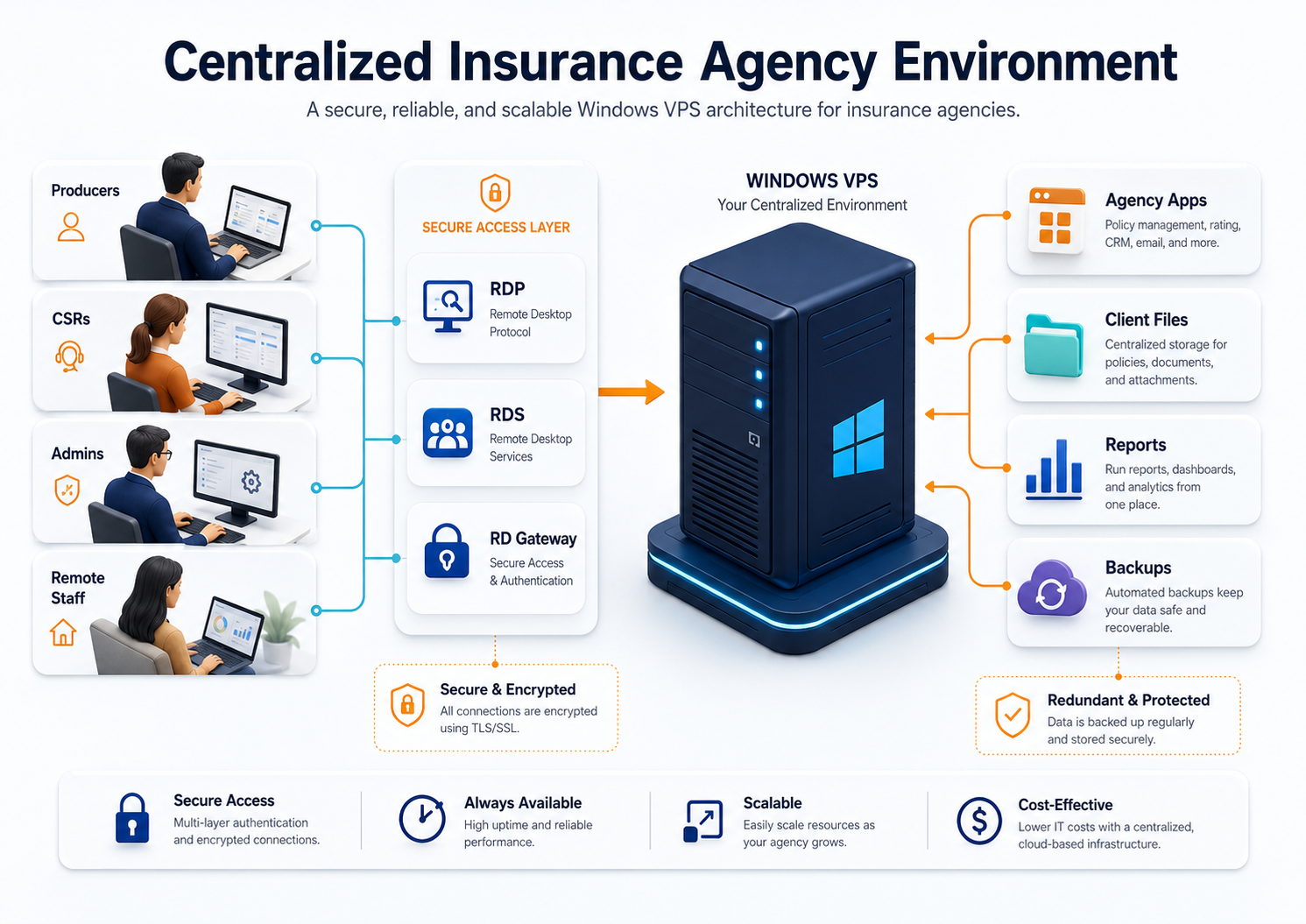
Insurance agencies often move to a Windows VPS after the current office setup becomes hard to manage.

Architecture diagram showing producers, CSRs, admins, and remote staff accessing agency apps, client files, reports, and backups through a centralized Windows VPS

ProblemWhat it looks likeHow a Windows VPS helps
Remote access is messyStaff remote into office PCs or use VPN workaroundsUsers connect to one hosted Windows environment
Client files are scatteredDocuments live on local PCs, shared drives, downloads, or emailCentral folders and permissions can be planned
Old server risk is growingOffice server is aging, slow, or hard to back upCloud Windows VPS reduces local hardware dependency
Apps need WindowsSome tools still depend on Windows, file paths, or local installsSupported apps can run in a central Windows environment
Branch offices duplicate filesOffices use separate folders or app installsShared environment reduces duplication
Backups are unclearDeleted files or ransomware recovery is not provenBackup and restore planning becomes part of production
MSP support is inconsistentEvery workstation is differentOne server is easier to document and manage
User offboarding is weakAccess remains on shared accounts or old devicesNamed users and access review are easier to enforce

For insurance agencies, downtime is not the only risk. The bigger operational risk is losing access to client records, policy documents, billing exports, certificates, reports, scans, or the tools staff need during business hours.

Windows VPS vs office PC vs local office server

Many agencies begin with a shared drive on one office PC, then move to a small local server, then eventually need better remote access and backup planning.

AreaOffice PCLocal office serverWindows VPS
Best fitVery small officeMostly on-site agency staffRemote or hybrid agency team
Remote accessAwkward and inconsistentVPN/RDP/firewall planning neededDesigned around remote access
Client filesOften scatteredCentral on LANCentral in hosted environment
Agency appsLocal installsServer-based where supportedCentral Windows environment
BackupsOften inconsistentDepends on local processVM/file/app backups can be planned
Hardware riskHighMedium/high over timeNot tied to one office machine
Branch accessWeakMore complexBetter fit
MSP supportHarderManageableEasier to standardize
GrowthLimitedHardware upgrade requiredResize or split roles

A Windows VPS is not automatically right for every agency. But it is often the cleanest next step when the agency has outgrown one office PC or local server.

Common insurance agency workloads on a Windows VPS

Agency management workflows

Insurance agencies may use a mix of agency management systems, rating tools, document templates, file exports, carrier portals, PDFs, and local folders.

A Windows VPS can help when:

NeedPlanning point
Multiple users need the same Windows appConfirm vendor support for Windows Server/RDS use
App depends on shared foldersKeep paths, permissions, and drive mappings consistent
Reports and exports matterTest real workflows before production
App uses a databasePlan database backups and performance
Remote staff need accessPlan RDP/RDS/RD Gateway or VPN access
Vendor support is requiredConfirm supported hosting model before migration

Do not assume every agency application supports hosted or RDS use. Confirm the vendor’s supported deployment model first.

Client files and policy documents

Client files are often the center of agency work.

A Windows VPS can centralize:

File typeExample
Client foldersAccount records, policy documents, notes
CertificatesCOIs, forms, renewal documents
ScansIDs, signed forms, supporting documents
Quotes and proposalsPDF exports, spreadsheets, submissions
Billing filesStatements, invoices, payment documents
Claims documentsSupporting files and correspondence
TemplatesLetters, forms, agency documents
Archived clientsHistorical account folders

Moving a messy file system to the cloud does not fix it. Clean up folder structure, permissions, naming, and archives before migration.

Remote Desktop for producers, CSRs, and admins

Remote Desktop is often the access layer for insurance agency Windows VPS workloads.

Users may include:

User typeCommon need
Agency ownersFull overview, reports, admin workflows
ProducersClient files, quotes, proposals, carrier docs
CSRs/account managersClient files, certificates, renewals, document workflows
Admin staffShared folders, reports, billing exports
Remote employeesSame environment from home or branch offices
MSP/ITServer administration and support

Microsoft describes Remote Desktop Services as a Windows Server platform for securely delivering managed desktops and applications to users in the office, at home, branch locations, or partner locations.

For staff desktop sessions, Microsoft states that each user or device connecting to an RD Session Host running Windows Server needs a Remote Desktop Services Client Access License.

Use these related guides:

  • Remote Desktop Server for Business
  • Windows VPS for Remote Employees
  • Remote Desktop Gateway vs Direct RDP
  • RDS CAL Licensing on Windows Server

Plan users, apps, files, backups, and migration before production.

Talk to Windows Engineer

Client files, permissions, and retention planning

Insurance agencies handle client records, policy data, payment documents, identification documents, claims information, and correspondence. File access should be deliberate.

Plan:

AreaRecommendation
User accountsUse named users, not shared logins
Role groupsCreate groups for owners, producers, CSRs, admins, and MSPs
Client foldersStandardize folder names before migration
PermissionsUse least privilege for sensitive folders
ArchivesSeparate active and inactive client files
DownloadsControl where carrier downloads and exports are stored
TemplatesKeep shared templates read-only where appropriate
OffboardingRemove access quickly when staff leave
RetentionAlign with agency policy, carrier agreements, and legal/regulatory obligations
DocumentationRecord folder owners, permissions, exceptions, and backup scope

This article is not legal or compliance advice. Insurance agencies should validate retention, privacy, cybersecurity, and access-control obligations with qualified advisors.

The NAIC Insurance Data Security Model Law is one important reference point for the insurance sector. The NAIC says the model requires licensees in adopting states to develop, implement, and maintain an information security program, investigate cybersecurity events, and notify the state insurance commissioner of such events.

Security planning for insurance agency data

A Windows VPS can hold sensitive client and business data. Security should be planned before production use.

Minimum planning:

Security areaRecommendation
Named usersAvoid shared producer/CSR/admin accounts
Admin separationKeep admin accounts separate from daily user accounts
Strong passwordsUse strong password rules and offboarding process
RDP exposureAvoid broad direct RDP exposure
RD Gateway/VPNUse controlled access where appropriate
Firewall rulesRestrict allowed sources and ports
PermissionsUse groups and least privilege
Local redirectionControl clipboard, drive, and printer redirection where needed
BackupsRestrict who can delete backups
UpdatesPatch Windows and apps deliberately
LogsReview failed sign-ins and suspicious access
DocumentationRecord users, apps, shares, backups, and owners

Microsoft provides Windows Server security baseline guidance and Security Compliance Toolkit resources for recommended configuration baselines. Those baselines are only a starting point. Agencies also need operational process, user training, access reviews, vendor checks, and retention policy.

Use: Windows Server Hardening Checklist.

Backups and restore testing for insurance agencies

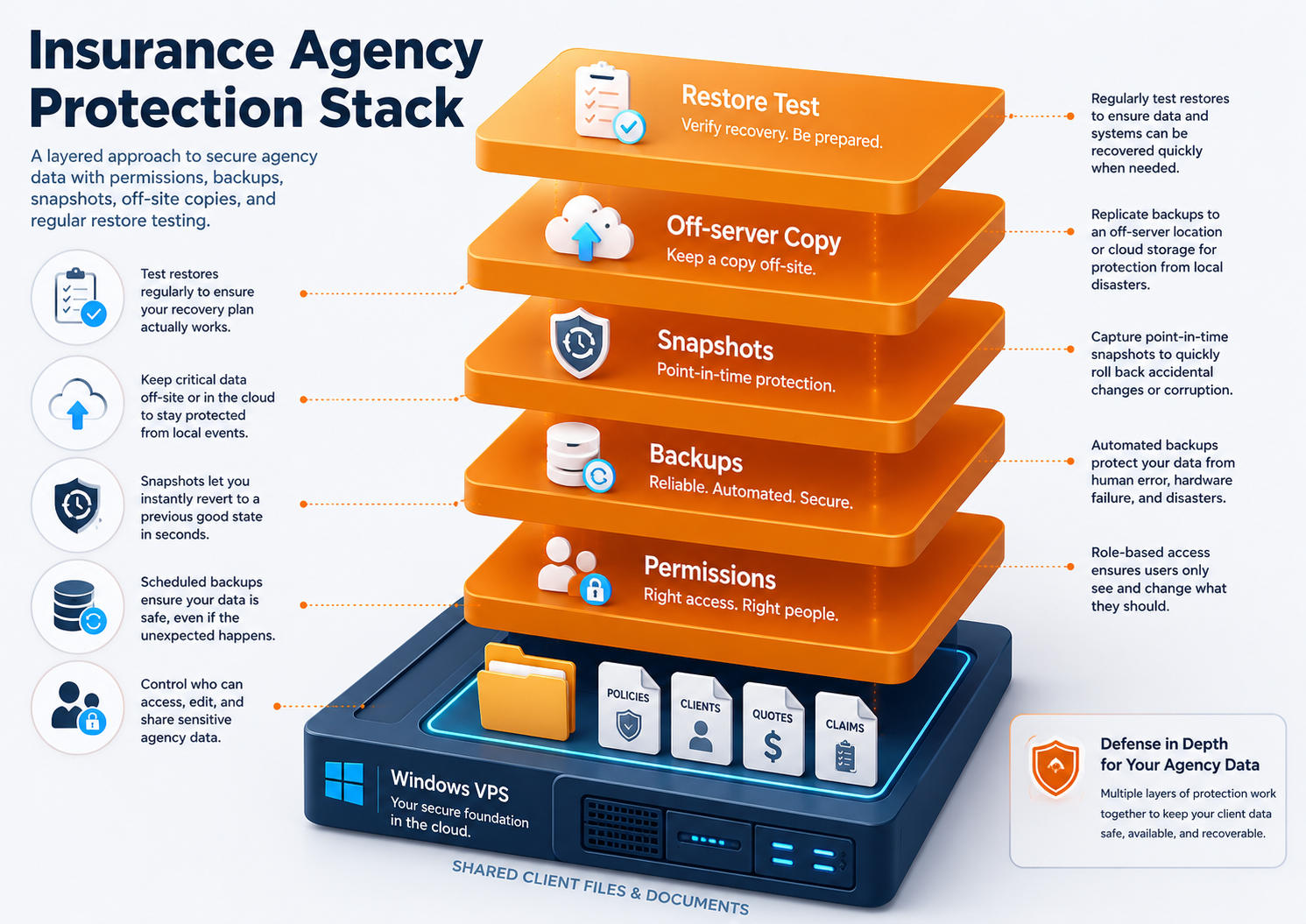
Backups are not optional for insurance agency workloads.

Layered protection stack showing permissions, backups, snapshots, off-server copies, and restore testing for insurance agency client files on a Windows VPS A Windows VPS backup plan should cover:

Backup layerPurpose
VM backupRecover the whole Windows VPS
Snapshot before changesRoll back before updates, migrations, or app changes
File-level backupRestore deleted or changed client files
App/database backupProtect agency app data correctly
Off-server copyReduce risk from account, server, or ransomware issues
Restore testProve recovery works before an emergency
Retention policyAlign with agency requirements and business risk

Do not confuse “server is in the cloud” with “we have backups.” Cloud hosting and backup planning are different.

Use: Windows VPS Backup Strategy for Small Businesses.

Protect client files, app data, and restore points.

Explore Data Protection

Sizing a Windows VPS for an insurance agency

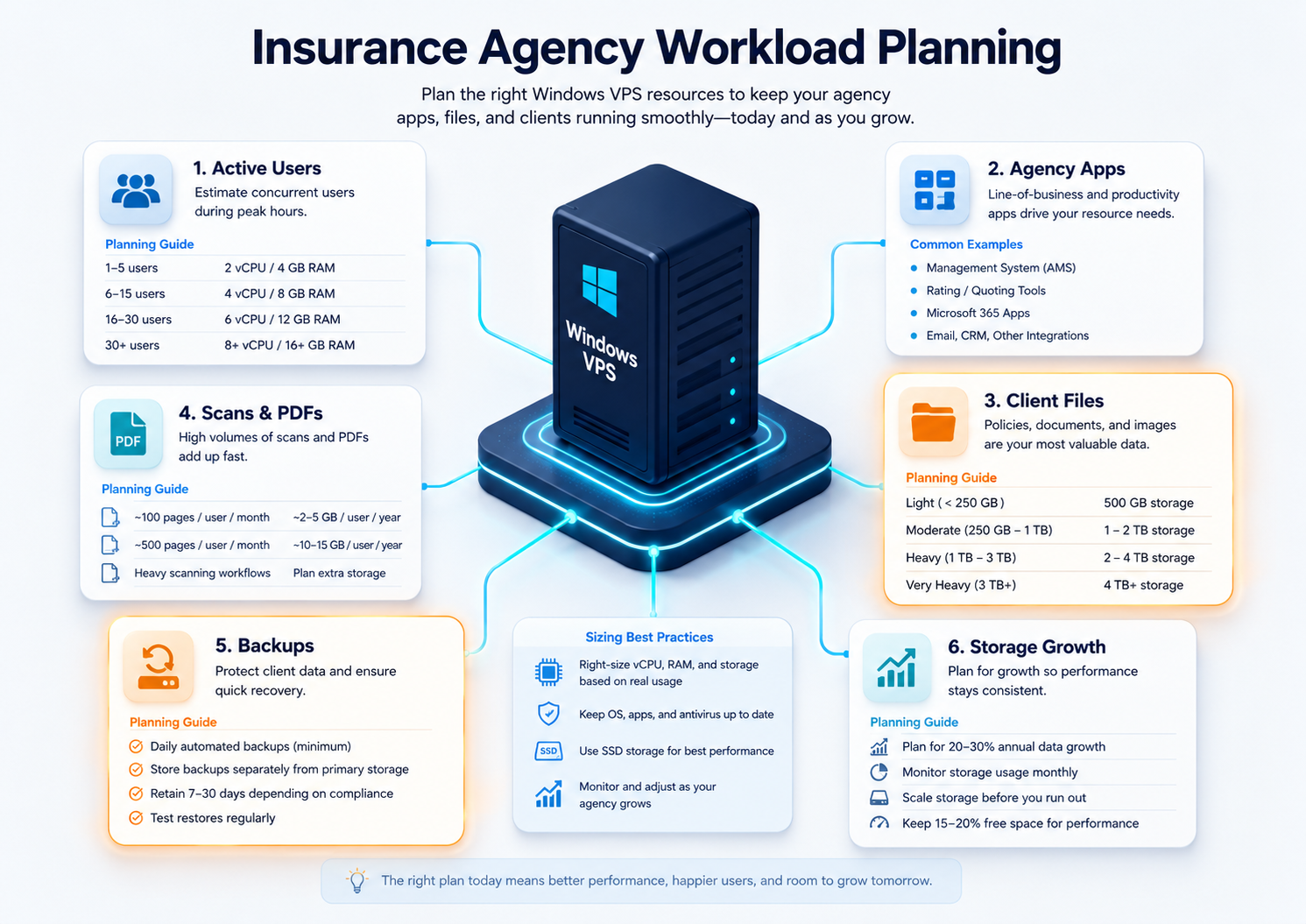
Do not size only by employee count. Size by active users, apps, file volume, scanning/export workflows, and Remote Desktop workload.

Workload planning infographic for insurance agency Windows VPS sizing with active users, agency apps, client files, scans, backups, and storage growth

Use this as a starting point:

Insurance agency workloadStarting sizeWhen to move up
Solo owner/admin use2 vCPU / 4 GB RAMIf apps, PDFs, or reports run on the server
2-3 light users4 vCPU / 8 GB RAMIf users open PDFs, Office apps, portals, and shared folders
3-5 active users4 vCPU / 16 GB RAMBetter for agency apps, shared files, and RDS sessions
5-10 active users8 vCPU / 32 GB RAMUseful when the server becomes a daily shared workspace
Document-heavy agencySize storage firstPDFs, scans, policy docs, and archived files grow quickly
Database-backed agency app8-16 vCPU / 32-64 GB RAMConsider database load, reports, and app requirements

Plan storage for:

  • active client files;
  • archived accounts;
  • policy documents;
  • certificates;
  • scans;
  • PDFs;
  • billing exports;
  • claims documents;
  • templates;
  • user profiles;
  • downloads;
  • logs;
  • backups;
  • migration staging;
  • 12 to 24 months of growth.

For deeper sizing, use: Windows VPS sizing for remote users.

Pricing factors for insurance agencies

The monthly VM price is only the foundation.

Cost factorWhy it matters
CPU and RAMActive users, apps, PDFs, reports, and RDS sessions
StorageClient files, scans, archived accounts, backups, growth
BackupsFrequency, retention, restore tests
Windows licensingDepends on provider and deployment model
RDS CALsStaff Remote Desktop sessions may require licensing
Agency software licensesVendor licensing and support terms
SQL/database licensingApplies if the app uses SQL Server
MigrationFiles, permissions, users, apps, cutover
SupportWindows, RDS, app, printer/scanner troubleshooting
SecurityAccess controls, hardening, logging, offboarding
Recovery expectationsBetter recovery targets may require stronger planning

A cheap server can become expensive if files are slow, backups fail, access is insecure, or staff cannot work during renewal deadlines.

Use: Windows VPS Pricing Explained.

Compare plans for users, files, apps, and backups.

View Pricing

Migration path for insurance agencies

If the agency is moving from an office server, shared workstation, or local file share, migrate carefully.

Use this path:

  1. Inventory users, apps, client folders, shares, printers, scanners, databases, and integrations.
  2. Confirm agency software vendor support for Windows Server/RDS or hosted use.
  3. Clean up file structure and old permissions before migration.
  4. Choose the Windows VPS size.
  5. Build the Windows VPS.
  6. Configure access, firewall, users, groups, and backups.
  7. Install agency apps and dependencies.
  8. Copy test data first.
  9. Test workflows with owners, producers, CSRs, admins, and remote staff.
  10. Test printing, scanning, PDFs, downloads, templates, and reports.
  11. Run a restore test.
  12. Schedule cutover outside critical deadlines.
  13. Move final data.
  14. Keep the old environment available for rollback.
  15. Monitor performance and support tickets after cutover.

Do not migrate during a critical renewal, enrollment, audit, or reporting period unless there is an urgent risk and a clear rollback plan.

Use:

  • Windows Server Migration Checklist for Small Businesses
  • Local Office Server to Cloud Windows VPS Migration
  • File Server Migration to Windows VPS

Windows VPS as a cloud file server for insurance agencies

Some agencies think they need a full cloud desktop platform, but the main problem is file centralization.

A Windows VPS can work as a cloud file server when:

NeedFit
Shared client foldersStrong fit
NTFS permissionsStrong fit
Mapped drives for appsGood fit after testing
Remote users access files through RDSStrong fit
Branch office file accessGood fit with access planning
Direct public SMB accessAvoid
Large file uploads/downloadsDepends on workflow and storage size

SMB is the Windows file-sharing protocol. Do not expose SMB directly to the public internet. Use a controlled access model such as RDS, RD Gateway, VPN/private networking, or another secure access pattern.

Use: Windows VPS as a Cloud File Server.

When a Windows VPS is not the right fit

A Windows VPS is useful, but it is not always the answer.

Pause when:

SituationBetter next step
Agency only uses browser-based SaaSSaaS may already solve the need
Agency software vendor forbids hosted/RDS useDo not proceed without support path
Internet is unreliableFix connectivity or design fallback
Scanning/printing workflow is untestedTest devices before production
Compliance requirements are strictDesign access, logging, retention, and policy first
High availability is requiredPlan redundancy and failover
Users need local offline access all dayCloud desktop may frustrate users
File organization is chaoticClean up before migration
Licensing is unclearResolve before production

The right answer may be SaaS, a local server, Windows VPS, or a hybrid model. Choose based on workflow, risk, supportability, and compliance requirements.

How Raff fits insurance agencies

Raff fits insurance agencies that need a cloud-hosted Windows Server environment for remote producers, CSRs, admins, client files, agency apps, shared folders, reports, backups, and office server replacement.

Raff can provide the Windows VM foundation. Your agency or MSP should still plan:

  • agency software licensing;
  • RDS CAL requirements;
  • user access and offboarding;
  • file permissions;
  • backup retention;
  • restore testing;
  • vendor support;
  • secure remote access;
  • document workflows;
  • migration and rollback.

That is the clean way to use Raff: use the platform for the Windows Server foundation, then design the insurance agency workload properly.

Raff is especially relevant when your agency wants a practical alternative to maintaining local office hardware, but still needs Windows apps, shared folders, Remote Desktop access, and recovery planning.

Launch a Raff Windows VM for your agency workload.

Deploy Windows Now

Recommended path by insurance agency situation

SituationRead next
You need the broad SMB decision guideWindows VPS Hosting for Small Businesses
You need remote access planningRemote Desktop Server for Business
You support remote employeesWindows VPS for Remote Employees
You need pricing clarityWindows VPS Pricing Explained
You need file server planningWindows VPS as a Cloud File Server
You are replacing office hardwareCloud Windows Server vs Local Office Server
You are moving filesFile Server Migration to Windows VPS
You need backupsWindows VPS Backup Strategy for Small Businesses
You need secure remote accessRemote Desktop Gateway vs Direct RDP
You need hardeningWindows Server Hardening Checklist
You manage agencies as an MSPWindows VPS for MSP Client Environments

Final insurance agency checklist

Before moving insurance agency workloads to a Windows VPS, confirm:

CheckDone
Agency apps listed☐
Vendor support checked☐
App licenses reviewed☐
RDS CAL requirements reviewed☐
Owners, producers, CSRs, admins, and remote users estimated☐
CPU/RAM/storage starting point chosen☐
Client folder structure documented☐
File permissions planned☐
Sensitive folder access reviewed☐
Retention requirements reviewed☐
Backup layers defined☐
Restore test planned☐
Remote access model chosen☐
Printers/scanners tested☐
Security hardening reviewed☐
Migration window selected☐
Rollback plan documented☐
Support owner assigned☐

If the checklist feels unclear, do not treat the environment as production yet.

What's next

  • Explore Raff Windows VM when you are ready to compare Windows VM options.
  • Review Raff pricing before choosing CPU, RAM, storage, and monthly cost.
  • Read Windows VPS Hosting for Small Businesses for the broader SMB guide.
  • Read Remote Desktop Server for Business before rolling out remote staff access.
  • Read Windows VPS for Remote Employees if remote work is the main driver.
  • Read Windows VPS Pricing Explained before budgeting the full environment.
  • Read Windows VPS as a Cloud File Server if client files are the main workload.
  • Read Windows VPS Backup Strategy for Small Businesses before moving production agency data.
  • Read Windows Server Hardening Checklist before opening access to users.

Sources

  • Raff — Windows VM product page
  • Raff — Pricing
  • Raff — Windows Server Hub
  • Microsoft Learn — Remote Desktop Services overview in Windows Server
  • Microsoft Learn — License Remote Desktop Services with Client Access Licenses
  • Microsoft Learn — Deploy Remote Desktop Gateway role for Remote Desktop Services
  • Microsoft Learn — What is SMB File Sharing for Windows and Windows Server?
  • Microsoft Learn — SMB security hardening in Windows Server and Windows Client
  • Microsoft Learn — Security baselines guide
  • NAIC — Cybersecurity
  • NAIC — Insurance Data Security Model Law
Was this article helpful?

Published July 11, 2026 · Updated July 11, 2026

Back to hub
On this page
Quick verdict: when insurance agencies should use a Windows VPSWhy insurance agencies move Windows workloads to the cloudWindows VPS vs office PC vs local office serverCommon insurance agency workloads on a Windows VPSClient files, permissions, and retention planningSecurity planning for insurance agency dataBackups and restore testing for insurance agenciesSizing a Windows VPS for an insurance agencyPricing factors for insurance agenciesMigration path for insurance agenciesWindows VPS as a cloud file server for insurance agenciesWhen a Windows VPS is not the right fitHow Raff fits insurance agenciesRecommended path by insurance agency situationFinal insurance agency checklistWhat's nextSources

Related articles

run your softwareWindows VPS for Real Estate Offices: Remote Access, Documents, Apps, and Shared FilesLearn when a Windows VPS makes sense for real estate offices that need remote access, transaction documents, shared folders, office apps, backups, security, permissions, and branch access.18 min read7/11/2026run your softwareWindows VPS Hosting for Small BusinessesLearn when a Windows VPS makes sense for small businesses that need Remote Desktop access, Windows apps, shared files, backups, migration, and predictable cloud infrastructure.15 min read7/8/2026run your softwareWindows VPS for Accounting Firms: Remote Access, Apps, Files, and Backups Learn when a Windows VPS makes sense for accounting firms that need remote access, QuickBooks, Sage, tax software, client files, backups, security, and cloud Windows Server hosting.18 min read7/8/2026