
• Pricing
  • Performance
  • About Us
PricingPerformanceAbout Us
Sign InSign Up
  • Pricing
  • Performance
  • About Us
PricingPerformanceAbout Us
Sign InSign Up
Sign InGet Started

High-Performance Cloud Infrastructure

Empowering businesses with enterprise-grade cloud solutions at competitive prices. Built for reliability and simplicity. Designed for growth.

SOC 2 Compliant
ISO 27001
99.9% Uptime

Stay Updated

1000+

Customers

15,000+

VMs Deployed

24/7

Human Support

Products

Build

  • Raff VM
  • Raff Windows VM
  • Raff AppsSoon
  • Kubernetes

Templates

  • Linux VM
  • Forex VM
  • n8n VM

Store

  • Raff S3
  • Raff DatabasesSoon

Support

  • Documentation
  • API Reference
  • CLI
  • Terraform Provider
  • Contact
  • FAQ
  • Status

Company

  • About
  • Pricing
  • Blog
  • Release Notes
  • Performance
  • Status

Account

  • Sign In
  • Sign Up
  • Reset Password

Legal

  • Terms of Service
  • Privacy Policy
  • Service Level Agreement
  • Acceptable Use Policy

© 2026 Raff Technologies. All rights reserved.

System Status
run your software
run your softwarebeginner18 min read·Updated Jul 8, 2026

Windows VPS for Accounting Firms: Remote Access, Apps, Files, and Backups

Learn when a Windows VPS makes sense for accounting firms that need remote access, QuickBooks, Sage, tax software, client files, backups, security, and cloud Windows Server hosting.

Batuhan Esirger
Batuhan Esirger
Co-Founder & Business Lead

A Windows VPS can be a practical cloud server for accounting firms that need remote access to Windows accounting software, tax software, shared client folders, reports, SQL-backed tools, and backups. It works best when the firm plans user count, application support, RDS licensing, file permissions, backup retention, security, and busy-season performance before production. Raff Technologies provides Windows VMs for firms that want a cloud-hosted Windows Server environment instead of relying on one office PC, one aging local server, or scattered desktop installs.

Accounting firms do not only need “remote desktop.” They need a reliable place where the team can access the same accounting tools, the same client files, the same reports, and the same Windows environment during normal work and peak season.

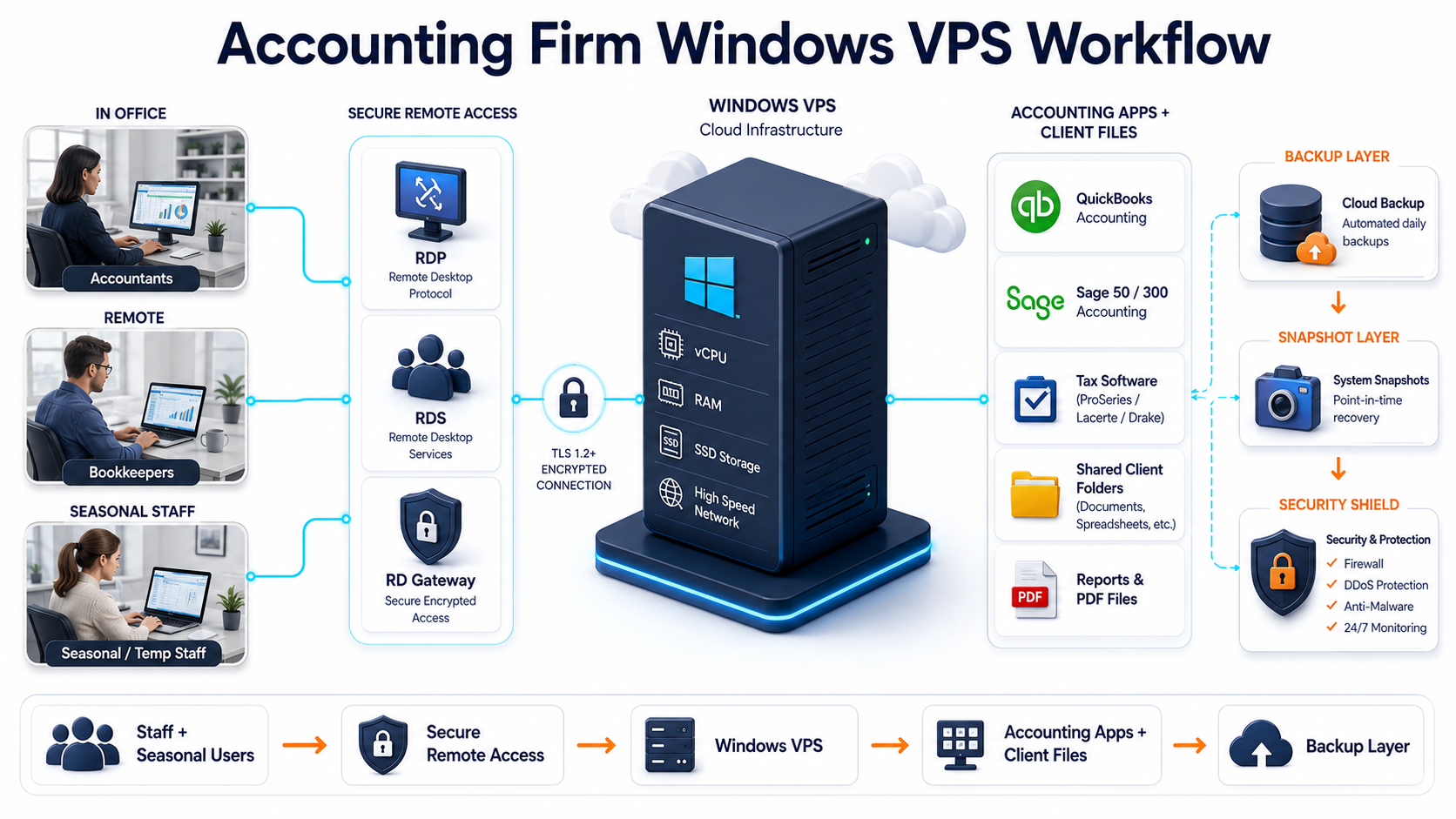
That is why a Windows VPS for an accounting firm should be planned around the full workflow:

  • staff and seasonal users;
  • QuickBooks, Sage, tax software, Access, Excel, PDFs, and reports;
  • client folders and permissions;
  • backups and restore testing;
  • secure remote access;
  • vendor licensing and support;
  • migration from old office hardware.

A Windows VPS gives the firm the infrastructure layer. The business still needs a correct app, licensing, access, and data-protection plan.
Use Raff Windows VM when your accounting firm needs a cloud-hosted Windows Server for remote access, accounting apps, client files, and business workloads.

Explore Windows VM

Quick verdict: when accounting firms should use a Windows VPS

Use this table before moving accounting work to a Windows VPS.

Accounting firm situationWindows VPS fitWhy
Staff need remote access to accounting appsStrong fitUsers can connect to one hosted Windows environment.
QuickBooks Desktop or Sage is used by multiple peopleStrong fit after vendor/licensing checkApp, files, and users can be centralized.
Tax software needs seasonal remote accessStrong fit after testingPeak-season users can work in a shared Windows environment.
Client files are spread across PCs or officesGood fitClient folders can be centralized with permissions and backups.
Local office server is old or unreliableStrong fitCloud Windows VPS can replace the server role.
Firm has multiple officesStrong fit with access planningBranch users can work from one environment.
Firm uses simple cloud accounting onlyDependsSaaS accounting tools may be enough.
Heavy local scanning/printing workflows are criticalDependsTest device redirection and workflow first.
App vendor does not support RDS/hosted useRiskyVerify support before production.
Regulatory/compliance requirements are strictNeeds planningAccess, logging, backups, encryption, and policy ownership matter.

A Windows VPS fits best when the firm still depends on Windows-based accounting workflows but wants access that is less tied to one office machine.

Why accounting firms move Windows workloads to the cloud

Accounting firms usually move to a Windows VPS because one or more of these problems become painful.

Architecture diagram showing accounting firm staff accessing QuickBooks, Sage, tax software, and client files on a Windows VPS

ProblemWhat it looks likeHow Windows VPS helps
Remote work is messyStaff remote into office PCs or use VPN workaroundsCentral Windows environment for users
Apps live on one machineQuickBooks, Sage, tax software, or Access is installed locallyApps can run on the hosted Windows server
Client files are scatteredFiles are on laptops, desktops, USB drives, or old sharesShared folders and permissions can be centralized
Backups are unclearNobody knows whether yesterday’s data can be restoredBackup and restore planning becomes part of the server model
Office server is agingHardware risk grows during tax season or month-endCloud server reduces dependency on office hardware
Multi-user access is inconsistentOnly one person can use a company file cleanlyRDS/app model can be planned properly
Seasonal staff need accessTemporary users need a secure workspaceUsers can be added, removed, and documented
MSP support is hardEvery workstation is differentCentral server is easier to document and support

For accounting firms, the business risk is not only downtime. It is also client-file access, missed deadlines, broken reports, failed backups, and unclear responsibility.

Windows VPS vs office PC vs local office server

Many accounting firms start with a simple setup: one main office PC, one bookkeeper’s workstation, or one local server.

That can work for a while. It becomes risky when remote users, multiple apps, client files, and backups grow.

AreaOffice PCLocal office serverWindows VPS
Best fitVery small officeOn-site team with local ITRemote or hybrid accounting team
Remote accessUsually awkwardVPN/RDP/firewall planning neededBuilt around remote access
App centralizationWeakGood on-siteGood for distributed users
Client filesOften scatteredCentral on LANCentral in hosted environment
BackupsOften inconsistentDepends on local processCan be designed with VM/file/app backups
Hardware riskHighMedium/high over timeNot tied to one office machine
Multi-location accessPoorComplexStronger fit
MSP supportHarderManageableEasier to standardize
GrowthLimitedHardware upgrade neededResize or split roles

The key question is not “cloud or local?” The key question is: where should the accounting workload live so staff can work reliably, securely, and recoverably?

Common accounting workloads on a Windows VPS

QuickBooks Desktop

QuickBooks Desktop is one of the most common reasons firms look for a Windows VPS.

Typical goals:

GoalPlanning point
Multiple users need accessPlan RDS users, Windows users, QuickBooks users, and permissions
Company file must stay centralizedKeep the company file close to QuickBooks inside the server session
Remote staff need accessAvoid opening company files across a slow WAN
Backups must be predictableUse QuickBooks backup plus server-level backup planning
Vendor support mattersVerify your QuickBooks license, hosting rules, and support path

For a detailed workflow, use the Raff guide: Self-Host QuickBooks Desktop Multi-User on a Windows Server VPS.

Important: Raff provides the Windows VPS infrastructure. You remain responsible for your QuickBooks license, Intuit support status, application configuration, company file backups, and data integrity.

Sage 50, Sage 100, and Sage 300

Sage workloads vary by product.

Sage productTypical fit
Sage 50Smaller accounting teams and lighter company-file workloads
Sage 100More planning around users, reporting, integrations, and sometimes SQL
Sage 300More planning around database, modules, integrations, and performance

For Sage-specific planning, use: Host Sage 50, 100, and 300 on Windows VPS.

Do not treat Sage 50, 100, and 300 as the same workload. User count, database behavior, reporting, integrations, and version support can change the right Windows VPS size.

Tax software

Tax software creates seasonal pressure. The firm may have more users, more client documents, more PDF exports, more scanning/printing, and less tolerance for downtime during filing deadlines.

A Windows VPS can help when:

NeedWhy it helps
Seasonal usersAdd documented access for temporary staff
Client filesKeep tax files and folders centralized
Remote preparersUsers connect to the hosted Windows environment
Backup disciplineProtect data before and during tax season
App consistencyKeep software versions controlled

Use the detailed guide: Windows VPS for Tax Software.

Microsoft Access and legacy accounting apps

Some firms still depend on Microsoft Access, older billing tools, legacy reporting apps, or industry-specific Windows software.

A Windows VPS can help when the app still needs Windows but users need remote access.

Key planning areas:

AreaWhat to check
Access database designSplit front-end/back-end where appropriate
File pathsAvoid broken mapped drives and local-only paths
RDS supportTest with real users
BackupsInclude database files and shared folders
Vendor supportConfirm support status
MigrationTest before cutover

Use: Windows VPS for Microsoft Access and Legacy Apps.

Remote access for accountants and bookkeepers

Remote access is usually the first reason accounting firms consider a Windows VPS.

But there are different access models.

Access modelBest fit
Admin RDPOne or two administrators managing the server
RDS Session HostStaff users need daily desktop/app sessions
RD GatewayControlled access for remote RDS users
VPN/private accessPrivate network access before connecting
RemoteAppUsers need specific apps, not a full desktop

Microsoft states that each user or device connecting to an RD Session Host running Windows Server needs a Remote Desktop Services Client Access License. That means staff Remote Desktop access should be planned separately from simple administrator RDP access.

For deeper planning, use:

  • Remote Desktop Server for Business
  • Remote Desktop Gateway vs Direct RDP
  • RDS CAL Licensing on Windows Server
  • Windows VPS sizing for remote users

Review accounting users, Remote Desktop access, RDS licensing, QuickBooks or Sage needs, backups, and migration scope before choosing your Windows VPS plan.

Talk to Windows Engineer

Client files, permissions, and shared folders

Accounting firms handle client folders, statements, tax documents, reports, PDFs, exports, and working papers. The file structure matters.

A Windows VPS can work as the central place for client files when the access model is secure and backups are planned.

Plan:

File areaRecommendation
Client folder structureStandardize naming before migration
PermissionsUse Windows groups and least privilege
Shared foldersDocument shares and who can access them
Mapped drivesKeep drive letters and paths consistent where apps depend on them
PDF exportsStore reports in predictable folders
Scans/uploadsTest device workflow before production
Archive foldersSeparate active and historical client data
Backup scopeInclude client files, app data, and database files
RetentionAlign with business and compliance requirements

Do not expose SMB file sharing directly to the public internet. Use Remote Desktop, RDS/RD Gateway, VPN/private access, or another controlled access model.

For file-specific planning, use:

  • Windows VPS as a Cloud File Server
  • File Server Migration to Windows VPS

Backups and restore testing for accounting firms

Backups are not optional for accounting workloads. A missed backup can become a client problem.

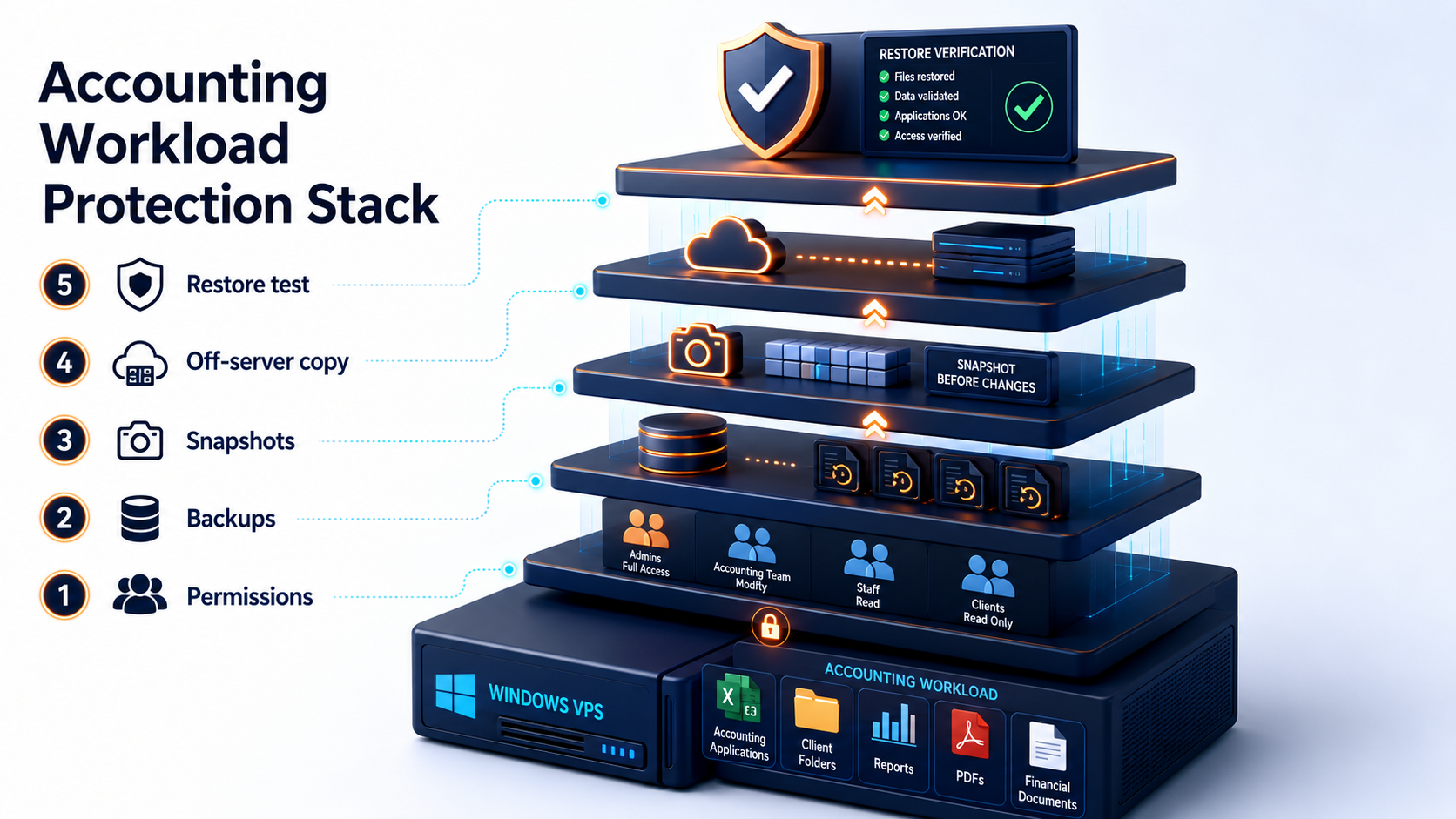
Layered protection stack showing permissions, backups, snapshots, off-server copies, and restore testing for an accounting firm Windows VPS

A backup plan should cover:

Backup layerPurpose
VM backupRecover the whole Windows VPS
Snapshot before changesRoll back before software updates or migrations
File-level backupRestore client folders and documents
Application backupProtect QuickBooks, Sage, tax, or Access data using app-safe methods
SQL/database backupProtect SQL-backed workloads correctly
Off-server copyReduce risk from server-level or account-level failure
Restore testProve that recovery works

Accounting firms should not rely on only one backup layer. Application-level backups and server-level backups solve different problems.

Use: Windows VPS Backup Strategy for Small Businesses.

Protect accounting workloads with backup, snapshot, and restore planning before client files and production apps move to a Windows VPS.

Explore Data Protection

Security planning for accounting data

Accounting firms handle sensitive client and business data. A Windows VPS should be secured before production use.

Minimum planning:

Security areaRecommendation
User accountsNamed users, not shared logins
Admin accessSeparate admin accounts from daily users
PasswordsStrong credentials and offboarding process
RDP exposureAvoid broad direct RDP exposure
RD Gateway/VPNUse controlled remote access where appropriate
FirewallRestrict allowed ports and sources
PermissionsUse groups and least privilege
BackupsRestrict who can delete or modify backups
UpdatesSchedule Windows and app patching
LogsReview failed sign-ins and access events
DevicesTest printers, scanners, and local drive redirection policy
DocumentationRecord users, apps, backups, owners, and support process

Security is not only a technical setting. It is also user onboarding, offboarding, password discipline, access review, backup ownership, and vendor support.

Use: Windows Server Hardening Checklist.

Sizing a Windows VPS for an accounting firm

Do not size the server only by total employee count. Size it by concurrent users and workload type.

Use this as a starting point:

Accounting workloadStarting sizeWhen to move up
1 admin or solo bookkeeper2 vCPU / 4 GB RAMIf apps, PDFs, or reports run on the server
2-3 light accounting users4 vCPU / 8 GB RAMIf users keep browsers, PDFs, Office apps, and accounting apps open
3-5 active app users4 vCPU / 16 GB RAMBetter for QuickBooks, Sage, tax software, Access, and file work
5-10 active users8 vCPU / 32 GB RAMUseful when the server becomes a daily shared workspace
Tax season workloadSize for peak seasonSeasonal users and reports increase pressure
Sage 100/300 or SQL-backed workload8-16 vCPU / 32-64 GB RAMConsider database load, reports, and integrations

Plan storage for:

  • accounting app data;
  • company files;
  • tax files;
  • client folders;
  • PDF reports;
  • Excel exports;
  • user profiles;
  • scanned documents;
  • database files;
  • logs;
  • backups;
  • 12 to 24 months of growth.

For deeper sizing, use: Windows VPS sizing for remote users.

Pricing factors for accounting firms

The monthly VM price is only one part of the cost.

Cost factorWhy it matters
CPU and RAMActive users, reports, accounting apps, tax tools
StorageClient files, databases, reports, backups, growth
BackupsRetention, restore testing, off-server copies
Windows licensingDepends on provider and deployment model
RDS CALsStaff Remote Desktop sessions may require licensing
App licensesQuickBooks, Sage, tax software, Microsoft 365 Apps
SQL ServerSome workloads need SQL licensing and separate backup planning
MigrationFiles, apps, users, permissions, databases, cutover
SupportWindows, RDS, app, printer, and user troubleshooting
SecurityAccess controls, hardening, monitoring, offboarding

A very cheap Windows VPS can become expensive if it is too slow, lacks backups, or creates downtime during filing deadlines.

For the cost model, use: Windows VPS Pricing Explained.

Compare Raff Windows VM plans when sizing CPU, memory, storage, backups, and monthly cost for your accounting firm.

View Pricing

Migration path for accounting firms

If the firm currently runs accounting software on an office server or workstation, migrate carefully.

Use this path:

  1. Inventory users, apps, client files, company files, databases, printers, scanners, and integrations.
  2. Confirm vendor support and licensing for the planned hosted/RDS model.
  3. Choose the Windows VPS size.
  4. Build the Windows VPS.
  5. Configure access, firewall, users, and backups.
  6. Install accounting and tax applications.
  7. Copy test data first.
  8. Test with real users from real locations.
  9. Test printing, scanning, PDF exports, and reporting.
  10. Run a restore test.
  11. Schedule cutover outside busy hours.
  12. Move final data.
  13. Keep the old environment available for rollback.
  14. Monitor performance and support tickets after cutover.

Do not migrate during tax season unless there is a clear emergency and rollback plan.

Use:

  • Windows Server Migration Checklist for Small Businesses
  • Local Office Server to Cloud Windows VPS Migration
  • File Server Migration to Windows VPS

When a Windows VPS is not the right fit

A Windows VPS is useful, but not universal.

Pause when:

SituationBetter next step
Firm only uses cloud accounting appsSaaS may already solve the need
App vendor forbids hosted/RDS useDo not proceed without support path
Internet is unreliableFix connectivity or design fallback
Heavy scanning/printing workflow is untestedTest devices first
Firm needs formal compliance architectureDesign access, logging, encryption, policy, and audit process
High availability is mandatoryPlan redundancy, failover, and recovery architecture
Users need local offline work all dayCloud desktop may frustrate users
Licensing is unclearResolve licensing before production

The right answer may be SaaS accounting, local server, Windows VPS, or a hybrid model. Choose based on workflow, not hype.

How Raff fits accounting firms

Raff fits accounting firms that need a cloud-hosted Windows Server environment for remote staff, QuickBooks Desktop, Sage, tax software, Access or legacy apps, client folders, reports, backups, and office server replacement.

Raff’s Windows VM product page currently highlights Windows Server 2019, 2022, and 2025 options, full administrator access with RDP, a 6-month evaluation license to get started, 24/7 expert support, 99.9% uptime SLA, and Windows VPS hosting from $9.99/month.

Raff can provide the Windows VM foundation. Your firm or MSP should still plan:

  • application licensing;
  • RDS CAL requirements;
  • user access;
  • permissions;
  • backups;
  • restore testing;
  • vendor support;
  • client-file structure;
  • security ownership;
  • migration and rollback.

That is the clean way to use Raff: use the platform for the Windows Server foundation, then design the accounting workload properly.

Create a Raff Windows VM when your accounting firm is ready to run remote users, accounting apps, client files, and Windows workloads in the cloud.

Deploy Windows Now

Recommended path by accounting firm situation

SituationRead next
You need the broad SMB decision guideWindows VPS Hosting for Small Businesses
You need a remote desktop decision guideRemote Desktop Server for Business
You need pricing clarityWindows VPS Pricing Explained
You use QuickBooks DesktopSelf-Host QuickBooks Desktop Multi-User on a Windows Server VPS
You use SageHost Sage 50, 100, and 300 on Windows VPS
You use tax softwareWindows VPS for Tax Software
You need shared client foldersWindows VPS as a Cloud File Server
You are replacing office hardwareCloud Windows Server vs Local Office Server
You are moving filesFile Server Migration to Windows VPS
You need backupsWindows VPS Backup Strategy for Small Businesses
You need secure remote accessRemote Desktop Gateway vs Direct RDP
You need hardeningWindows Server Hardening Checklist

Final accounting firm checklist

Before moving accounting work to a Windows VPS, confirm:

CheckDone
Accounting and tax applications listed☐
Vendor support checked☐
App licenses reviewed☐
RDS CAL requirements reviewed☐
Active and seasonal users estimated☐
CPU/RAM/storage starting point chosen☐
Client folder structure documented☐
File permissions planned☐
Backup layers defined☐
Restore test planned☐
Remote access model chosen☐
Printers/scanners tested☐
Security hardening reviewed☐
Migration window selected☐
Rollback plan documented☐
Support owner assigned☐

If the checklist feels unclear, do not treat the environment as production yet.

What's next

  • Explore Raff Windows VM when you are ready to compare Windows VM options.
  • Review Raff pricing before choosing CPU, RAM, storage, and monthly cost.
  • Read Windows VPS Hosting for Small Businesses for the broader SMB guide.
  • Read Remote Desktop Server for Business before rolling out remote staff access.
  • Read Windows VPS Pricing Explained before budgeting the full environment.
  • Read Self-Host QuickBooks Desktop Multi-User on a Windows Server VPS if your firm uses QuickBooks Desktop.
  • Read Host Sage 50, 100, and 300 on Windows VPS if your firm uses Sage.
  • Read Windows VPS for Tax Software if filing-season workload is the main driver.
  • Read Windows VPS Backup Strategy for Small Businesses before moving production data.

Sources

  • Raff — Windows VM product page
  • Raff — Pricing
  • Raff — Windows Server Hub
  • Raff — Self-Host QuickBooks Desktop Multi-User on a Windows Server VPS
  • Raff — Host Sage 50, 100, and 300 on Windows VPS
  • Raff — Windows VPS for Tax Software
  • Microsoft Learn — Remote Desktop Services overview in Windows Server
  • Microsoft Learn — License Remote Desktop Services with Client Access Licenses
  • Microsoft Learn — Deploy Remote Desktop Gateway role for Remote Desktop Services
  • Microsoft Learn — What is SMB File Sharing for Windows and Windows Server?
  • Microsoft Learn — Security baselines guide
Was this article helpful?

Published July 8, 2026 · Updated July 8, 2026

Back to hub
On this page
Quick verdict: when accounting firms should use a Windows VPSWhy accounting firms move Windows workloads to the cloudWindows VPS vs office PC vs local office serverCommon accounting workloads on a Windows VPSRemote access for accountants and bookkeepersClient files, permissions, and shared foldersBackups and restore testing for accounting firmsSecurity planning for accounting dataSizing a Windows VPS for an accounting firmPricing factors for accounting firmsMigration path for accounting firmsWhen a Windows VPS is not the right fitHow Raff fits accounting firmsRecommended path by accounting firm situationFinal accounting firm checklistWhat's nextSources

Related articles

run your softwareWindows VPS Hosting for Small BusinessesLearn when a Windows VPS makes sense for small businesses that need Remote Desktop access, Windows apps, shared files, backups, migration, and predictable cloud infrastructure.15 min read7/8/2026run your softwareWindows VPS for MSP Client EnvironmentsLearn how MSPs can use Windows VPS environments for client apps, Remote Desktop, backups, security, documentation, and repeatable deployments.15 min read7/3/2026run your softwareWindows VPS as a Cloud File Server: What Small Businesses Should KnowLearn when a Windows VPS can work as a cloud file server for small businesses, including SMB access, Remote Desktop, backups, security, storage, and migration planning.15 min read7/3/2026