
Workloads & Use Cases
Workloads & Use Casesbeginner26 min read·Updated Jul 24, 2026

Windows VPS for Property Management Companies: Apps, Files, and Remote Access

Learn when a Windows VPS fits property management companies that need shared business applications, lease and owner records, maintenance workflows, accounting access, backups, and remote teams.

Genuine, fully-licensed Windows
Spin up a Windows Server: full admin, RDP-ready
Genuine Windows Server 2019, 2022, or 2025 with full administrator access. We handle the Microsoft licensing, billed monthly with nothing to buy upfront.

A Windows VPS for property management companies can centralize supported Windows business applications, accounting tools, lease and owner records, maintenance documents, reports, shared folders, and remote user sessions in one cloud-hosted Windows Server environment.

It is strongest for small and midsize property managers that still depend on Windows-based software, mapped drives, local databases, shared documents, or an aging office server. It is less useful when the company already runs entirely on vendor-hosted browser applications and cloud document platforms.

Raff Technologies provides the Windows VM infrastructure. The property management company or its MSP remains responsible for application compatibility, software licensing, Remote Desktop Services licensing, user permissions, database administration, backups, security, migration, and recovery.

This article is different from Windows VPS for Real Estate Offices. The real estate article focuses on brokerage and transaction workflows. This guide focuses on recurring property operations: leases, rent and owner reporting, maintenance coordination, vendor records, property-level permissions, and multi-location staff access.
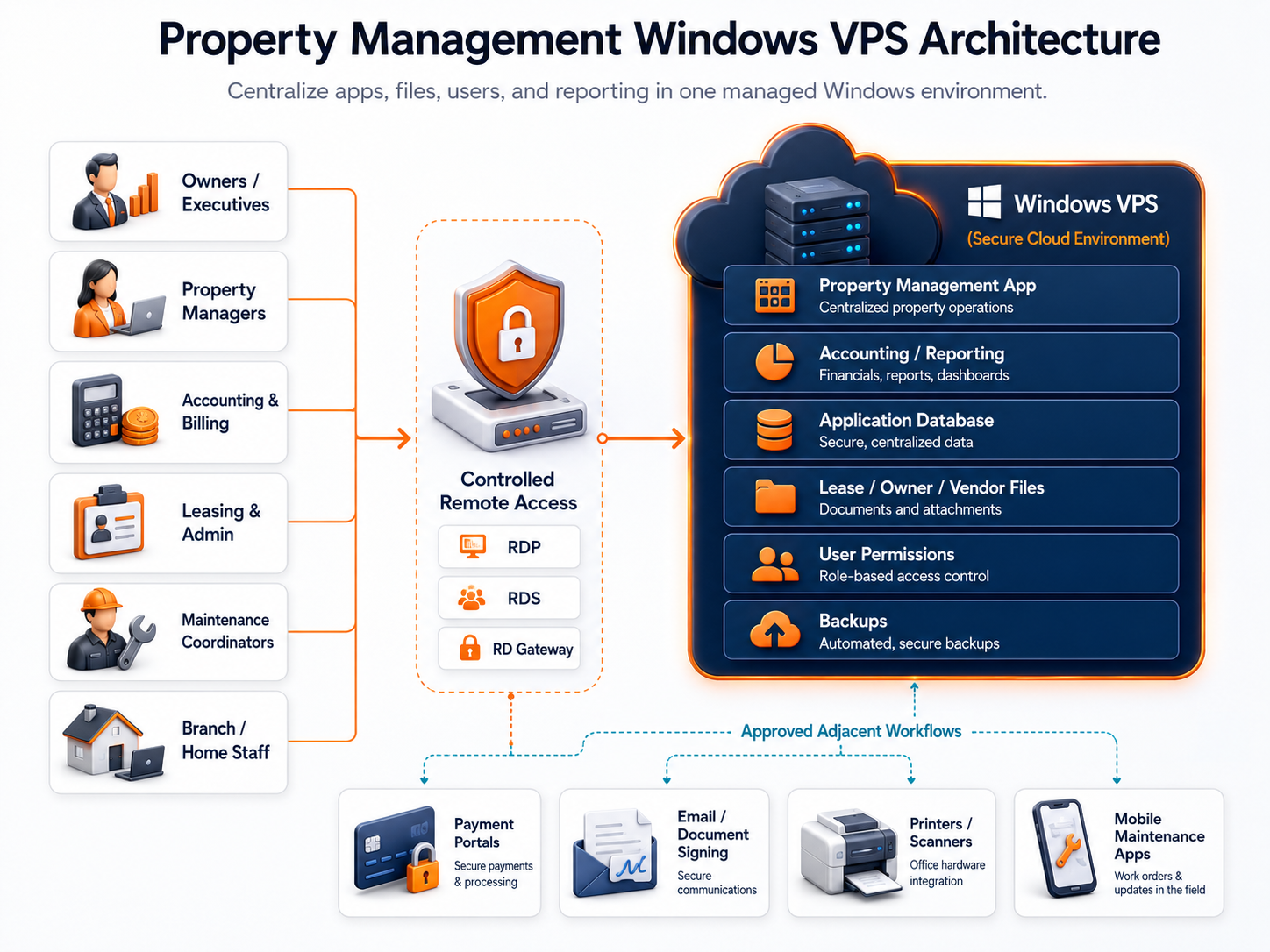
Centralize property apps, records, users, and reporting on Windows.

Quick verdict: when a Windows VPS fits property management

Use this table before moving a property management workload to a Windows VPS.

Property management situationWindows VPS fitWhy
The core application supports Windows Server or RDSStrong fit after vendor confirmationThe app, database, reports, and users can share one hosted environment.
Managers, accountants, and maintenance coordinators work remotelyStrong fitAuthorized users can reach the same Windows environment from different locations.
Lease, owner, vendor, and property files are scatteredStrong fitShared folders and permissions can be centralized.
An aging office server hosts property or accounting softwareStrong fit after dependency reviewThe workload can move away from one physical machine.
Several offices manage the same propertiesStrong fit with connectivity planningTeams can work from one controlled environment.
The company uses desktop accounting alongside property softwareGood fitAccounting tools, reports, exports, and files can remain close together.
Check printing, document scanning, or local printers are criticalTest before productionDriver, redirection, security, and workflow behavior vary.
The main property platform is already vendor-hosted SaaSDependsA Windows VPS may only be useful for accounting, files, legacy tools, or integrations.
The vendor prohibits hosted or multi-user deploymentPoor fitUse a supported deployment model.
The business needs application-level high availabilityNot a single-VM decisionDesign redundancy, database recovery, and failover separately.

The strongest candidate is a residential, commercial, or mixed-property management company that needs one controlled Windows environment for staff, business applications, records, reports, and backups.

The goal is not to move every process into Remote Desktop. The goal is to centralize the Windows workloads that are currently difficult to secure, support, and recover.

Why property management companies outgrow office-based systems

Many property management companies begin with a practical setup: one office server, a shared drive, desktop accounting software, a property application, and several staff PCs.

That model becomes harder to manage as the portfolio, team, and document volume grow.

Common problemWhat it looks like in practiceHow a Windows VPS can help
Property software is tied to one officeRemote staff depend on VPN workarounds or office PCsA supported application can run in one cloud-hosted Windows environment.
Files are organized differently by employeeLease, inspection, owner, and vendor records are difficult to findShared folders and permissions can be standardized.
Accounting and property data are separatedStaff export and email files between departmentsApplications and approved shared folders can remain close together.
The office server is agingHardware, power, storage, and warranty risks increaseThe workload moves away from one physical server.
Several branches maintain separate copiesProperty records and reports become inconsistentUsers can work from one controlled environment.
Former employees retain access or copiesOffboarding is incompleteNamed users and central permissions are easier to review.
Backups are unclearNobody can prove that the application or database can be restoredBackup layers and restore tests can be documented.
Growth requires another server purchaseMore users, properties, reports, and documents increase loadA VM can be resized and storage can be expanded.

The business benefit is not simply replacing an office server with a cloud server.

It is giving property managers, accounting staff, leasing teams, maintenance coordinators, and administrators one controlled place to reach the applications and records they use every day.

Property management workloads that fit a Windows VPS

Property management and accounting applications

A Windows VPS can host property management or accounting software when the vendor supports the operating system, hosted deployment, database, and multi-user access model.

Potential workloads include:

  • property and unit records;
  • tenant or resident records;
  • owner records;
  • lease administration;
  • charges and payment records;
  • accounts receivable and payable;
  • owner statements;
  • general ledger and financial reports;
  • security deposit records;
  • vendor records;
  • maintenance costs;
  • property budgets;
  • bank reconciliation tools;
  • year-end exports;
  • custom reports;
  • document generation.

Do not assume that every desktop property application supports Windows Server or Remote Desktop Services. Confirm the exact version, database engine, licensing model, and support terms with the vendor before migration.

When accounting is the primary workload, read Windows VPS for Accounting Firms.

Lease, owner, property, and vendor documents

Property management companies generate a large volume of operational records.

A Windows VPS can centralize:

  • leases and amendments;
  • owner agreements;
  • property and unit documents;
  • move-in and move-out records;
  • inspection reports;
  • maintenance photos and attachments;
  • vendor contracts;
  • invoices and purchase records;
  • insurance certificates;
  • notices and correspondence;
  • property reports;
  • owner statements;
  • bank and accounting exports;
  • archived tenant records;
  • templates and forms.

Moving a disorganized file structure to the cloud does not fix it. Clean up duplicate folders, naming rules, property codes, access groups, retention requirements, and archive ownership before migration.

Read Windows VPS as a Cloud File Server when shared files are the main problem.

Maintenance and work-order administration

A Windows VPS can support the administrative side of maintenance operations when the software is compatible.

Potential uses include:

  • work-order entry;
  • assignment and scheduling;
  • vendor contact records;
  • estimate and invoice review;
  • property notes;
  • maintenance history;
  • recurring maintenance schedules;
  • purchase approvals;
  • inspection records;
  • photos and attachments;
  • cost reporting;
  • exported work lists.

Mobile maintenance applications and vendor portals may remain separate SaaS systems. The Windows VPS can still host the back-office application, reporting tools, accounting integration, or shared records when the workflow supports it.

Owner reporting and month-end work

Month-end can create more server load than normal daily use.

The environment may need to process:

  • owner statements;
  • property-level income statements;
  • rent-roll reports;
  • delinquency reports;
  • accounts payable batches;
  • bank reconciliation;
  • management fee calculations;
  • vendor payment reports;
  • general ledger exports;
  • PDF generation;
  • spreadsheet exports;
  • archived report packages.

Size for reporting peaks, database activity, and PDF or spreadsheet generation, not only the number of people who can log in.

Remote and multi-location staff

Property management work is often distributed across a main office, leasing locations, property sites, home offices, and external accounting or IT support.

A centralized Windows VPS can give authorized users access to the same:

  • supported property application;
  • accounting tools;
  • reports;
  • shared folders;
  • templates;
  • property records;
  • vendor documents;
  • maintenance records;
  • archived files;
  • administrative utilities.

Use named accounts and role-based permissions. Property managers, accountants, leasing staff, maintenance coordinators, executives, and IT providers should not automatically receive the same desktop or folder access.

Read Windows VPS for Multi-Location Small Businesses for the broader branch-office model.

A practical property management architecture

A small or midsize property management company may use this pattern:

Property managers, accounting staff, leasing teams, maintenance coordinators, and remote staff accessing applications, files, databases, permissions, and backups through a Windows VPS

The cloud Windows environment becomes the shared business workspace. Browser-based services and local devices remain separate where that design is safer or better supported.

A good architecture answers seven questions:

  1. Which application is the source of truth for property and financial records?
  2. Which users need a full desktop, a RemoteApp, or only shared files?
  3. Which integrations require local software or a service account?
  4. Which documents must remain close to the application?
  5. Which printers, scanners, or check-printing devices are business-critical?
  6. What happens when an office or property site loses internet access?
  7. Who owns recovery when the application, database, integration, or server fails?

Remote Desktop access should follow job roles

Microsoft describes Remote Desktop Services as a Windows Server platform for delivering managed desktops and applications to users in offices, homes, branches, and partner locations.

A property management company should design access around the actual job.

User roleLikely access need
Owner or executivePortfolio reports, approvals, financial visibility, and dashboards
Property managerProperty records, leases, work orders, vendor information, and reports
Accounting teamReceivables, payables, bank reconciliation, owner statements, and exports
Leasing staffUnit records, applicant or tenant documents, templates, and approved reports
Maintenance coordinatorWork orders, vendor records, schedules, costs, and attachments
Administrative staffShared documents, forms, reports, and data entry
External accountantRestricted accounting access for an approved period
MSP or IT providerAdministration, patching, monitoring, backups, and recovery

If employees use an RD Session Host for daily desktop or RemoteApp sessions, Microsoft requires an appropriate RDS Client Access License for each connecting user or device. Administrative sessions are not a substitute for a licensed multi-user environment.

Use these related guides:

Plan users, applications, integrations, storage, backups, and migration first.

Printers, scanners, check printing, and integrations need testing

A migration can be technically successful while daily office workflows still fail.

Property management teams may depend on:

  • office printers;
  • PDF printers;
  • document scanners;
  • check printers;
  • MICR-capable printing workflows;
  • signature pads;
  • USB licensing devices;
  • local email clients;
  • browser extensions;
  • document-signing tools;
  • payment portals;
  • banking portals;
  • watched folders;
  • local export or import utilities;
  • spreadsheet templates;
  • service accounts and scheduled tasks.

Remote Desktop can redirect some printers, drives, clipboard content, and other resources, but policy, client settings, drivers, application behavior, and the device communication method affect the result.

Test the complete business process, not only whether Windows detects the device.

DependencyAcceptance test
Office printerCorrect queue, paper size, duplex settings, speed, and user access
PDF workflowCorrect file name, save location, permissions, and application attachment behavior
Document scannerTWAIN or WIA requirement, multi-page scans, resolution, naming, and upload path
Check printingApproved printer, paper, alignment, security controls, and accounting-software support
Signature deviceVendor support, redirection method, and session behavior
Payment or bank portalBrowser compatibility, authentication, export or upload workflow, and user role
Email integrationSupported client, SMTP or API settings, attachment behavior, and service account
Document signingBrowser or desktop requirement, file path, and final document storage
Scheduled exportService account, file path, schedule, error handling, and duplicate prevention
Application integrationSupported API, ODBC, file transfer, service, or vendor-approved method

Do not weaken security controls only to make an old workflow function. When a local device or integration cannot be supported safely, keep that component local or replace the workflow.

Application databases and integrations determine real performance

The visible desktop application may not be the main resource consumer. Database queries, owner reports, payment imports, document generation, and month-end jobs can create more load than user sessions.

Document:

  • database engine and version;
  • database size and monthly growth;
  • number of properties and units;
  • peak concurrent users;
  • reporting peaks;
  • payment and bank imports;
  • accounting exports;
  • scheduled jobs;
  • integrations and APIs;
  • ODBC connections;
  • service accounts;
  • file paths and mapped drives;
  • document-generation tools;
  • transaction-log growth;
  • database recovery model;
  • backup windows;
  • restore process.

Keep the application and database close to each other. Avoid placing a file-based database across a wide-area network path. If the database becomes large or business-critical, consider separating Remote Desktop, application, and database roles.

SQL Server backup and restore planning must match the database recovery model. A VM-level backup alone does not replace application-aware database protection.

Size for concurrent users and peak reporting

Do not size a property management Windows VPS by total employee count. Size it by concurrent sessions, application requirements, database activity, reports, integrations, and file growth.

Use the following only as initial test ranges:

WorkloadInitial test sizeIncrease resources when
One administrator or reporting user2 vCPU / 4 GB RAMThe app, browser, PDF tools, and reports compete for memory
2-3 light office users4 vCPU / 8 GB RAMSeveral sessions and documents stay open together
3-5 active business users4 vCPU / 16 GB RAMProperty app, accounting, database, and reports share one VM
6-10 active users8 vCPU / 32 GB RAMThe server becomes a daily shared workspace
SQL-backed property or accounting platform8-16 vCPU / 32-64 GB RAMDatabase working set, reports, imports, and integrations need more capacity
Document-heavy portfolioSize storage separatelyLeases, inspections, invoices, photos, and reports grow quickly
High-availability requirementMulti-server assessmentOne VM does not provide application-level failover

For a five-user office, 4 vCPU and 16 GB RAM can be a reasonable test starting point. It is not a performance guarantee.

Raff's current sizing documentation recommends dedicated CPU plans for Windows responsiveness and lists 4 vCPU / 8 GB as the starting infrastructure plan for a light multi-user RDP terminal server. Property management workloads commonly need more memory once accounting tools, databases, browsers, PDFs, and reports run together.

Measure during representative workflows:

  • user logon time;
  • application launch time;
  • property or tenant lookup time;
  • posting and save time;
  • owner statement generation;
  • rent-roll report duration;
  • bank or payment import duration;
  • PDF generation;
  • CPU peaks;
  • available memory;
  • disk latency;
  • database waits;
  • backup duration;
  • session disconnects;
  • storage growth.

Read Windows VPS Sizing for Remote Users before choosing a production plan.

Plan storage around records, profiles, and growth

Property management environments can grow faster than expected because application data and documents expand at different rates.

Plan capacity for:

  • Windows and application installation;
  • property management database;
  • accounting database;
  • transaction logs;
  • lease and owner documents;
  • inspection files and photos;
  • vendor invoices and contracts;
  • maintenance attachments;
  • statements and reports;
  • scanned documents;
  • user profiles;
  • temporary PDF and export files;
  • integration logs;
  • backup staging;
  • migration copies;
  • 12 to 24 months of growth.

Keep the operating system, database, documents, and backups logically separated where the application supports it. Raff Volumes can add block storage that outlives the VM, but volume layout and backup scope should be designed before moving production data.

Security must protect property, financial, and personal records

A property management Windows environment may contain personal contact information, lease records, owner records, financial data, bank exports, vendor information, maintenance records, credentials, and remote-access pathways.

Minimum controls include:

Security areaPlanning requirement
IdentitiesNamed users, strong authentication, and prompt offboarding
AdministrationSeparate privileged accounts from daily user accounts
Remote accessUse controlled RDS, RD Gateway, VPN, or private-access design
FirewallPermit only required ports and sources
PermissionsLimit access by role, property, department, or responsibility
Shared foldersUse groups and least privilege instead of broad access
Service accountsDocument purpose, ownership, permissions, and credential rotation
UpdatesPlan Windows, application, browser, and integration maintenance
LoggingReview failed logons, account changes, and unusual access
BackupsProtect backup deletion rights and recovery credentials
Vendor accessMake access approved, time-bound, and monitored where possible
DocumentationRecord owners, dependencies, recovery order, and support contacts

Do not expose unrestricted RDP, SMB, or database ports directly to the public internet. Microsoft recommends blocking inbound SMB from the internet and using segmentation and controlled access for file-sharing traffic.

Microsoft's Windows Server security baselines provide a standardized hardening starting point, but baseline changes can affect legacy applications and must be tested before production.

This article is not legal, privacy, payment-security, housing, or compliance advice. Review applicable requirements with qualified advisers and the relevant software vendors.

Read Windows Server Hardening Checklist before production rollout.

Backups must protect the server, database, files, and recovery process

A property management backup plan needs more than a copy of the Windows disk.

Use layered protection:

Protection layerPurpose
Application-aware database backupProtect property, accounting, payment, and reporting data correctly
File backupRecover deleted or changed leases, reports, invoices, and records
VM backupRecover the broader Windows environment
Snapshot before changeCreate a short-term rollback point before updates or migration
Off-server copyReduce risk from server, account, or ransomware incidents
Retention policyPreserve recovery points for the required business period
Restore testProve that applications, data, permissions, and workflows are usable
Recovery documentationPreserve owners, credentials, sequence, dependencies, and contacts

A successful backup notification does not prove the operation can resume.

Restore the database to a test environment. Open the property application. Confirm property, lease, owner, and accounting records. Generate an owner statement. Open shared documents. Validate permissions, integrations, scheduled jobs, and printing.

Raff VMs support point-in-time snapshots and automated daily or weekly backup schedules with configurable retention. Application owners still need to define database protection, file-level recovery, off-server copies, and restore procedures.

Read Windows VPS Backup Strategy for Small Businesses before moving production records.

Protect property applications, databases, documents, and recovery points.

Internet outages and business continuity need a fallback

A cloud-hosted Windows environment depends on connectivity from the office or property site.

Define what happens when users cannot reach the server.

Possible fallback measures include:

  • a secondary office internet connection;
  • cellular failover;
  • locally available emergency contact information;
  • locally stored building and vendor emergency procedures;
  • approved manual maintenance intake;
  • a process for recording payments or documents for later entry;
  • offline copies of critical property instructions;
  • a reconciliation process after connectivity returns;
  • a defined point at which financial or data-entry work pauses.

Do not assume mobile data is a recovery plan until it has been tested from the actual office. Signal strength, carrier congestion, VPN behavior, firewall rules, and data limits can change the result.

The business should know whether a one-hour outage delays reporting, blocks leasing administration, stops payment posting, prevents maintenance coordination, or halts the whole office. That impact determines the connectivity and recovery design.

Migration should start with discovery and one bounded workflow

A property management migration is safer when the first phase has a clear scope.

1. Inventory the current environment

Document:

  • applications and versions;
  • databases;
  • users and groups;
  • properties, units, and portfolio size;
  • file shares and permissions;
  • mapped drives;
  • printers and scanners;
  • check-printing workflow;
  • email and document-signing integrations;
  • payment and banking exports or imports;
  • scheduled tasks and services;
  • ODBC connections;
  • service accounts;
  • storage usage and growth;
  • backup jobs;
  • remote offices and home users;
  • recovery requirements;
  • vendor and MSP contacts.

2. Classify every dependency

Mark each item as:

  • cloud candidate;
  • local office dependency;
  • browser-based external service;
  • integration between systems;
  • unsupported or unknown;
  • replacement candidate.

Unknown dependencies should block production cutover until they are tested.

3. Confirm vendor and licensing support

Ask the application vendor:

  • Is Windows Server supported?
  • Is virtual or hosted deployment supported?
  • Is Remote Desktop Services supported?
  • Which database edition and version are required?
  • Are multiple concurrent users supported?
  • Are printers, scanners, check printing, and PDF workflows supported remotely?
  • Does the product require a USB device, local service, or desktop Office installation?
  • Are payment, bank, email, and document-signing integrations supported?
  • Will the vendor support the application after migration?

4. Build a parallel test environment

Create a test Windows VPS, install the software, restore a copy of the data, and create non-administrator accounts for representative roles.

Test from the office, home, branch, and external accountant or MSP networks where applicable.

5. Validate complete workflows

Test:

  • login and authentication;
  • application launch;
  • property and tenant lookup;
  • lease and document access;
  • charge or payment entry using test data;
  • owner statement generation;
  • rent-roll and financial reports;
  • invoice entry and approval;
  • work-order entry;
  • PDF generation;
  • printing and scanning;
  • check printing where applicable;
  • payment and bank imports or exports;
  • email and document-signing workflow;
  • file open and save;
  • scheduled jobs;
  • backup;
  • database restore;
  • loss of connectivity;
  • rollback.

6. Schedule a low-risk cutover

Avoid month-end, owner reporting periods, major portfolio onboarding, rent-processing peaks, or other critical business windows.

Run the final backup and data synchronization. Validate the destination. Release users in a controlled order. Keep the previous environment available until the business owner, application owner, accounting owner, and IT owner approve the new workflow.

7. Monitor the first operating cycle

Track performance and support issues through a normal reporting, accounting, maintenance, and leasing cycle.

Monitor:

  • CPU and memory;
  • disk capacity and latency;
  • database performance;
  • session disconnects;
  • application errors;
  • printing and scanning issues;
  • integration failures;
  • backup success;
  • restore readiness;
  • support tickets;
  • user feedback.

Use the Windows Server Migration Checklist for Small Businesses and Local Office Server to Cloud Windows VPS Migration before production cutover.

When a Windows VPS is not the right fit

A Windows VPS should not be forced into every property management workflow.

SituationBetter next step
The company already uses a complete vendor-hosted SaaS platformUse the SaaS platform unless another Windows workload justifies a server
The vendor prohibits Windows Server, cloud, or RDS deploymentUse the supported model or replace the application
Critical workflow depends on unsupported local hardwareKeep the dependent component local or redesign the workflow
Internet outages cannot interrupt office workPreserve local capability or build tested connectivity redundancy
Check printing cannot be secured or supported remotelyKeep the approved printing workflow local
The database requires high availabilityDesign database redundancy and failover rather than relying on one VM
Security ownership is undefinedAssign access, patching, backup, and incident owners first
Restore testing cannot be completedKeep the environment in test status
Users only need browser applications and cloud documentsAvoid adding Windows infrastructure without a clear benefit
No one owns application vendor supportResolve support responsibility before migration

The right answer may be SaaS, Windows VPS, local server, or a hybrid design. Place each workload where it can be supported and recovered.

How Raff supports property management workloads

Raff fits property management companies that need a cloud-hosted Windows Server foundation for supported business applications, accounting, shared documents, remote users, multi-location access, and replacement of an aging office server.

Raff Windows VMs provide selectable Windows Server templates, Administrator and RDP access, dedicated or shared CPU plan families, SSD storage, optional attached Volumes, snapshots, automated backups, security groups, VPC networking, performance metrics, VM resizing, and human support.

The property management company or its MSP remains responsible for:

  • application compatibility;
  • vendor licensing;
  • RDS licensing;
  • user roles and offboarding;
  • database administration;
  • printer and scanner testing;
  • check-printing controls;
  • payment, bank, email, and signing integrations;
  • backup retention;
  • restore testing;
  • Windows and application updates;
  • security hardening;
  • migration and rollback;
  • business continuity;
  • legal and compliance decisions.

Raff should be the infrastructure layer under a documented property management workflow, not a shortcut around vendor support, licensing, security, or recovery planning.

SituationRecommended path
One office has an aging property-management serverTest the application, database, users, documents, backups, and restore on one Windows VPS
Managers and accounting staff need remote accessUse a controlled RDS or remote-access design with named users and licensing
Several offices manage the same portfolioCentralize the supported application, then test every site's connectivity and workflow
Shared property documents are the main problemUse a structured file-server design with permissions and backup
Accounting and property software run togetherSize around month-end reporting, database memory, and exports
Printers, scanners, and checks are criticalTest exact models, drivers, permissions, and user sessions before cutover
The main property platform is SaaSUse a Windows VPS only for workloads SaaS does not solve
SQL Server drives performanceSize around database memory, reports, jobs, and recovery requirements
High availability is mandatoryEvaluate a multi-server application and database architecture

Final property management Windows VPS checklist

Before putting the environment into production, confirm:

CheckDone
Applications and versions inventoried
Vendor support for Windows Server confirmed
Hosted and RDS licensing reviewed
Active users and roles documented
Properties, units, and reporting peaks documented
Database requirements documented
Shared folders and permissions planned
Lease, owner, vendor, and maintenance records classified
Printers and PDF workflows tested
Scanners tested
Check-printing workflow reviewed
Payment, bank, email, and signing integrations tested
Service accounts and scheduled jobs documented
Network flows and firewall rules documented
Internet-outage fallback tested
CPU, RAM, and storage starting point selected
Storage growth estimated
Application-aware database backups configured
File-level and off-server recovery copies planned
File, database, and application restores tested
Migration window approved
Rollback path documented
System, accounting, security, and recovery owners named
Old environment retained until final approval

An incomplete checklist means the system is still a test environment.

FAQ

Can a property management company use a Windows VPS?

Yes. A property management company can use a Windows VPS for supported Windows applications, accounting tools, shared documents, reports, databases, and remote users when licensing, security, backups, and workflow testing are completed.

Is a Windows VPS useful when the property software is already SaaS?

Sometimes. If the main platform is already vendor-hosted, a Windows VPS may still help with desktop accounting, legacy applications, reports, shared files, integrations, or office-server replacement. Do not add a server without a clear workload.

Can property managers and accountants use the same Windows VPS?

Yes, when the server is sized for concurrent users and the applications support multi-user Windows Server or RDS deployment. Use named accounts, role-based permissions, and appropriate RDS licensing.

Do employees need RDS CALs?

Users or devices connecting to an RD Session Host for daily desktop or RemoteApp sessions require appropriate RDS CALs. Administrative RDP sessions are different from a licensed multi-user work environment.

Can a Windows VPS store leases and property documents?

Yes. A Windows VPS can host structured shared folders with Windows permissions and backups. Do not expose SMB broadly to the public internet, and plan file-level recovery in addition to VM backups.

Will local printers and scanners work through Remote Desktop?

Some printers, drives, and devices can be redirected, but policies, drivers, client settings, vendor support, and application behavior affect the result. Test the exact model and complete workflow before production.

What size Windows VPS does a property management office need?

A light 2-3 user test may start around 4 vCPU and 8 GB RAM. A 3-5 user property and accounting workload often needs 4 vCPU and 16 GB RAM, while larger or SQL-heavy teams may need 8 vCPU and 32 GB RAM or more.

Does Raff manage the property management application?

Raff provides the Windows VM infrastructure and platform support. The customer or MSP remains responsible for the application, licensing, users, database, integrations, backups, security, and migration unless a separate service agreement says otherwise.

What's next

A Windows VPS for property management companies works best when the business centralizes supported Windows applications and records, tests local devices and integrations, and proves that backups can restore the complete workflow.

Read Windows VPS for Real Estate Offices for brokerage and transaction workflows. Review Windows VPS for Accounting Firms when accounting software is the main workload. Use Windows VPS as a Cloud File Server when shared property documents are the main problem. Explore Raff Windows VM when the users, applications, database, devices, storage, backups, and migration path are documented well enough to build a test environment.

Build a test environment for your property management workload.

Sources

Was this article helpful?

Published July 24, 2026 · Updated July 24, 2026

Back to hub
Ready when you are

Your Windows Server, live in ~55 seconds

Genuine, fully-licensed Windows with full admin and RDP. We handle the Microsoft licensing, billed monthly with nothing upfront. On NVMe SSD, backed by a 14-day money-back guarantee.

Related articles