run your software
run your softwarebeginner28 min read·Updated Jul 23, 2026

Windows VPS for Logistics & Distribution: Inventory, Warehouse Access, and Apps

Learn when a Windows VPS fits logistics and distribution companies that need inventory systems, warehouse access, remote teams, shared files, and backup planning.

Genuine, fully-licensed Windows
Spin up a Windows Server: full admin, RDP-ready
Genuine Windows Server 2019, 2022, or 2025 with full administrator access. We handle the Microsoft licensing, billed monthly with nothing to buy upfront.

A Windows VPS for logistics and distribution companies can centralize inventory software, order processing, customer records, billing, reports, shared documents, and remote user sessions in one cloud-hosted Windows Server environment.

It is strongest for the business systems used by management, finance, dispatch, purchasing, customer service, and warehouse administration. It can also support warehouse users when the application vendor allows hosted Windows Server or Remote Desktop Services deployments and every scanner, label printer, scale, carrier integration, and packing workflow has been tested.

A Windows VPS should not automatically replace every local warehouse system. Device-heavy packing stations, conveyor controls, serial equipment, proprietary shipping hardware, or workflows that must continue during an internet outage may need a local component or hybrid design.

Raff Technologies provides the Windows VM infrastructure. The logistics company or its MSP remains responsible for application support, licensing, RDS CALs, user access, device testing, database administration, backups, security, migration, and recovery.
Centralize logistics apps, files, users, and reporting on Windows.

Windows VPS for logistics companies: quick verdict

Use the table below before moving logistics or distribution workloads to a Windows VPS.

Logistics situationWindows VPS fitWhy
Inventory or order-processing software supports Windows ServerStrong fit after vendor confirmationApplications, databases, reports, and users can share one hosted environment.
Management needs access from home, another office, or while travelingStrong fitAuthorized users can reach the same Windows applications and reports remotely.
Finance, billing, and customer service use the same operational dataStrong fitCentralization reduces separate installs, exports, and conflicting records.
Several warehouses or branches use different copies of filesStrong fit with connectivity planningUsers can work from one controlled environment rather than maintaining separate versions.
An aging office server hosts inventory or shipping softwareStrong fit after dependency reviewThe business can move away from one physical server without immediately replacing the application.
Barcode scanners and label printers are essentialTest before productionDrivers, redirection, local services, label templates, and application behavior vary.
Carrier tools require local USB or proprietary hardwareHybrid or local component may be requiredThe application may work remotely while the shipping workflow fails.
Warehouse work must continue through an internet outageHybrid or offline-capable design requiredA cloud-only system creates a connectivity dependency.
Conveyor, sortation, or automation control is the main workloadKeep control localPhysical equipment control has different latency, safety, and availability requirements.
The company already uses a supported browser-based SaaS platformDependsA Windows VPS may add complexity without solving a real problem.

The strongest candidate is a small or midsize logistics, wholesale, fulfillment, or distribution company that still relies on Windows business software but needs consistent access across offices, warehouses, branches, and remote staff.

The goal is not to move every warehouse device into the cloud. The goal is to centralize the business environment while preserving local workflows that depend on physical equipment or uninterrupted site access.

Why logistics companies outgrow local Windows servers

Many logistics businesses begin with a practical setup: one office server, a shared drive, locally installed inventory software, and several warehouse PCs.

That setup becomes harder to manage as the company adds customers, stock locations, users, carriers, branches, delivery routes, and higher order volume.

Common problemWhat it looks like in practiceHow a Windows VPS can help
Inventory software is tied to one officeRemote staff connect through an unreliable VPN or office PCThe supported application can run in one cloud-hosted Windows environment.
Warehouses use separate spreadsheets or exportsStock data and order status differ by locationCentral users can work from the same application and database.
Shipping documents are scatteredLabels, manifests, invoices, POD files, and reports live on different PCsShared folders and permissions can be centralized.
The server is agingDisk, power supply, warranty, and replacement concerns increaseThe workload moves away from one physical machine.
Remote access is inconsistentHome users, dispatchers, and managers depend on changing VPN or PC conditionsUsers connect to a controlled hosted environment.
Every workstation has a different setupApplication versions, printers, mapped drives, and settings varyA central environment is easier to standardize and support.
Backups are unclearFiles are copied occasionally, but database and restore procedures are unprovenBackup layers, retention, and restore testing can be documented.
Growth requires another hardware purchaseMore users and records demand CPU, RAM, and storageA VM can be resized and extended with attached storage.

The business benefit is not simply replacing a server rack with a cloud server.

It is giving authorized teams one controlled place to reach the applications, data, and documents that move orders through the business.

Logistics workloads that fit a Windows VPS

Inventory and warehouse-management administration

A Windows VPS can host inventory or warehouse-management software when the vendor supports the operating system, hosted deployment, database, and multi-user access model.

Potential workloads include:

  • item and SKU records;
  • stock balances;
  • warehouse locations and bins;
  • receiving administration;
  • picking and packing records;
  • transfers between locations;
  • batch, lot, or serial-number records;
  • reorder and replenishment reports;
  • cycle-count administration;
  • damaged-stock records;
  • stock valuation reports;
  • exported labels and packing documents.

The server can centralize the application and its data, but it does not guarantee that the physical warehouse workflow will function correctly. Receiving, picking, scanning, label printing, corrections, and returns must be tested from the actual site.

Read Windows VPS for ERP and Inventory Software when the ERP or inventory platform is the primary workload.

Order processing and customer service

Distribution businesses often use Windows applications for the steps between customer demand and warehouse execution.

A hosted environment may centralize:

  • sales orders;
  • purchase orders;
  • order status;
  • allocations and backorders;
  • customer records;
  • pricing and discount rules;
  • credit status;
  • returns and authorizations;
  • shipment history;
  • invoice preparation;
  • proof-of-delivery documents;
  • customer-service notes;
  • reports and exports.

Central access can reduce the need to email spreadsheets or export data between departments. It also makes role-based permissions easier to manage than separate application installs on many PCs.

Dispatch, routing, and delivery administration

A Windows VPS can support dispatch and delivery administration when the software is a normal Windows business application rather than a latency-sensitive vehicle-control or automation system.

Potential uses include:

  • dispatch boards;
  • route planning applications;
  • delivery schedules;
  • driver documents;
  • shipment status reports;
  • customer delivery windows;
  • freight documents;
  • proof-of-delivery archives;
  • exported route files;
  • billing and exception reports.

Mobile driver applications, telematics platforms, and live tracking systems may remain separate SaaS or vendor-managed systems. The Windows VPS can host the back-office application, integration service, reports, or exported records when the vendor supports that design.

Finance, billing, and purchasing

Logistics companies often combine operational software with separate accounting, billing, purchasing, or payroll applications.

Business workloadTypical use in the hosted environment
Accounts receivableCustomer invoices, credits, statements, and aging reports
Accounts payableSupplier and carrier invoices, approvals, and payment files
BillingFreight, handling, storage, fulfillment, and accessorial charges
PurchasingPurchase orders, supplier records, and replenishment activity
PayrollRestricted access for authorized finance staff
CostingMargin, freight cost, warehouse cost, and customer profitability reports
Month-end reportingDatabase, CPU, memory, and export capacity during peak periods

The environment should be sized for reporting peaks and database activity, not only the number of employees with licenses.

Shared documents and operational records

Logistics businesses generate large volumes of documents that support the application workflow.

A Windows VPS can centralize:

  • bills of lading;
  • packing lists;
  • manifests;
  • invoices;
  • delivery notes;
  • proof-of-delivery files;
  • customs and import-export records;
  • customer instructions;
  • carrier documents;
  • rate sheets;
  • warehouse procedures;
  • safety documents;
  • claims and damage reports;
  • exported spreadsheets;
  • archived reports;
  • scanned receiving documents.

Moving files to a cloud server does not fix poor organization. Clean up duplicate folders, naming rules, access permissions, retention requirements, and archive ownership before migration.

Read Windows VPS as a Cloud File Server when shared files are the main problem.

A practical logistics and warehouse architecture

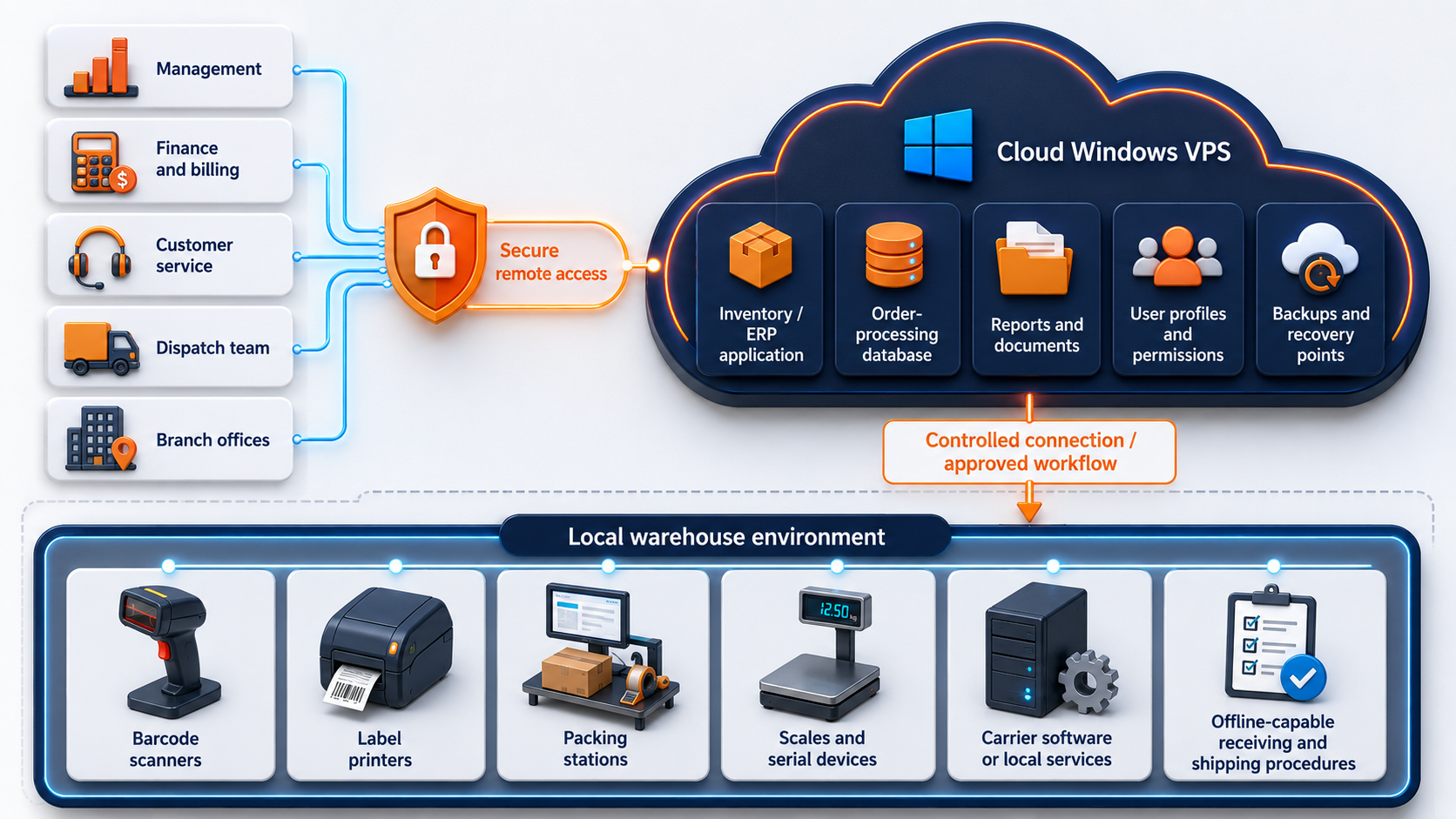
A small or midsize logistics environment may use a hybrid pattern:

Hybrid logistics architecture showing management, finance, customer service, dispatch, and branch offices accessing a cloud Windows VPS for inventory, order processing, documents, permissions, and backups while barcode scanners, label printers, packing stations, scales, and carrier services remain in the local warehouse environment

The cloud environment becomes the shared business system. The local warehouse keeps the devices and procedures that need to remain close to physical operations.

A good design answers six questions:

  1. Which system is the source of truth for inventory and orders?
  2. Which warehouse devices connect directly to the application?
  3. Which services must remain local?
  4. What data moves between the warehouse and cloud environment?
  5. What happens when the site loses internet access?
  6. Who owns recovery when an application, device, or integration fails?

Do not create broad network access only because it is convenient. Permit the identities, ports, systems, and data flows that the documented workflow requires.

Connecting offices, warehouses, and branches

A logistics company may operate a head office, one or more warehouses, retail or service branches, remote dispatchers, and staff working from home.

A centralized Windows VPS can give authorized users access to the same:

  • inventory application;
  • order database;
  • customer records;
  • billing tools;
  • reports;
  • shared documents;
  • mapped drives;
  • templates;
  • archived records;
  • administrative utilities.

This can reduce application-version drift and separate file copies, but the user experience still depends on connectivity and latency at each site.

Test from every important location. A server that feels fast from headquarters may perform differently from a warehouse using congested broadband, fixed wireless, or cellular failover.

For every location, document:

  • primary internet connection;
  • backup connection;
  • expected latency;
  • firewall or VPN requirements;
  • active user count;
  • printers and scanners;
  • local carrier tools;
  • outage procedure;
  • support contact;
  • recovery priority.

Read Windows VPS for Multi-Location Small Businesses for the broader branch-office model.

Remote Desktop access should follow user roles

Microsoft describes Remote Desktop Services as a Windows Server platform for delivering managed desktops and applications to users in offices, homes, branches, and partner locations.

A logistics company should not give every employee the same desktop, permissions, or redirection rights.

User roleLikely access need
Owner or directorReports, dashboards, approvals, and financial visibility
Operations managerInventory, order status, exceptions, and warehouse reporting
DispatcherDispatch board, routes, shipment status, and driver documents
Customer serviceOrders, availability, delivery status, returns, and customer records
Finance teamBilling, accounting, payroll, and reports
Purchasing teamSuppliers, purchase orders, replenishment, and stock reports
Warehouse supervisorInventory, receiving, picking, packing, and exception workflows
Warehouse operatorA limited application or task-specific session rather than full desktop access
MSP or IT providerAdministration, patching, monitoring, backups, and recovery

Use named accounts instead of shared warehouse logins where practical. Separate administrator credentials from daily user accounts. Restrict clipboard, drive, printer, and device redirection based on the workflow.

If employees use an RD Session Host for daily desktop or RemoteApp sessions, Microsoft requires an appropriate RDS Client Access License for each connecting user or device. Administrative sessions are not a substitute for a licensed multi-user environment.

Use these related guides:

Plan users, devices, storage, backups, and migration before launch.

Barcode scanners, label printers, scales, and carrier tools need workflow testing

Hardware dependencies are one of the biggest reasons a technically successful migration fails in daily operations.

A warehouse workflow may involve:

  • handheld barcode scanners;
  • USB scanners in keyboard-wedge mode;
  • network-connected scanners;
  • thermal label printers;
  • office and laser printers;
  • document scanners;
  • scales;
  • signature pads;
  • USB licensing dongles;
  • serial devices;
  • carrier desktop clients;
  • local browser extensions;
  • watched folders;
  • local services that generate labels or manifests.

Remote Desktop can redirect some local resources and peripherals, but policy, client settings, drivers, application behavior, and the device communication method all affect the result.

Test the complete process, not only whether Windows detects the hardware.

Device or dependencyAcceptance test
Barcode scannerScan mode, correct characters, focus behavior, prefixes or suffixes, and application validation
Label printerDriver, label size, template, queue, print speed, darkness, and barcode readability
Document scannerTWAIN or WIA requirement, upload path, resolution, naming, and multi-page workflow
Network printerReachability, permissions, driver compatibility, spool behavior, and failover
Shipping scaleLocal service, serial or USB interface, unit handling, and application integration
Signature padVendor support, redirection method, session behavior, and data capture
USB dongleVendor permission, network-license option, and redirection support
Carrier applicationSupported Windows Server version, user context, updates, browser component, and printer integration
Watched folderPath, permissions, naming, pickup timing, and recovery after disconnection
Export or import jobFile format, schedule, service account, error handling, and duplicate prevention

Microsoft documents printer, drive, USB, clipboard, and other peripheral redirection as configurable RDP capabilities. A policy or client configuration can block a resource even when the session itself works.

Zebra also documents scanner behavior and remote-management options for supported hardware. That does not make every model or workflow automatically compatible. Use the device vendor's documentation for the exact scanner or printer model.

Inventory databases and integrations determine real performance

The visible Windows application may not be the main resource consumer. Inventory databases, order imports, reports, carrier integrations, and scheduled jobs can create more load than user sessions.

Document:

  • database engine and version;
  • database size and monthly growth;
  • peak order periods;
  • receiving and shipping peaks;
  • concurrent users;
  • report schedules;
  • import and export jobs;
  • EDI processes;
  • carrier integrations;
  • API services;
  • label-generation services;
  • mapped-drive dependencies;
  • service accounts;
  • scheduled tasks;
  • backup windows;
  • database maintenance;
  • transaction-log growth;
  • recovery model;
  • restore process.

A ten-user application can still need significant resources when a report scans years of order history or a batch job imports thousands of transactions.

Keep the application and database close to each other. Avoid placing a file-based database across a wide-area network path. If the database becomes large or business-critical, consider separating Remote Desktop, application, and database roles.

SQL Server backups should be planned around the chosen recovery model and verified through actual restore tests. A VM-level backup alone does not replace application-aware database protection.

Size for concurrent workflows, not total employees

Do not size a logistics Windows VPS by total staff count. Size it by concurrent sessions, application requirements, database activity, reports, integrations, and file growth.

Use the following only as initial test ranges:

WorkloadInitial test sizeIncrease resources when
One administrator or reporting user2 vCPU / 4 GB RAMThe app, browser, PDF tools, and reports compete for memory
2-3 light office users4 vCPU / 8 GB RAMSeveral sessions and documents stay open together
4-5 active business users4 vCPU / 16 GB RAMInventory app, database, printing, and reports share one VM
6-10 active users8 vCPU / 32 GB RAMThe server becomes a daily shared workspace
SQL-backed inventory or ERP system8-16 vCPU / 32-64 GB RAMDatabase working set, reports, imports, and integrations need more capacity
Document-heavy operationSize storage separatelyPOD files, scans, manifests, labels, reports, and archives grow quickly
High-availability requirementMulti-server assessmentOne VM does not provide application-level failover

For a five-user office or dispatch team, 4 vCPU and 16 GB RAM can be a reasonable test starting point. It is not a performance guarantee.

Measure during representative workflows:

  • user logon time;
  • application launch time;
  • order lookup and save time;
  • inventory query time;
  • report duration;
  • CPU peaks;
  • available memory;
  • disk latency;
  • database waits;
  • label generation time;
  • print completion time;
  • import and export duration;
  • backup duration;
  • session disconnects;
  • storage growth.

Read Windows VPS Sizing for Remote Users before choosing a production plan.

Plan storage around database and document growth

Logistics environments can grow faster than expected because application data and operational documents expand at different rates.

Plan capacity for:

  • Windows and application installation;
  • inventory or ERP database;
  • transaction logs;
  • customer and supplier documents;
  • scanned receiving files;
  • labels and manifests;
  • proof-of-delivery archives;
  • exports and imports;
  • user profiles;
  • temporary report files;
  • integration logs;
  • backup staging;
  • migration copies;
  • 12 to 24 months of growth.

Keep system, database, documents, and backups logically separated where the application supports it. Attached Raff Volumes can add block storage without using VM resize only to gain disk space, but volume layout and backup scope should be designed before moving production data.

Security must protect customer, inventory, and shipping data

A logistics Windows environment may contain customer records, addresses, pricing, invoices, supplier data, stock records, shipment history, credentials, and remote-access pathways.

Minimum controls include:

Security areaPlanning requirement
IdentitiesNamed users, strong authentication, and prompt offboarding
AdministrationSeparate privileged accounts and restrict administrator access
Remote accessUse a controlled RDS, RD Gateway, VPN, or private-access design
FirewallPermit only required ports and sources
PermissionsLimit access by role, warehouse, department, customer, or responsibility
Warehouse stationsUse task-specific accounts and avoid unnecessary administrator rights
Service accountsDocument purpose, ownership, permissions, and credential rotation
UpdatesPlan Windows, application, carrier-client, and device-driver maintenance
LoggingReview failed logons, changes, and unusual access
BackupsProtect backup deletion rights and recovery credentials
Vendor accessMake access approved, time-bound, and monitored where possible
DocumentationRecord owners, dependencies, recovery order, and support contacts

Do not expose unrestricted RDP, SMB, or database ports directly to the public internet. Use explicit access rules instead of assuming that every office or warehouse network is trusted.

Backups must protect the application, database, files, and recovery process

A logistics backup plan needs more than a copy of the Windows disk.

Use layered protection:

Protection layerPurpose
Application-aware database backupProtect inventory, orders, billing, and transactional data correctly
File backupRecover deleted or changed labels, manifests, scans, reports, and documents
VM backupRecover the broader Windows environment
Snapshot before changeCreate a short-term rollback point before updates or migration
Off-server copyReduce risk from server, account, or ransomware incidents
Retention policyPreserve recovery points for the required business period
Restore testProve that applications, data, permissions, and workflows are usable
Recovery documentationPreserve owners, credentials, sequence, dependencies, and contacts

A successful backup notification does not prove the operation can resume.

Restore the database to a test environment. Open the application. Confirm inventory and order records. Run a report. Test user permissions. Print a sample label or packing document. Validate integrations and scheduled jobs.

Raff VMs support scheduled backups and point-in-time snapshots, but application owners still need to define database protection, retention, off-server copies, and restore procedures.

Read Windows VPS Backup Strategy for Small Businesses before moving production logistics data.

Protect logistics applications, databases, files, and recovery points.

Internet outages require a warehouse fallback

A cloud-hosted business application depends on site connectivity. Logistics companies should define what happens when a warehouse cannot reach the server.

Possible fallback measures include:

  • a secondary internet connection;
  • cellular failover;
  • locally available emergency contacts;
  • approved manual receiving forms;
  • approved manual shipping forms;
  • locally cached work instructions;
  • printed pick lists for limited scenarios;
  • queued transactions for later entry;
  • local access to carrier emergency procedures;
  • a process for reconciling offline activity;
  • a defined point at which shipping or receiving pauses.

Do not assume that mobile data is a recovery plan until it has been tested from the actual warehouse. Building construction, signal strength, carrier congestion, VPN behavior, firewall rules, and data limits can change the result.

The business should know whether a one-hour outage delays management reports, stops label printing, blocks receiving, prevents shipment confirmation, or halts the whole warehouse. That impact determines the connectivity and recovery design.

Migration should start with one bounded workflow

A logistics migration is safer when the first phase has a clear scope.

1. Inventory the current environment

Document:

  • applications and versions;
  • databases;
  • users and groups;
  • file shares and permissions;
  • mapped drives;
  • warehouse and branch locations;
  • scanners and printers;
  • scales and serial devices;
  • carrier software;
  • USB and licensing dongles;
  • scheduled tasks and services;
  • imports, exports, EDI, and APIs;
  • storage usage and growth;
  • backup jobs;
  • internet connections;
  • outage procedures;
  • recovery requirements;
  • vendor and MSP contacts.

2. Classify every dependency

Mark each item as:

  • cloud candidate;
  • local warehouse dependency;
  • integration between cloud and warehouse;
  • unsupported or unknown;
  • replacement candidate.

Unknown dependencies should block production cutover until they are tested.

3. Confirm vendor and licensing support

Ask the application vendor:

  • Is Windows Server supported?
  • Is virtual or hosted deployment supported?
  • Is Remote Desktop Services supported?
  • Which database edition and version are required?
  • Are multiple concurrent users supported?
  • Are label printers, scanners, scales, and carrier tools supported remotely?
  • Does the product require a USB dongle or local service?
  • Will the vendor support the application after migration?

4. Build a parallel test environment

Create a test Windows VPS, install the software, restore a copy of the data, and create non-administrator accounts for representative roles.

Test from the office, warehouse, branch, and remote-user networks. Do not approve the environment based only on an administrator session from headquarters.

5. Validate complete workflows

Test:

  • login and authentication;
  • application launch;
  • order entry and lookup;
  • inventory lookup and adjustment;
  • receiving workflow;
  • picking and packing workflow;
  • label printing;
  • document printing;
  • scanner input;
  • scale integration;
  • carrier export or client workflow;
  • report generation;
  • file open and save;
  • imports and exports;
  • scheduled jobs;
  • backup;
  • database restore;
  • loss of connectivity;
  • rollback.

6. Schedule a low-risk cutover

Avoid month-end, stock counts, holiday peaks, major promotions, large customer launches, or critical shipping windows.

Run the final backup and data synchronization. Validate the destination. Release users in a controlled order. Keep the previous environment available until the business owner, application owner, warehouse owner, and IT owner approve the new workflow.

7. Monitor the first operating cycle

Track performance and support issues through normal receiving, picking, packing, shipping, billing, and reporting cycles.

Monitor:

  • CPU and memory;
  • disk capacity and latency;
  • database performance;
  • session disconnects;
  • application errors;
  • printer and scanner issues;
  • integration failures;
  • backup success;
  • restore readiness;
  • support tickets;
  • user feedback.

Use the Windows Server Migration Checklist for Small Businesses and Local Server to Cloud Windows VPS Migration before production cutover.

When a Windows VPS is not the right fit

A Windows VPS should not be forced into every logistics workflow.

SituationBetter next step
Conveyor, sortation, or automation control depends on the serverKeep the control workload local and design integration separately
Warehouse work cannot tolerate internet lossPreserve offline operation or build tested connectivity redundancy
The vendor prohibits hosted or RDS deploymentUse a supported model or replace the application
Critical workflow depends on unsupported USB or serial hardwareKeep the dependent component local or use a tested gateway
Carrier software requires an unsupported local environmentKeep the carrier tool local and integrate through approved files or APIs
A suitable SaaS WMS, TMS, or ERP already solves the requirementAvoid adding Windows infrastructure without a clear benefit
The database requires high availabilityDesign database redundancy and failover rather than relying on one VM
Security ownership is undefinedAssign access, patching, backup, and incident owners first
Restore testing cannot be completedKeep the environment in test status
No one owns warehouse outage proceduresComplete operational continuity planning before migration

The right answer may be cloud, local, SaaS, hybrid, or a larger multi-server design. The purpose of planning is to place each workload where it can be supported and recovered.

How Raff supports logistics and distribution workloads

Raff fits logistics and distribution companies that need a cloud-hosted Windows Server foundation for inventory applications, order processing, billing, reporting, shared documents, remote users, and replacement of an aging business server.

Raff Windows VMs provide administrator and Remote Desktop access, selectable Windows Server templates, NVMe-backed storage, optional attached Volumes, snapshots, scheduled backups, firewall controls, private networking options, VM resizing, and human support.

The logistics company or its MSP remains responsible for:

  • application compatibility;
  • vendor licensing;
  • RDS licensing;
  • user roles and offboarding;
  • database administration;
  • warehouse device testing;
  • printer and scanner configuration;
  • carrier integrations;
  • backup retention;
  • restore testing;
  • Windows and application updates;
  • security hardening;
  • migration and rollback;
  • business continuity;
  • compliance decisions.

Raff should be the infrastructure layer under a documented logistics workflow, not a shortcut around application support, device testing, or warehouse continuity planning.

SituationRecommended path
One warehouse has an aging inventory serverTest the application, database, users, devices, backups, and restore on one Windows VPS
Management and finance need remote accessUse a controlled RDS or remote-access design with named users and licensing
Several warehouses need the same business systemCentralize the application, then test each site's connectivity and device workflow
Barcode scanners and printers are criticalTest exact models, drivers, templates, queues, and user sessions before cutover
Carrier software must remain localKeep the local carrier component and define a narrow, documented integration
SQL Server drives performanceSize around database memory, reports, jobs, and recovery requirements
Warehouse operations must work offlinePreserve local procedures or an offline-capable component
Shared documents are the main problemUse a structured file-server design with permissions and backup
High availability is mandatoryEvaluate a multi-server application and database architecture

Final logistics Windows VPS checklist

Before putting the environment into production, confirm:

CheckDone
Applications and versions inventoried
Vendor support for Windows Server confirmed
Hosted and RDS licensing reviewed
Active users and roles documented
Warehouses, branches, and remote locations documented
Database requirements documented
Barcode scanners tested
Label printers and templates tested
Scales, serial devices, and USB dependencies reviewed
Carrier software and integrations tested
Imports, exports, EDI, and APIs documented
Network flows and firewall rules documented
Internet-outage fallback tested
CPU, RAM, and storage starting point selected
Storage growth estimated
Application-aware database backups configured
Off-server recovery copy planned
File, database, and application restores tested
Migration window approved
Rollback path documented
System, warehouse, security, and recovery owners named
Old environment retained until final approval

An incomplete checklist means the system is still a test environment.

What's next

A Windows VPS for logistics and distribution companies works best when the business centralizes supported Windows applications and data, tests every warehouse device, and preserves a clear fallback for connectivity loss.

Read Windows VPS Hosting for Small Businesses for the broader decision framework. Review Windows VPS for Manufacturing Businesses when the same environment also supports production operations. Explore Raff Windows VM when the users, devices, database, storage, backups, and migration path are documented well enough to build a test environment.

Build a test environment for your logistics Windows workload.

Sources

Was this article helpful?

Published July 23, 2026 · Updated July 23, 2026

Back to hub
Ready when you are

Your Windows Server, live in ~55 seconds

Genuine, fully-licensed Windows with full admin and RDP. We handle the Microsoft licensing, billed monthly with nothing upfront. On NVMe SSD, backed by a 14-day money-back guarantee.

Related articles